
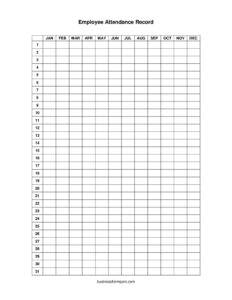
Employee Attendance Record
Track employee work hours, absences, and tardiness with our free Employee Attendance Record template — download in PDF or DOCX, no signup required.
PDF
DOCX
6 downloads
0
likes
Download Files
- DOCX
An Employee Attendance Record is a simple tracking document that logs when employees are present, absent, late, or on leave over a defined period. The most common reason people use it is to keep an accurate, organized history of attendance for payroll, performance reviews, and policy enforcement. You can download this Employee Attendance Record free in PDF or DOCX with no signup required.
What Is an Employee Attendance Record?
An Employee Attendance Record is a form used by employers, managers, and HR departments to document each worker’s daily presence at the workplace. It typically captures the employee’s name and identifying details, the dates being tracked, and a status for each day — such as present, absent, sick, vacation, or late. The record may also note arrival and departure times, total hours worked, and the reason for any absence. Whether kept on paper, in a spreadsheet, or as a printable template, the goal is the same: to create a clear, defensible history of who showed up and when. This information supports accurate payroll, fair scheduling, and consistent application of company attendance policies.
When Do You Need an Employee Attendance Record?
Attendance tracking matters in nearly every workplace, but it becomes especially important in these situations:
- Hourly payroll processing — when wages depend on hours actually worked, an accurate daily log prevents over- or underpayment.
- Monitoring absenteeism patterns — repeated absences on Mondays or around holidays become visible when logged consistently over weeks.
- Managing paid time off — tracking vacation, sick days, and personal leave against accrued balances keeps everyone on the same page.
- Performance reviews and evaluations — a documented attendance history gives managers objective data instead of relying on memory.
- Enforcing attendance policies fairly — written records support warnings or disciplinary steps and demonstrate consistent treatment across staff.
- Compliance and audits — businesses sometimes need to show hours and leave records to verify overtime, benefits eligibility, or labor-rule adherence.
Types of Attendance Records
Not every workplace tracks attendance the same way. A daily attendance sheet records check-in and check-out for each shift, ideal for hourly teams. A weekly or monthly summary uses status codes (P for present, A for absent, S for sick, V for vacation) across a grid of dates, which is efficient for salaried staff. A leave-focused record emphasizes the type and reason for time away rather than precise clock times. This template can be adapted to any of these formats depending on whether your priority is hours worked or days present.
What an Employee Attendance Record Should Have
A complete and useful attendance record generally includes the following elements:
- The employee’s full name and an identifier such as an ID number, role, or department.
- The reporting period — a specific week, pay period, or month.
- A row or column for each date in that period.
- A status for each day (present, absent, late, sick, vacation, holiday, or remote).
- Optional time-in and time-out fields, plus total hours worked.
- A space to note the reason for absences or tardiness.
- Running totals for days present, days absent, and hours worked.
- A signature line for the employee and/or supervisor to confirm accuracy.
How to Fill Out an Employee Attendance Record
Follow these steps to complete the form accurately:
- Enter the employee details. Write the worker’s full name, employee ID, job title, and department at the top so the record is unambiguous.
- Define the tracking period. Specify the start and end dates — for example, a single workweek or a full calendar month.
- List each date. Fill in the calendar dates being tracked down the rows or across the columns of the grid.
- Record daily status. For each date, mark whether the employee was present, absent, late, sick, on vacation, or off for a holiday using a clear code or checkmark.
- Log times if needed. Where hours matter, enter the time in and time out, then calculate total hours worked for the day.
- Note reasons. Add a brief explanation in the notes column for any absence or late arrival.
- Total the period. Sum the days present, days absent, and total hours at the bottom of the form.
- Review and sign. Have the employee and supervisor confirm the record is correct and add signatures and the date.
Tips for Keeping Accurate Attendance Records
Consistency is what makes attendance data trustworthy. Update the record at the end of each day rather than recreating a week from memory, which invites errors. Use a fixed set of status codes and define them in a legend so everyone interprets the marks the same way. Store completed records securely, since they often contain personal information, and retain them for the period your business or local rules require. If you track time digitally, periodically reconcile the spreadsheet against the signed paper copy. Finally, keep your attendance policy and the record format aligned so the data you collect actually supports the decisions you need to make.
How It Differs From a Timesheet
An attendance record and a timesheet overlap but serve different primary purposes. A timesheet focuses on the exact hours worked, often broken down by project or task, and is built mainly for billing and payroll calculation. An attendance record focuses on presence and absence patterns — whether someone showed up, was late, or took leave — and is built for policy enforcement, scheduling, and HR review. Many small businesses combine the two into one document, which this template can accommodate by adding time-in and time-out fields alongside daily status.
Common Mistakes to Avoid
- Filling it in from memory. Reconstructing a week days later leads to inaccurate dates and missed absences.
- Using inconsistent status codes. Mixing “A,” “absent,” and a blank square makes totals unreliable.
- Forgetting to note the reason. An absence without context is hard to evaluate fairly later.
- Skipping signatures. Unsigned records carry less weight if attendance is ever disputed.
- Not totaling the period. Without running totals, the record provides data but no quick summary.
- Storing records carelessly. Leaving them in shared, unsecured locations risks exposing personal information.
Frequently Asked Questions
What is an Employee Attendance Record used for? It is used to document when employees are present, absent, late, or on leave during a set period. Employers rely on it for payroll accuracy, performance reviews, scheduling, and enforcing attendance policies consistently across staff.
How do I fill out an Employee Attendance Record? Enter the employee’s name and details, set the tracking period, then mark a status for each date — present, absent, sick, vacation, or late. Add time-in and time-out where hours matter, note reasons for absences, total the period, and have both parties sign.
Is an Employee Attendance Record legally required? Requirements vary by jurisdiction and industry. While not every employer is required to use this exact form, many are required to keep records of hours worked and leave taken, and a structured attendance record is a practical way to meet that obligation. Check your local labor rules.
Does an attendance record need to be signed? Signatures are not always mandatory, but having the employee and supervisor sign adds credibility and confirms both parties agree the record is accurate. This is especially valuable if attendance ever becomes part of a performance or disciplinary discussion.
How long should I keep employee attendance records? Retention periods depend on local labor and tax rules, but many businesses keep them for several years. As a general practice, store them securely for at least as long as your jurisdiction requires for payroll and employment records.
Is this Employee Attendance Record template free to download? Yes. You can download this template completely free in both PDF and DOCX formats with no signup required, and edit it in your preferred software to match your workplace’s status codes and pay periods.
This Employee Attendance Record template is a general example provided for informational purposes only and is not legal, financial, or tax advice. Employment and recordkeeping requirements vary by jurisdiction. Consult a qualified professional or your local labor authority to ensure your records meet applicable requirements.
Official resource: for the rules that apply to your situation, see the U.S. Small Business Administration.
Related Forms
- Fancy Gold Appointment Reminder Card
- 2026 Postal Holidays
- Meeting Minutes Form
- Client Information Worksheet
- Office Supplies Request Form
- Lobby Hours
Browse more in Office.