
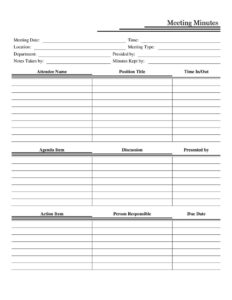
Meeting Minutes Form
Download a free Meeting Minutes Form template in PDF and DOCX to record attendees, agenda items, decisions, and action items — free download, no signup.
PDF
DOCX
1 downloads
0
likes
Download Files
- DOCX
A Meeting Minutes Form is a structured document used to capture what happened during a meeting — who attended, what was discussed, what decisions were made, and which action items were assigned. People most often use one to create an accurate, shareable record so that absent team members stay informed and follow-up tasks don’t fall through the cracks. This template is free to download in both PDF and DOCX, with no signup required.
What Is a Meeting Minutes Form?
A Meeting Minutes Form is the written summary of a meeting prepared by a designated note-taker and later approved by the group. It typically records the meeting date, time, and location, the type of meeting, the department involved, who presided, and a roster of attendees with their roles. The heart of the document is the running list of agenda items, the discussion around each, and the action items that came out of them. Organizations use it to maintain an official account of proceedings, to document votes or approvals, and to assign accountability. Because minutes serve as the institutional memory of an organization, they are referenced long after the meeting ends.
When Do You Need a Meeting Minutes Form?
Almost any structured gathering benefits from written minutes. Common situations include:
- Board and committee meetings where decisions and votes must be formally recorded for governance and compliance.
- Departmental staff meetings to track project updates, assignments, and deadlines across a team.
- Project kickoffs and status reviews where action items and responsible owners need to be captured clearly.
- Client or vendor meetings to document agreements, scope, and next steps in writing.
- Nonprofit and association meetings that require minutes for bylaws, audits, or member transparency.
- Recurring weekly check-ins where you want a consistent paper trail of progress from one session to the next.
Types of Meeting Minutes
Minutes generally fall into a few styles. Action minutes focus only on decisions and assigned tasks, keeping the record short and outcome-driven. Discussion minutes include a summary of the conversation behind each decision, which is useful when context matters later. Verbatim minutes capture statements word-for-word and are usually reserved for legal or formal proceedings. This template supports a flexible middle ground: it has space for both the discussion and the resulting action items, so you can keep it brief or detailed depending on the meeting’s importance.
What a Meeting Minutes Form Should Have
A complete set of minutes should clearly identify the meeting and produce an unambiguous record of outcomes. Strong minutes include the logistical details (date, time, location, and meeting type), the names of the people who presided and took notes, a full attendee list with positions and time in/out, and an organized account of each agenda item. Equally important is the action-item section that ties every task to a person responsible and a due date. Finally, minutes should note who is keeping the official record so the document can be located and approved later.
How to Fill Out a Meeting Minutes Form
- Enter the Meeting Date, Time, and Location at the top so the record is properly dated and traceable.
- Select the Meeting Type (for example, board, staff, committee, or project) and the relevant Department.
- Record who is Presided by (the chair or leader), who is Notes Taken by, and who the Minutes Kept by is for the official file.
- In the attendance section, list each Attendee Name with their Position Title and their Time In/Out to show who was present and for how long.
- For each topic, fill in the Agenda Item, summarize the Discussion, and note who it was Presented by.
- Capture every decision in the Action Item field, assign a Person Responsible, and set a clear Due Date.
- Review the completed form for accuracy, then distribute it to attendees and store the approved copy with prior minutes.
Tips for Writing Clear, Useful Minutes
The best minutes are concise but complete. Write in the past tense and the third person, and summarize discussion rather than transcribing it. Capture decisions and assignments in plain language — anyone reading the document weeks later should understand exactly what was agreed and who owns each task. Use the agenda as your outline so the minutes follow the meeting in order. Whenever possible, fill in the form during the meeting and confirm action items aloud before adjourning, so the responsible person and due date are agreed on the spot. Save each set of minutes with a consistent file name that includes the date and meeting type for easy retrieval.
Approving and Storing Minutes
Minutes usually become official only after they are reviewed and approved, often at the start of the next meeting. Once approved, store them in a central, organized location — a shared drive folder, binder, or governance system — so they form a continuous record over time. For organizations with bylaws or regulatory obligations, retaining approved minutes for a set period may be required. Keeping the Minutes Kept by field accurate makes it easy to identify the custodian of the official record.
Common Mistakes to Avoid
- Recording too much detail — verbatim transcription buries the decisions that actually matter.
- Leaving action items vague — every task needs a named Person Responsible and a real Due Date.
- Skipping the attendee list or time in/out, which can matter for quorum or accountability.
- Writing opinions or editorializing instead of neutrally summarizing what was discussed and decided.
- Delaying the write-up until details are forgotten — draft minutes promptly after the meeting.
- Forgetting to circulate and approve the minutes, leaving the record unconfirmed.
Frequently Asked Questions
What is a Meeting Minutes Form used for? It is used to create an official written record of a meeting, including who attended, what was discussed, what was decided, and what tasks were assigned. This gives the organization a reliable reference and keeps absent members informed. It also creates accountability through documented action items and due dates.
Who is responsible for taking the minutes? A designated note-taker, recorded in the Notes Taken by field, captures the discussion during the meeting. The Minutes Kept by person is the custodian of the official, approved record. In many groups the chair or a secretary handles one or both roles.
How detailed should meeting minutes be? Minutes should clearly capture decisions, action items, and key points of discussion without transcribing every word. A concise summary of each agenda item, plus who presented it, is usually enough. The level of detail depends on whether the meeting is informal or formal and governance-related.
Do meeting minutes need to be signed or approved? Many organizations approve minutes at the following meeting, and the chair or secretary may sign them as the official version. Approval confirms the record is accurate. This template leaves room to note who presided and who kept the minutes for that purpose.
Are meeting minutes a legal document? For some organizations — such as corporations and nonprofits — board and committee minutes can be an official governance record and may be required by bylaws or law. Requirements vary by jurisdiction and entity type, so check your own rules. For informal team meetings, minutes are simply a helpful internal record.
Is this Meeting Minutes Form free to download? Yes. You can download this template for free in both PDF and DOCX formats, with no signup required. The DOCX version is fully editable so you can adapt the headings, fields, and branding to fit your meetings.
This Meeting Minutes Form template is provided as a general example for informational purposes only and does not constitute legal, financial, or professional advice. Recordkeeping and governance requirements vary by organization and jurisdiction. Consult a qualified professional to ensure your minutes meet any applicable rules.
Official resource: for the rules that apply to your situation, see the U.S. Small Business Administration.
Related Forms
- Employee Attendance Record
- Workplace Safety Checklist
- Meeting Agenda Portrait
- Green Appointment Reminder Card
- Driver Delivery Schedule
- Beauty Salon Appointment
Browse more in Office.