
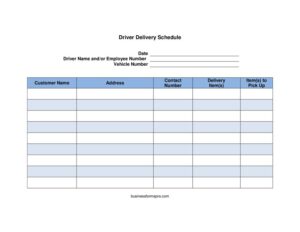
Driver Delivery Schedule
Download a free Driver Delivery Schedule template to organize routes, stops, and pickups in PDF or DOCX — free download, no signup required.
PDF
DOCX
1 downloads
0
likes
Download Files
- DOCX
A Driver Delivery Schedule is a planning sheet that lists every stop a driver must make on a given day, including the customer, address, and what to drop off or pick up. The most common reason people use one is to keep daily routes organized so nothing is missed and drivers know exactly where to go. You can download it free in PDF or DOCX, with no signup required.
What Is a Driver Delivery Schedule?
A Driver Delivery Schedule is a document used by dispatchers, fleet coordinators, warehouse supervisors, and small business owners to assign and track a driver’s stops for the day. It pairs a specific driver and vehicle with a list of customers, addresses, and the items being delivered or collected at each location. The schedule acts as both a route plan and a running record: drivers follow it stop by stop, and the office keeps it to confirm what was completed. Whether you run a courier service, a catering company, a parts supplier, or a furniture store, this form turns a loose pile of orders into a clear, sequential plan that one person can carry, follow, and hand back at the end of a shift.
When Do You Need a Driver Delivery Schedule?
This form is useful any time a vehicle and driver are responsible for multiple stops in a day. Common situations include:
- Daily courier or parcel runs where one driver visits several customers in sequence and needs the addresses and contact numbers in one place.
- Wholesale or supply deliveries for restaurants, retailers, or job sites that order on a recurring basis.
- Furniture, appliance, or equipment drop-offs that also involve hauling away an old unit or empty packaging — captured in the pickup column.
- Catering and event logistics, where timing and the exact items at each venue matter.
- Returns, swaps, and rental pickups, when the driver must both deliver new stock and collect items at the same address.
- Fleet coordination across several drivers, where each driver gets their own dated sheet tied to a specific vehicle number.
In each case, the schedule reduces phone calls back to the office, prevents duplicate or skipped stops, and creates a paper trail of what was assigned.
What a Driver Delivery Schedule Should Have
A complete schedule clearly identifies who is driving, which vehicle they are using, and where they are going. The core elements are the date, the driver’s name or employee number, and the vehicle number at the top, followed by a row for each stop. Every stop row should hold the customer name, full address, a contact number, the item or items being delivered, and any item to be picked up. Leaving room for these details on a single page is what makes the form portable and easy to follow on the road. A good schedule is legible, ordered logically by route, and specific enough that a substitute driver could complete it without extra instructions.
How to Fill Out a Driver Delivery Schedule
- Date: Enter the day the deliveries are scheduled. Use a consistent format so sheets can be filed and found later.
- Driver name and/or employee number: Write the assigned driver’s name, employee ID, or both, so it is clear who is accountable for the route.
- Vehicle number: Record the van, truck, or fleet number being used that day. This helps with mileage, fuel, and maintenance tracking.
- Customer name: For each stop, list the recipient or business name exactly as it should appear on any receipt or order.
- Address: Enter the full delivery address, including unit numbers, gate codes, or loading-dock notes where relevant.
- Contact number: Add a phone number the driver can call if the location is hard to find or no one answers.
- Delivery item(s): Describe what is being dropped off — product names, quantities, or order numbers — so the driver loads and confirms the right goods.
- Item(s) to pick up: Note anything to collect at that stop, such as returns, empties, signed paperwork, or a trade-in unit. Leave it blank if nothing is being collected.
Planning an Efficient Route
The schedule works best when the stops are listed in the order the driver will actually travel them, not the order the orders arrived. Group nearby addresses together to cut backtracking and fuel use, and place time-sensitive stops — like a lunch catering drop or a customer who is only home in the morning — where they fit the clock. If your business handles both deliveries and pickups at the same customer, keeping those on a single row avoids a wasted second trip. For multi-driver operations, give each driver a separate sheet so vehicles and routes never overlap, and keep the completed copies together as a daily log.
Using the Schedule as a Record
Once a route is finished, the schedule becomes a useful record. Many teams have drivers mark each stop as completed, note the delivery time, or jot down problems such as a closed business or a refused order. Returned sheets let the office reconcile what shipped, confirm pickups, and follow up on anything left undone. Storing the schedules — paper or scanned — also helps when a customer disputes whether a delivery happened, and makes it easy to spot recurring routes you can pre-fill to save time.
Common Mistakes to Avoid
- Leaving the address incomplete — missing unit numbers, suite details, or access codes cause failed stops and callbacks.
- Skipping the contact number, which leaves the driver stranded when a location is locked or unmarked.
- Listing stops out of route order, forcing extra mileage and longer shifts.
- Vague item descriptions like “box” instead of a product name or quantity, leading to wrong or partial deliveries.
- Forgetting the pickup column when a return, empty, or trade-in needs to be collected at the same address.
- Not recording the vehicle number, which makes mileage, fuel, and maintenance tracking harder later.
Frequently Asked Questions
What is a Driver Delivery Schedule used for? It is used to plan and track a driver’s stops for the day, pairing a specific driver and vehicle with a list of customers, addresses, deliveries, and pickups. It keeps routes organized, prevents missed stops, and serves as a record of what was assigned and completed.
How do I fill out a Driver Delivery Schedule? Start with the date, driver name or employee number, and vehicle number at the top. Then list each stop with the customer name, full address, contact number, the items to deliver, and any items to pick up, ideally ordered in the sequence the driver will travel.
Can one schedule cover both deliveries and pickups? Yes. This template includes separate columns for delivery items and items to pick up, so a single row can capture a stop where the driver drops off new goods and collects a return, empty, or trade-in at the same address.
Should I use a separate sheet for each driver? In most cases, yes. Giving each driver their own dated sheet tied to a specific vehicle number keeps routes from overlapping, makes accountability clear, and lets the office collect each completed schedule as part of the daily log.
Is this Driver Delivery Schedule template free? Yes. You can download it for free in PDF or DOCX with no signup required. The DOCX version is fully editable, so you can add your company name, adjust the columns, or pre-fill recurring stops.
Can I customize the form for my business? Absolutely. The editable version lets you add fields such as delivery time, completion checkboxes, signature lines, order numbers, or special handling notes to match how your operation runs.
This Driver Delivery Schedule template is a general example provided for informational purposes only and is not legal, financial, or operational advice. Delivery, transport, and recordkeeping requirements vary by jurisdiction and industry — consult a qualified professional to ensure your practices meet applicable rules.
Official resource: for the rules that apply to your situation, see the U.S. Small Business Administration.
Related Forms
- Fancy Gold Appointment Reminder Card
- Workplace Safety Checklist
- Employee Performance Evaluation
- Hoshin Kanri Matrix
- Meeting Minutes Form
- Safety Violation Form
Browse more in Office.