
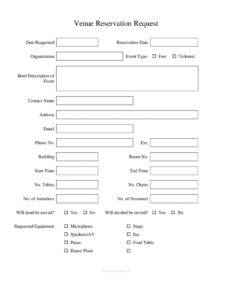
Venue Reservation Request
Download a free Venue Reservation Request form template in PDF and DOCX to book a room, request equipment, and confirm event details with ease.
PDF
DOC
1 downloads
0
likes
Download Files
- DOC
A Venue Reservation Request is a short form used to ask a building manager, facilities office, or community center to hold a specific room or space for an event on a chosen date. People most often use it to formally book a hall or meeting room and spell out exactly what they need — tables, chairs, AV, and timing. You can download this template free in PDF and DOCX formats, with no signup required.
What Is a Venue Reservation Request?
A Venue Reservation Request is a structured intake document that lets an individual or organization apply to use a physical space for a defined period. It captures who is asking, what kind of event is planned, when and where it will take place, and what furnishings or equipment the space must provide. The form is typically submitted to a facilities coordinator, office manager, or venue administrator who reviews availability, checks for conflicts, and approves or declines the request. Because it documents the agreed details in one place, it protects both the requester and the venue — everyone knows the room number, start and end times, attendee count, and whether food or alcohol will be served before the event day arrives.
When Do You Need a Venue Reservation Request?
This form is useful any time a shared space must be booked formally rather than verbally. Common situations include:
- Corporate meetings and trainings — reserving a conference room with a microphone, screen, and seating for staff.
- Community or nonprofit events — booking a hall for a free public gathering or a ticketed fundraiser.
- Workshops and seminars — requesting a room with tables, chairs, and AV equipment for presenters and attendees.
- Receptions and celebrations — securing a space that allows food service, a bar, a dance floor, and a stage.
- Recurring club or association meetings — holding the same room on a set date for members.
- Performances or recitals — reserving a venue equipped with a stage, piano, and speakers.
Types of Events This Form Covers
The template separates events into free and ticketed categories, which matters because ticketed events often trigger extra requirements such as security, insurance, or fee schedules. The Event Type field and Brief Description of Event let the venue understand the nature of the gathering at a glance — whether it is a board meeting, a charity gala, a lecture, or a private party. Capturing this early helps the coordinator assign an appropriate room and anticipate the support staff and equipment needed.
What a Venue Reservation Request Should Have
A complete request leaves no guesswork. The essential elements are: the date the request is submitted and the requested reservation date; the organization and a named contact with full reach-back details; a clear event type and description; the specific building and room; precise start and end times; expected attendee and personnel counts; furnishing quantities like tables and chairs; food and alcohol indicators; and a checklist of requested equipment. A free-text notes area rounds out the form for anything unusual. Together these fields give the approver everything required to confirm the booking confidently.
How to Fill Out a Venue Reservation Request
- Date Requested — enter the date you are submitting the form.
- Reservation Date — write the calendar date you want the space.
- Organization — list the company, club, or group hosting the event.
- Event Type — describe the event and check Free or Ticketed.
- Brief Description of Event — summarize the purpose and format in a sentence or two.
- Contact Name, Address, Email, Phone No., Ext. — provide the responsible person and how to reach them.
- Building and Room No. — name the desired location, if known.
- Start Time / End Time — note when access begins and ends, including setup and cleanup.
- No. Tables, No. Chairs — enter the furnishing quantities required.
- No. of Attendees / No. of Personnel — estimate guests and staff or volunteers.
- Food / Alcohol — mark Yes or No for each.
- Requested Equipment — check Microphone, Stage, Speakers/AV, Bar, Piano, Food Table, Dance Floor as needed.
- Notes — add special instructions, accessibility needs, or timing details.
Equipment and Setup Considerations
The equipment checklist is more than a wish list — it drives logistics. Requesting a microphone and speakers/AV tells the venue to test sound equipment and assign a technician. A stage or dance floor may need to be assembled in advance, while a piano sometimes requires tuning or relocation. If you check the bar or mark alcohol as served, the venue may ask for licensing or proof of a licensed server. The No. Tables and No. Chairs fields let staff lay out the room correctly, and a food table signals where catering should be staged. Filling these in accurately reduces last-minute scrambling on event day.
Common Mistakes to Avoid
- Leaving start and end times vague — always include enough time for setup and teardown, not just the event itself.
- Underestimating attendees — an inaccurate headcount can lead to an undersized room or fire-code issues.
- Skipping the food and alcohol questions — these often require extra permits or cleaning arrangements.
- Forgetting contact details — an unreachable requester delays approval and day-of coordination.
- Requesting equipment you don’t confirm — assuming a microphone or piano is available without checking the box.
- Submitting too late — popular rooms book quickly, so send the request well in advance.
Frequently Asked Questions
What is a Venue Reservation Request used for? It is used to formally ask a facility to hold a specific room or space for an event on a chosen date. The form records the event details, timing, attendee count, and equipment needs so the venue can review availability and approve the booking.
How do I fill out a Venue Reservation Request? Start with the date requested and your desired reservation date, then add your organization and contact information. Next describe the event, specify the building and room, set the start and end times, and complete the furnishing and equipment sections before adding any special notes.
Is a Venue Reservation Request legally binding? On its own, the form is a request rather than a contract; it becomes a confirmed booking only when the venue approves it, often through a signed agreement or written confirmation. Many venues attach their own terms, deposits, or cancellation policies once the request is accepted.
Do I need to specify food and alcohol service? Yes — marking these fields is important because serving food or alcohol frequently triggers extra requirements such as catering permits, liability insurance, licensed servers, or additional cleaning. Disclosing them upfront prevents your event from being delayed or denied later.
How far in advance should I submit the request? As early as possible, since desirable rooms and dates fill up quickly and equipment must be scheduled. Submitting weeks ahead gives the coordinator time to confirm availability and arrange tables, chairs, and AV support.
How much does this template cost? This Venue Reservation Request template is completely free to download from Business Forms Pro in both PDF and DOCX formats, with no signup required. You can customize the fields to match your venue’s specific policies before sharing it with requesters.
This template is provided as a general example for informational purposes only and does not constitute legal, financial, or professional advice. Venue policies, permit rules, and event requirements vary by location and organization — consult the facility administrator or a qualified professional to confirm what applies to your event.
Official resource: for the rules that apply to your situation, see the U.S. Small Business Administration.
Related Forms
- Blue Appointment Reminder Card
- Lobby Hours
- Employee Attendance Record
- Meeting Minutes Form
- Bank Holidays
- Beauty Salon Appointment
Browse more in Office.