
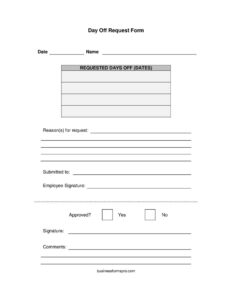
Day Off Request Form
Download a free Day Off Request Form template in PDF and DOCX to request time off, document approvals, and keep clear leave records, free download.
PDF
DOCX
2 downloads
0
likes
Download Files
- DOCX
A Day Off Request Form is a short written document an employee uses to ask for one or more days away from work and to record whether the request was approved. It’s the simplest, most common way to put a time-off request in writing so both the employee and the manager have a clear record. You can download this Day Off Request Form for free in PDF and DOCX, with no signup required.
What Is a Day Off Request Form?
A Day Off Request Form is a single-page document an employee completes and submits to a supervisor, manager, or HR to formally request paid or unpaid time away from work. It captures who is asking, the specific dates requested, the reason, and a space for the approver to mark the request approved or denied with comments. Unlike a verbal request or a quick text message, the form creates a paper trail that protects everyone: the employee can show they asked in advance, and the employer has a consistent way to track and respond to leave. Small businesses and teams without formal HR software often rely on a simple form like this to manage scheduling fairly.
When Do You Need a Day Off Request Form?
This form is useful any time an employee needs to be away from work and wants the absence acknowledged in writing. Common situations include:
- Planned vacation: requesting a day or a stretch of days off well in advance so coverage can be arranged.
- Personal appointments: medical, dental, or family obligations that fall on a workday.
- Family events: a wedding, graduation, school activity, or a long weekend trip.
- Mental health or rest days: taking a recharge day where your employer permits it.
- Religious or cultural observances: requesting time off for holidays not on the standard calendar.
- Unpaid leave: asking for a day off when paid leave has run out or isn’t offered.
Because the form is generic, it works for hourly staff, salaried employees, contractors, and volunteers alike. Managers often keep completed forms on file to reconcile against payroll and accrued leave balances at the end of a pay period.
What a Day Off Request Form Should Have
A complete Day Off Request Form should make the request unambiguous and easy to act on. At minimum it should include the date the request is submitted, the employee’s full name, the exact dates being requested, and a brief reason. It also needs a place to identify who the request is going to, a signature line for the employee, and a decision area where the approver checks Yes or No and adds comments. The strongest forms leave just enough room for context without becoming a lengthy document — the goal is a quick, clear exchange that can be filed and referenced later.
How to Fill Out a Day Off Request Form
- Date: Write the date you are submitting the form. This establishes how much advance notice you gave.
- Name: Enter your full name as it appears in company records so payroll and scheduling can match it.
- Requested days off (dates): List the exact calendar date or date range you want off — for example, “March 14” or “March 14–16.” Be precise; “next week” is too vague.
- Reason(s) for request: Briefly explain why you need the time, such as “family vacation” or “medical appointment.” Keep it short and honest.
- Submitted to: Write the name or title of the manager, supervisor, or HR contact who will review your request.
- Employee Signature: Sign to confirm the request is genuine and made by you.
- Approved? (Yes/No) and Comments: Leave these blank — the approver completes them, checking Yes or No and adding any notes about coverage, conditions, or partial approval.
Submitting and Tracking Your Request
Once the form is filled in and signed, hand or email it to the person named in the “Submitted to” line. Submit as early as you reasonably can — many workplaces ask for advance notice (often a week or more) for planned days off so they can arrange coverage. After the approver marks the decision and signs or comments, ask for a copy of the completed form for your own records. Keeping the approved form helps you confirm the time was granted if there is ever a scheduling conflict or a question about your leave balance. Employers typically file these forms with attendance records and use them to update paid-time-off accruals.
Day Off Request Form vs. Leave of Absence Request
A Day Off Request Form is designed for short, routine absences — usually a single day or a few days. A leave of absence request, by contrast, covers extended time away such as parental leave, medical leave, or a sabbatical, and often triggers additional paperwork, documentation requirements, and legal protections. If you need more than a few days or your absence relates to a serious health condition, your employer may direct you to a different, more detailed form. Use this Day Off Request Form for the everyday, short-term scheduling needs that don’t rise to the level of formal leave.
Common Mistakes to Avoid
- Vague dates: writing “a few days next month” instead of specific calendar dates the approver can verify.
- Submitting too late: handing in the form the day before, leaving no time to arrange coverage.
- Forgetting to sign: an unsigned form may be treated as informal or returned.
- Assuming approval: treating a submitted request as granted before the manager marks Yes.
- Not keeping a copy: losing your only record of the approval and the dates.
- Skipping the reason: leaving the reason blank can slow approval or invite questions.
Frequently Asked Questions
What is a Day Off Request Form used for? It is used by an employee to formally request one or more days away from work and to document the manager’s decision. It creates a written record of who asked, the dates requested, the reason, and whether the time was approved. This protects both the employee and the employer if questions come up later.
How do I fill out a Day Off Request Form? Enter the submission date, your full name, the exact dates you want off, and a brief reason. Note who you are submitting it to, then sign the employee signature line. Leave the approval and comments section blank for your manager to complete.
How much notice should I give? Notice expectations vary by workplace, but submitting as early as possible is always best. Many employers prefer at least a week’s notice for planned days so they can arrange coverage, while shorter notice may be acceptable for unexpected needs. Check your company’s policy or employee handbook.
Does a Day Off Request Form need to be notarized? No. This is an internal workplace document and does not require notarization or witnesses. Only the employee’s signature and the approver’s decision are needed to make it complete.
Is a submitted form the same as approved time off? No. Submitting the form is only a request — your time off is not granted until the approver checks “Yes” and confirms it. Always wait for written approval before making firm plans.
Is this Day Off Request Form free to download? Yes. You can download this template for free in both PDF and DOCX formats with no signup required. Edit it to match your company’s name, fields, or policies as needed.
This Day Off Request Form template is provided as a general example for informational purposes only and does not constitute legal, HR, or employment advice. Leave policies and employment requirements vary by employer and jurisdiction. Consult your employer’s policies or a qualified professional for guidance specific to your situation.
Related Forms
- Company Request Rejection
- Polygraph Consent
- Repair Under Warranty Request
- Repair Request
- Supplies Requisition Form
- Transcript Request
Browse more in Request and Authorization.