
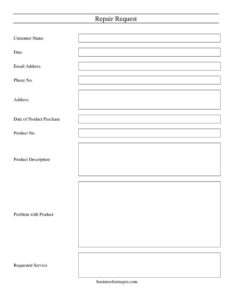
Repair Request
Use this free Repair Request form template to document a faulty product and ask for service or repairs, available as a free download in PDF and DOCX.
PDF
DOC
0
likes
Download Files
- DOC
A Repair Request form is a simple document a customer fills out to report a problem with a purchased product and formally ask the seller, manufacturer, or service department to fix it. People most often use it to start a warranty claim or repair ticket without a long phone call. This template is free to download in both PDF and DOCX, with no signup required.
What Is a Repair Request?
A Repair Request is a written notice that documents a defective or malfunctioning product and asks a company to repair, service, or assess it. It is typically completed by the customer and submitted to a retailer, manufacturer, repair shop, or in-house maintenance team. The form captures who is reporting the issue, which product is affected, when it was bought, and exactly what has gone wrong. By collecting these details in one place, it gives the service team enough information to verify the purchase, check warranty eligibility, and schedule the right kind of repair. It also creates a dated record both sides can refer back to if questions arise later.
When Do You Need a Repair Request?
This form fits many situations where a product stops working as expected and someone needs a fix on record. Common uses include:
- Reporting a faulty appliance, electronic device, or piece of equipment that is still under warranty.
- Asking a retailer or manufacturer to repair a defect found shortly after purchase.
- Submitting a service request to a repair shop for a paid (out-of-warranty) fix.
- Logging an internal maintenance request when company-owned equipment breaks down.
- Creating a paper trail before escalating a recurring product problem to customer support or a refund request.
- Documenting damage so a vendor can decide whether to repair, replace, or inspect the item.
What a Repair Request Should Have
A complete Repair Request leaves no doubt about who is asking, what product is involved, and what they want done. The essential elements are clear customer contact information, a precise product identifier such as a product number, the purchase date for warranty checks, a specific description of the problem, and the exact service being requested. The date of the request itself is also important, because it marks when the issue was officially reported. Together these fields let the receiving team match the request to a purchase record, confirm coverage, and respond quickly. A vague or incomplete form slows everything down, so each field should be filled in as accurately as possible.
How to Fill Out a Repair Request
- Customer Name: Enter your full name exactly as it appears on the purchase receipt or account.
- Date: Write the date you are submitting the request so the report is properly time-stamped.
- Email Address: Provide an email you check often, since most repair updates and scheduling details are sent there.
- Phone No.: Add a phone number where a technician or support agent can reach you.
- Address: Enter your full mailing or service address, especially if the item will be picked up or returned.
- Date of Product Purchase: Record when you bought the product; this determines whether the item is still under warranty.
- Product No.: Copy the product number, model number, or serial number from the label or original packaging.
- Product Description: Briefly describe the item, including brand, model name, and any distinguishing details.
- Problem with Product: Explain clearly what is wrong, when it started, and how it behaves so the team can diagnose it.
- Requested Service: State exactly what you want, such as repair, inspection, part replacement, or assessment.
Tips for Getting a Faster Repair
The clearer your request, the quicker the response. When describing the Problem with Product, be specific: note whether the issue is constant or intermittent, whether it appears under certain conditions, and any error messages or unusual sounds. If you can, mention what you have already tried, such as restarting the device or checking connections, so the technician does not repeat steps. Keep your receipt or proof of purchase handy in case the company asks to verify the Date of Product Purchase. Attaching photos or short videos of the fault, where the process allows it, can also speed up diagnosis and reduce back-and-forth.
Warranty vs. Paid Repair
A Repair Request can be used for both warranty claims and out-of-warranty service, but the outcome depends on the product’s coverage. If the Date of Product Purchase falls within the warranty period and the issue is a genuine defect, the repair is often free under the manufacturer’s terms. If the warranty has expired or the damage is from misuse, the company may quote a fee before doing the work. Submitting the form does not by itself guarantee a free repair; it simply opens the request. Always review the product’s warranty document for what is covered, how long coverage lasts, and whether you must use an authorized service center.
Common Mistakes to Avoid
- Leaving the Product No. blank or guessing it, which makes it hard to match the request to a record.
- Writing a vague problem description like “it doesn’t work” instead of specific symptoms.
- Forgetting the Date of Product Purchase, which is essential for confirming warranty eligibility.
- Providing an outdated email or phone number, so repair updates never reach you.
- Not stating the Requested Service clearly, leaving the team unsure whether you want a repair, replacement, or inspection.
- Failing to keep a copy of the completed form and your proof of purchase for your own records.
Frequently Asked Questions
What is a Repair Request form used for? It is used to formally report a problem with a product and ask a seller, manufacturer, or repair shop to fix or service it. The form gathers your contact details, the product information, and a description of the fault in one place. This helps the receiving team verify the item and respond efficiently.
How do I fill out a Repair Request? Enter your name, the date, and your contact details, then identify the product using its number and a short description. Add the purchase date, explain the problem clearly, and state the service you want. Submit the completed form to the company’s service or support team.
Is a Repair Request legally binding? A Repair Request is generally a service request rather than a binding contract on its own. It documents your report and what you have asked for, but whether the repair is performed, and at what cost, depends on the company’s policies and any warranty terms. Keeping a dated copy can still be useful if a dispute arises.
Do I need to include proof of purchase? The form itself asks for the purchase date and product number, which often allows the company to look up your record. However, many businesses will ask you to attach or present a receipt to confirm the purchase, especially for warranty claims. It is wise to have proof of purchase ready.
Will the repair be free? That depends on whether the product is still under warranty and whether the fault is covered. Defects within the warranty period are often repaired at no charge, while out-of-warranty or misuse-related issues may carry a fee. Check your warranty terms or ask the company for a quote.
How much does this template cost? The Repair Request template on Business Forms Pro is completely free to download in PDF and DOCX formats, with no signup required. You can fill it in digitally or print it and complete it by hand. Reuse it as often as you need for different products.
This Repair Request template is provided as a general example for informational purposes only and is not legal, financial, or warranty advice. Product coverage, consumer protection rules, and repair obligations vary by jurisdiction and by the seller’s or manufacturer’s policies. Consult a qualified professional or review your warranty documents for guidance specific to your situation.
Related Forms
- Garage Repair Order
- Request For Divorce Records
- Auto Repair Order
- Product Replacement Request
- Rejection Response Letter
- Transcript Request
Browse more in Request and Authorization.