
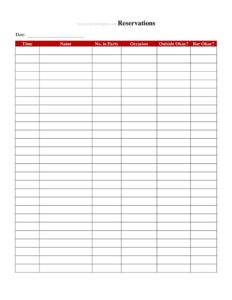
Reservations List
Use our free Reservations List template to track guest bookings, party sizes, and table assignments with ease — free download in PDF and DOCX.
PDF
DOCX
2 downloads
0
likes
Download Files
- DOCX
A Reservations List is a daily log restaurants use to record and organize guest bookings, and the single most common reason people use one is to keep the front-of-house team prepared for every table that walks through the door. Whether you run a small bistro or a busy fine-dining room, this form helps you avoid double-bookings and seat guests smoothly. It’s free to download in PDF and DOCX, with no signup required.
What Is a Reservations List?
A Reservations List is a structured sheet that consolidates all confirmed and pending table bookings for a given service period in one place. It is typically issued and maintained by a host, maître d’, or front-of-house manager and used by the entire service team throughout the shift. The document captures who is coming, when, how many people, and any special requests, so the restaurant can plan table assignments and staffing accordingly. Rather than relying on scattered notes or memory, a single, well-kept list gives the host stand a reliable source of truth. It supports a calmer service, faster seating, and a more polished guest experience from the moment a party arrives at the door.
When Do You Need a Reservations List?
Almost any restaurant that accepts advance bookings benefits from a daily Reservations List. Common situations include:
- Busy dinner services where multiple parties arrive within the same time window and tables must be turned efficiently.
- Holidays and special events such as Valentine’s Day, Mother’s Day, or New Year’s Eve, when bookings spike and timing is critical.
- Large group bookings that require combining tables or reserving a private area in advance.
- Walk-in coordination, so the host knows which tables are held and which are open for unexpected guests.
- Shift handoffs, where an outgoing host passes the list to the next person to keep service seamless.
- VIP or repeat guests who expect their preferences and seating to be remembered and ready.
What a Reservations List Should Have
A complete Reservations List balances brevity with the detail a host needs at a glance. Key elements include the service date and shift, the guest name for each booking, a contact phone number, the reservation time, the party size, an assigned table or section, and a notes column for special requests like allergies, high chairs, or anniversary celebrations. Many restaurants add a status indicator to mark whether a party has been seated, is running late, or has cancelled. A header for the venue name and a total count of expected covers help with kitchen and staffing forecasts. The clearer the layout, the faster the host can scan it during a rush.
How to Fill Out a Reservations List
Follow these steps to complete the form for each service:
- Set the date and shift. Write the service date and note whether the list covers lunch, dinner, or the full day at the top.
- Add the guest name. Record the name the reservation is held under, spelled as the guest gave it.
- Enter the contact number. Note a phone number so the host can confirm or follow up on late arrivals.
- Log the reservation time. Record the requested arrival time clearly, using a consistent format throughout.
- Note the party size. Write the number of guests so tables and place settings can be prepared.
- Assign a table or section. Pencil in a table number or area, leaving room to adjust as the floor changes.
- Record special requests. Use the notes column for allergies, celebrations, accessibility needs, or seating preferences.
- Update the status. Mark each party as confirmed, seated, late, or cancelled as the shift unfolds.
Tips for Managing Reservations Smoothly
A good list is only as useful as how the team maintains it. Keep the document in a fixed spot at the host stand and assign one person per shift to own it so updates don’t get lost. Confirm large bookings by phone earlier in the day to reduce no-shows. Build in realistic buffer time between seatings at the same table to avoid bottlenecks. When you combine tables for a big party, note the table numbers together so servers know who is covering. At the end of service, scan the completed list for patterns — peak times, frequent no-shows, or popular tables — that can inform future scheduling and floor planning.
Paper Lists vs. Booking Software
Many restaurants run a hybrid system. A printed Reservations List is fast, reliable, and never crashes during a power outage or Wi-Fi drop, which makes it a dependable backup even for venues using digital tools. Software can sync online bookings automatically and send guest reminders, but a physical sheet at the host stand remains easy for any team member to read and mark up mid-service. This template works well as a standalone tool for smaller venues or as a print-out from a digital system so the floor team always has a tangible reference. Choose whichever approach matches your volume, staffing, and budget.
Common Mistakes to Avoid
- Inconsistent time formats that cause confusion about whether a booking is for noon or midnight.
- Skipping the contact number, leaving no way to reach a guest about a delay or table change.
- Forgetting to record party size, which leads to seating mismatches and rushed table setups.
- Letting the list go stale by not updating statuses as guests arrive, cancel, or no-show.
- Ignoring special requests noted at booking, such as allergies or accessibility needs.
- Multiple people editing different copies, so no single version reflects the true state of the floor.
Frequently Asked Questions
What is a Reservations List used for? It is used to record and organize all guest bookings for a restaurant’s service period in one place. The host and service team rely on it to plan table assignments, manage timing, and prepare for each arriving party. It helps prevent double-bookings and keeps service running smoothly during busy shifts.
How do I fill out a Reservations List? Start with the service date and shift, then add each booking’s guest name, contact number, reservation time, and party size. Assign a table or section and note any special requests in the notes column. Update the status of each party as they arrive, cancel, or run late throughout the shift.
Is a Reservations List legally binding? No, a Reservations List is an internal operational document, not a contract. It records guest intentions to dine but does not create a legal obligation on either party. Any cancellation or deposit policies your restaurant enforces should be communicated separately at the time of booking.
How much does this Reservations List template cost? Nothing — it is completely free to download from Business Forms Pro. You can get it in both PDF and DOCX formats with no signup required. Print it as-is or edit the DOCX version to match your venue’s layout and columns.
Can I customize the template for my restaurant? Yes. The DOCX version is fully editable, so you can add columns for deposits, server assignments, or seating zones that fit your floor plan. You can also adjust the header to include your venue name and logo. Tailor it to your typical party sizes and service style.
How often should the list be updated? Update it continuously throughout each service as bookings come in and parties are seated, cancelled, or marked late. Print a fresh list for every shift so the team works from an accurate, current version. Reviewing the completed list after service also helps you spot trends in demand and no-shows.
This Reservations List template is provided as a general example for informational purposes only and does not constitute legal, financial, or business advice. Operational practices and any booking or cancellation policies vary by venue and jurisdiction — consult a qualified professional to ensure your procedures meet your needs.
Related Forms
- Kids Menu
- Lunch Menu
- Daily Food Sales Log
- Alcohol Inventory Log
- Please Pay At The Counter Sign
- Reservation Form
Browse more in Restaurant.