
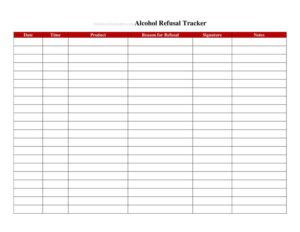
Alcohol Refusal Tracker
Document refused alcohol sales with our free Alcohol Refusal Tracker template, protect your liquor license, and train staff — free download in PDF and DOCX.
PDF
DOCX
8 downloads
0
likes
Download Files
- DOCX
An Alcohol Refusal Tracker is a log used by bars, restaurants, and retailers to document every time staff decline to serve or sell alcohol to a customer. The single most common reason people use it is to create a written record that demonstrates responsible alcohol service — proof that comes in handy during a liquor license review, an audit, or a dispute. You can download this template free as a PDF or DOCX, with no signup required.
What Is an Alcohol Refusal Tracker?
An Alcohol Refusal Tracker is a simple internal record kept by any licensed establishment that serves or sells alcohol. It documents incidents where an employee refused service — typically because a patron appeared intoxicated, could not provide valid identification, was suspected of being underage, or was buying for someone who had already been cut off. Managers, bartenders, servers, cashiers, and door staff all contribute entries. The log captures who refused, when, why, and what happened next. Over time it builds a defensible paper trail showing that your business takes responsible beverage service seriously, which can matter enormously if your license is ever challenged or you face a liability claim.
When Do You Need an Alcohol Refusal Tracker?
Almost any business with a liquor license benefits from keeping a refusal log. Common situations include:
- Refusing an intoxicated guest: A bartender cuts off a patron who is slurring, unsteady, or visibly drunk and wants the incident on record.
- Failed ID checks: A cashier or server declines a sale because the customer cannot produce valid, in-date identification.
- Suspected underage purchase: A door host or clerk turns away someone who appears under the legal drinking age or whose ID looks altered.
- Second-party (proxy) sales: Staff refuse a sober adult who is clearly buying for an intoxicated or underage companion.
- License inspections and audits: Regulators or your own compliance team request evidence of responsible service practices.
- Training and coaching: Managers review logged refusals to reinforce good judgment and identify staff who need additional support.
What an Alcohol Refusal Tracker Should Have
A complete refusal log doesn’t need to be complicated, but each entry should capture enough detail to stand on its own months later. At minimum, every record should include the date and time of the refusal, the location or station where it happened, the name or initials of the staff member who made the call, a brief description of the customer (no need for personal data — physical description and approximate age are enough), the specific reason for the refusal, and any follow-up action such as offering water, calling a ride, or alerting a manager. A signature or initial line and a space for manager review round out a solid record.
How to Fill Out an Alcohol Refusal Tracker
- Enter the date and time: Record exactly when the refusal occurred, including a.m./p.m., so entries can be matched to shift schedules and POS data later.
- Note the location or station: Specify the bar, register, dining section, or door where the incident took place.
- Identify the staff member: Write the name or initials of the employee who refused service so accountability is clear.
- Describe the customer: Give a brief, factual description — approximate age, build, clothing — without recording sensitive personal information.
- State the reason: Mark or write why service was refused: visible intoxication, no valid ID, suspected underage, proxy purchase, or other.
- Record observed signs: Note objective behaviors you witnessed, such as slurred speech, unsteady gait, or an expired ID.
- Log the action taken: Describe what you did next — offered water, arranged transport, asked the guest to leave, or notified a supervisor.
- Add staff signature and manager review: Have the employee initial the entry and a manager sign off to confirm it was reviewed.
Why a Refusal Log Protects Your Business
In many jurisdictions, an establishment can be held liable for harm caused by an over-served or unlawfully served patron. A consistently maintained Alcohol Refusal Tracker shows a pattern of good-faith compliance and staff diligence. If a regulator questions your practices or an incident leads to a claim, contemporaneous records carry far more weight than after-the-fact recollections. The log also reinforces a culture of accountability: when employees know refusals are documented and reviewed, they are more confident making the right call in a tense moment. Pair the tracker with regular responsible-service training and clear written policies for the strongest protection.
Best Practices for Keeping the Log
Store the tracker where staff can reach it quickly — near the register or behind the bar — and instruct everyone to complete an entry as soon as practical after a refusal, while details are fresh. Keep the language objective and factual; avoid opinions or labels about the customer. Have managers review entries at the end of each shift or week, and retain completed logs for the period your local rules recommend. Digital versions in DOCX can be filled on a tablet, while printed PDFs work well for a clipboard at the door or bar.
Common Mistakes to Avoid
- Filling it out late: Waiting days to log a refusal lets details fade and weakens the record’s credibility.
- Vague reasons: Writing only “refused” without the specific cause or observed behavior makes the entry far less useful.
- Recording sensitive personal data: Capturing more than a general description risks privacy issues; stick to relevant, factual details.
- Skipping manager review: Unreviewed logs miss the chance to coach staff and spot recurring problems.
- Inconsistent use: Logging some refusals but not others undermines the value of the entire record.
- Failing to retain logs: Discarding completed sheets too soon can leave you without evidence when it is needed most.
Frequently Asked Questions
What is an Alcohol Refusal Tracker used for? It is used to document each time staff decline to serve or sell alcohol, recording the date, reason, staff member, and follow-up action. The log demonstrates responsible service and creates a written record that can support your business during inspections or disputes.
Is keeping a refusal log legally required? Requirements vary by state and local jurisdiction; some regulators recommend or expect refusal records as part of responsible beverage service programs, while others do not mandate them. Even where it is optional, maintaining a log is widely considered a smart compliance practice. Check your local alcohol control authority’s rules.
Who should fill out the tracker? Any employee who refuses a sale or service should complete an entry — bartenders, servers, cashiers, and door staff. A manager should then review and initial each entry to confirm it was assessed and to coach staff where needed.
How long should I keep completed logs? Retention periods vary, so follow the guidance of your local licensing authority and your own legal or compliance advisor. Many businesses keep records for at least a couple of years to cover potential audits or claims. When in doubt, retain them longer rather than shorter.
Does this form need to be notarized or witnessed? No. An Alcohol Refusal Tracker is an internal operational record and does not require notarization or outside witnesses. A staff signature or initials plus manager review is generally sufficient to show the entry was made and verified.
How much does this template cost? The Alcohol Refusal Tracker is completely free to download from Business Forms Pro in both PDF and DOCX formats, with no signup required. You can customize it with your establishment’s name and station labels before printing or using it digitally.
This template is a general example provided for informational purposes only and is not legal, regulatory, or compliance advice. Alcohol service laws and recordkeeping requirements vary by jurisdiction. Consult your local alcohol control authority or a qualified professional to ensure your practices meet applicable rules.
Related Forms
- Employees Only Sign
- Happy Hour Table Cards
- Order Here Sign
- Catering Menu
- Sandwich Menu
- Restaurant Meal Comp Or Discount Log
Browse more in Restaurant.