
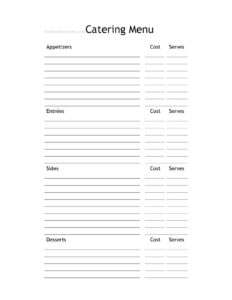
Catering Menu
Download a free Catering Menu template in PDF or DOCX to present packages, pricing, and options clearly to clients — easy to customize, free download.
PDF
DOCX
0
likes
Download Files
- DOCX
A Catering Menu is the document a caterer or restaurant uses to present food packages, dishes, and pricing to clients planning an event. The most common reason people use one is to give prospective customers a clear, professional overview of what they can order for a wedding, corporate lunch, or party — making it faster to quote and book. This template is free to download in both PDF and DOCX, with no signup required.
What Is a Catering Menu?
A Catering Menu is a presentation and ordering document created by a catering business, restaurant, or independent chef to show clients the food and beverage options available for their event. Unlike a regular dine-in menu, a catering menu is organized around servings, packages, and headcounts rather than individual plates. It typically groups offerings into categories — appetizers, mains, sides, desserts, and drinks — and lists pricing per person, per platter, or per package. It also communicates important logistics such as minimum orders, lead times, and what is included with each tier. In short, it is both a sales tool and an ordering reference that helps clients understand exactly what they are getting and at what cost.
When Do You Need a Catering Menu?
A well-built catering menu is useful any time food service is offered for a group rather than a single diner. Common scenarios include:
- Weddings and receptions — presenting plated dinner, buffet, and station options with per-guest pricing.
- Corporate events — offering boxed lunches, breakfast spreads, or conference catering packages for offices.
- Private parties — birthdays, anniversaries, graduations, and holiday gatherings that need set menus.
- Drop-off catering — listing trays and platters for clients who only need food delivered, not full service.
- Restaurants expanding into events — a dine-in restaurant that wants a separate, group-ready offering.
- Trade shows and tastings — handing prospects a printed menu they can review and share with decision-makers.
Types of Catering Menus
Caterers often maintain more than one version of their menu depending on service style. A buffet menu lists self-serve dishes priced per person. A plated menu describes multi-course meals served to seated guests. A family-style menu offers shared platters placed at each table. A drop-off or platter menu focuses on packaged trays for pickup or delivery. Choosing the right format for the document keeps client expectations aligned with what your kitchen and staff can actually deliver.
What a Catering Menu Should Have
A complete catering menu makes ordering simple and prevents confusion later. Strong menus include the catering business name and contact details, clearly labeled food categories, accurate dish descriptions, and transparent pricing with the unit (per person, per dozen, or per tray) spelled out. It should note serving sizes or minimum headcounts, any package inclusions, dietary or allergen labels (vegetarian, vegan, gluten-free, nut-free), and practical terms such as ordering lead time, deposit requirements, delivery fees, and gratuity. A space for notes or custom requests lets clients flag special needs.
How to Fill Out a Catering Menu
Because this template is fully customizable, you can adapt each section to your offerings. Follow these steps:
- Add your business header. Enter your catering or restaurant name, logo, phone number, email, and website at the top so clients know who to contact.
- Create menu categories. Label sections such as Appetizers, Entrées, Sides, Desserts, and Beverages, or build named packages like “Classic Buffet” and “Premium Plated.”
- List each dish. Write the dish name followed by a short, appetizing description of key ingredients and preparation.
- Set pricing and units. Enter the price beside each item and specify whether it is per person, per platter, or per dozen.
- Add serving details. Note minimum quantities, serving sizes, and how many guests each package covers.
- Mark dietary labels. Tag vegetarian, vegan, and gluten-free items so guests with restrictions can order confidently.
- State the terms. Include ordering deadlines, deposits, delivery or setup fees, and how to place an order.
- Review and brand. Proofread descriptions, confirm prices, and apply your colors or fonts before saving.
Tips for a Menu That Sells
Descriptions matter as much as price. Use sensory language — “slow-roasted,” “house-made,” “locally sourced” — to make dishes appealing without exaggerating. Keep categories scannable and avoid overwhelming clients with too many choices; a focused menu often books faster than an endless one. Group items into tiered packages so customers can quickly compare value. Update seasonal availability and pricing regularly, and keep a printable PDF version for events plus an editable DOCX you can revise as costs change.
Pricing and Logistics to Clarify
Catering pricing involves more than the food itself, so the menu should set expectations early. Spell out whether prices include service staff, rentals, linens, or delivery, and whether tax and gratuity are added separately. Note your minimum order amount and how far in advance orders must be placed — many caterers require several days to a week for large events. Being upfront about these details reduces back-and-forth and builds trust with clients comparing vendors.
Common Mistakes to Avoid
- Omitting the pricing unit — listing a number without “per person” or “per tray” leads to costly misunderstandings.
- Vague dish descriptions — clients can’t choose confidently if they don’t know what’s in a dish.
- Ignoring dietary labels — missing allergen or vegetarian tags can create serious problems at the event.
- Forgetting minimums and lead times — failing to state these invites last-minute orders you can’t fulfill.
- Outdated pricing — leaving old numbers on the menu erodes margins as ingredient costs rise.
- Burying contact info — if clients can’t easily find how to order, you lose the booking.
Frequently Asked Questions
What is a catering menu? It is a document a caterer or restaurant uses to present food packages, dishes, and pricing for events. Unlike a standard menu, it is organized around servings, packages, and headcounts rather than single plates.
How do I fill out this catering menu template? Add your business details at the top, create categories or packages, list each dish with a description and price, specify the pricing unit and serving size, label dietary options, and state your ordering terms. Both the PDF and DOCX versions can be edited to match your offerings.
Is this catering menu template free? Yes. You can download it for free in PDF or DOCX format with no signup required, and customize it as many times as you need.
Should I price per person or per platter? It depends on your service style. Buffets and plated meals are usually priced per person, while drop-off platters and trays are priced per item or per dozen — clearly state which unit applies to avoid confusion.
Do I need to list allergens on a catering menu? Listing dietary and allergen information is strongly recommended and may be legally required in some areas. Labeling vegetarian, vegan, gluten-free, and common allergens helps guests order safely and protects your business.
Can I have more than one version of my catering menu? Absolutely. Many caterers keep separate menus for buffet, plated, family-style, and drop-off service, plus seasonal editions. Because this is an editable template, you can save multiple versions easily.
This Catering Menu template is provided as a general example for informational purposes only and is not legal, financial, food-safety, or tax advice. Food labeling, allergen disclosure, and business requirements vary by jurisdiction — consult a qualified professional or your local health authority to ensure compliance.
Related Forms
- Ingredient Usage Report
- Lunch Menu
- Refrigerator Temperature Log
- Dinner Menu
- See Host Table Sign
- Bathrooms For Customers Sign
Browse more in Restaurant.