
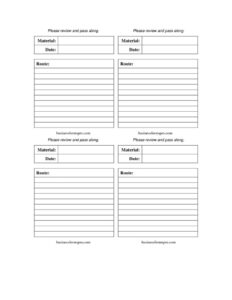
Routing Labels Multiple
Use this free Routing Labels Multiple template to label and route documents, files, or packages to several people in order — free download in PDF and DOCX.
PDF
DOCX
2 downloads
0
likes
Download Files
- DOCX
A Routing Labels Multiple form is a printable sheet of labels used to direct a document, file, package, or internal item through a sequence of people or departments. The most common reason people use it is to keep one physical item moving in the right order—reviewer to reviewer—without losing track of who has seen it. It’s free to download here in both PDF and DOCX, with no signup required.
What Is a Routing Labels Multiple Form?
A Routing Labels Multiple form is a single page that holds several routing labels at once, each meant to be attached to a folder, envelope, binder, or interoffice item. Rather than printing one label at a time, you generate a batch—so a mailroom, admin team, or project coordinator can prepare many routes in a single pass. Each label typically names the recipients in sequence, notes the action expected (review, sign, file, return), and leaves room for dates or initials. Businesses, schools, clinics, and government offices use these labels to manage circulation of paperwork that must physically pass through multiple hands before reaching a final destination.
When Do You Need a Routing Labels Multiple Form?
This form is most useful any time more than one person must handle the same physical item in order. Common scenarios include:
- Document review chains — a contract or report that must be reviewed and initialed by several managers before final approval.
- Interoffice mail — packages or envelopes that travel between departments or branch offices on a fixed path.
- Records circulation — patient charts, case files, or personnel folders that move between staff who each add notes.
- Batch mailings — preparing a stack of items at once, each with its own routing label printed from the same sheet.
- Sign-off workflows — purchase orders or expense reports that need signatures from finance, a supervisor, and accounting in turn.
- Return-to-sender tracking — items that must come back to an originator after everyone in the chain has acted.
Types of Routing Labels
Routing labels generally fall into two groups. Single-stop labels simply direct an item to one destination, like a standard address label. Sequential routing labels—the kind this multiple-label sheet supports—list several recipients in order so the item travels down the list, with each person passing it to the next. The multiple format is built so you can fill out many sequential or single labels at once, then cut or peel them apart and apply each to its own item. This saves time when a team handles high volumes of circulating paperwork.
What a Routing Labels Multiple Form Should Have
To work as intended, each label on the sheet should clearly identify where the item starts, who handles it, and where it ends up. A complete routing label typically includes a sender or originator line, an ordered list of recipients or departments, space for the action requested at each stop, and a place to mark the date received or initials. Because the form holds multiple labels, a consistent layout across all of them keeps the batch easy to read. Clear, legible fields reduce the chance that an item gets stuck or misdirected midway through its route.
How to Fill Out a Routing Labels Multiple Form
Because this template provides several blank labels on one page, work through it one label at a time:
- Choose a blank label on the sheet for each item you need to route, so each physical item gets its own label.
- Enter the originator — the name, department, or desk the item starts from and, if needed, returns to.
- List the recipients in order — write each person or department in the exact sequence the item should travel, numbering them if space allows.
- Note the action at each stop — indicate whether each recipient should review, sign, file, copy, or simply forward the item.
- Add dates or initial spaces — leave room for each handler to mark the date they received the item and initial when they pass it on.
- Mark the final destination — make clear where the item goes after the last recipient, whether that’s a file, an archive, or back to the originator.
- Repeat for each label, then print, cut or peel apart, and attach each label to its matching item.
Tips for Smooth Routing
A routing label only helps if it’s easy to follow. Keep names spelled correctly and use full titles or department codes if your organization has them, so nobody guesses where to send the item next. When routing time-sensitive material, add a due date so each handler knows the pace. If an item must come back to you, make the return step unmistakable—bold it or place it at the bottom. For recurring routes, save a master copy of your filled labels so you can reprint the same path without re-entering it. Finally, encourage each recipient to initial and date the label; that running record makes it easy to see exactly where a delayed item is sitting.
Common Mistakes to Avoid
- Listing recipients out of order — the sequence is the whole point; double-check it before printing.
- Leaving the action blank — without a stated action, handlers may not know whether to sign, copy, or just forward.
- Forgetting the return step — items that should come back can disappear if no final destination is named.
- Illegible handwriting — a misread name sends the item to the wrong desk and stalls the route.
- Reusing one label for multiple items — each physical item needs its own label to avoid confusion.
- Skipping date and initial fields — without them, you lose the trail that shows where a delayed item is stuck.
Frequently Asked Questions
What is a Routing Labels Multiple form used for? It’s used to print several routing labels at once, each directing a document, file, or package through a set sequence of people or departments. Teams that circulate a lot of physical paperwork use it to prepare many routes in a single batch. Each label keeps one item moving in the correct order until it reaches its final destination.
How do I fill out a routing label correctly? Enter the originator, list each recipient in the exact order the item should travel, and note the action expected at each stop. Leave space for dates and initials so handlers can mark when they received and passed on the item. Then attach the label to its matching item before sending it on its way.
How is a multiple-label sheet different from a single label? A multiple-label sheet places several blank labels on one page so you can prepare many routes at once, then separate them for individual items. A single label handles only one item. The multiple format saves time for mailrooms and admin teams processing high volumes.
Does a routing label need to be signed or notarized? No. A routing label is an internal organizational tool, not a legal document, so it does not require notarization or formal signatures. Many organizations do ask handlers to initial and date the label as an informal tracking record.
Can I customize the labels for my organization? Yes. Download the DOCX version to edit recipient lines, add department codes, insert your logo, or adjust the layout to match your interoffice routing process. The PDF version is ready to print as-is if you prefer to fill it in by hand.
Is this Routing Labels Multiple template free to download? Yes, it’s completely free to download in both PDF and DOCX formats with no signup required. You can print it as often as you need and reuse it for ongoing routing tasks. Save a filled master copy to quickly reprint recurring routes.
This template is provided as a general example for informational purposes only and is not legal, financial, or administrative advice. Internal routing and recordkeeping requirements vary by organization and jurisdiction—follow your own company’s policies and consult a qualified professional where appropriate.
Related Forms
Browse more in Routing Labels.