
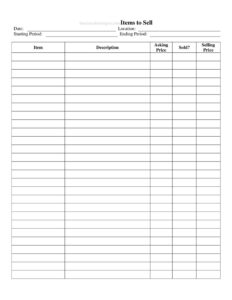
Items to Sell
Track everything you're selling with the free Items to Sell list template—log descriptions, asking prices, and final sale amounts in one place. Free download.
PDF
DOCX
3 downloads
0
likes
Download Files
- DOCX
The Items to Sell list is a simple tracking sheet for recording every product or possession you plan to sell, along with its asking price and final selling price. People most often use it to stay organized during a garage sale, online resale push, or inventory clearance so nothing slips through the cracks. It’s free to download here in both PDF and DOCX formats, with no signup required.
What Is an Items to Sell List?
An Items to Sell list is a worksheet that catalogs the goods you intend to sell during a defined period. It captures the date and location of the sale, a starting and ending period, and a line-by-line breakdown of each item, including a description, the price you’re asking, whether the item sold, and the actual amount it fetched. Anyone can use it—households decluttering before a move, hobbyists liquidating a collection, small retailers running a clearance event, or estate organizers handling a property. The form’s value is in turning a scattered pile of merchandise into a clear, trackable record that shows what’s available, what’s gone, and how much money has come in.
When Do You Need an Items to Sell List?
This list is useful any time you’re moving multiple items and want a single source of truth. Common scenarios include:
- Garage or yard sales: List furniture, tools, toys, and household goods with prices so you can answer buyer questions quickly and check off sales as they happen.
- Online resale: Track listings across marketplaces—note the asking price you posted versus what the buyer actually paid after negotiation.
- Estate or downsizing sales: Coordinate a large volume of items over several days, recording the location and the start and end of the selling window.
- Small business clearance: Document discounted stock you’re moving out before new inventory arrives and reconcile takings at the end.
- Charity or fundraiser sales: Keep a transparent record of donated items, asking prices, and proceeds raised for a cause.
- Splitting shared property: Roommates or family members selling joint belongings can use the log to track who sold what and at what price.
What an Items to Sell List Should Have
A complete and useful Items to Sell list includes a few essential elements. There should be header information identifying the sale—a date, a physical or online location, and the selling period so you know the window the record covers. Each line item needs a clear name and a fuller description that distinguishes similar goods (brand, size, condition, or quantity). Pricing columns are critical: an asking price you set in advance and a selling price for the amount actually received. Finally, a simple sold indicator lets you see at a glance what’s still available. Together these columns let you total your proceeds and compare expectations against reality.
How to Fill Out an Items to Sell List
- Date: Enter the date you’re creating the list or the day the sale begins.
- Location: Write where the sale takes place—your home address, a venue, or the name of the online platform.
- Starting Period: Record the date or time the selling window opens.
- Ending Period: Note when the sale closes so the record covers a defined span.
- Item: Name each product on its own row—keep it short, like “Oak dining table” or “Road bike.”
- Description: Add detail that helps identify and price the item: condition, brand, dimensions, color, or quantity included.
- Asking Price: Enter the price you’re requesting before any negotiation.
- Sold?: Mark this column once an item finds a buyer, using a check, “Yes,” or the sale date.
- Selling Price: Record the final amount you actually received, which may differ from the asking price after haggling or a discount.
Tips for Pricing and Tracking
Set your asking prices a little above your minimum acceptable amount so you have room to negotiate, especially at garage and estate sales where bargaining is expected. Group similar items together on consecutive rows so the list reads logically and buyers can compare. As items sell, update the Sold? and Selling Price columns immediately rather than from memory—this keeps your running total accurate. At the close of the selling period, add up the Selling Price column to see your gross proceeds, then compare it to the sum of your asking prices to gauge how much you discounted overall. Keeping the completed sheet is also handy for your own records or, if you sold business inventory, for bookkeeping.
Items to Sell List vs. a Sales Receipt
It’s worth understanding how this list differs from a receipt or bill of sale. An Items to Sell list is a planning and tracking tool for the seller—it shows everything you intend to move and logs the outcome. A receipt or bill of sale, by contrast, is a document handed to the buyer confirming a specific transaction and, in some cases, transferring ownership. Use the Items to Sell list to manage the whole event, and issue a separate receipt for individual high-value sales when a buyer needs proof of purchase or you need to document a transfer.
Common Mistakes to Avoid
- Vague descriptions: Writing only “lamp” makes it hard to tell two similar items apart—add brand, size, or condition.
- Forgetting to mark items sold: An out-of-date Sold? column leads to double-selling or confusion at checkout.
- Confusing asking and selling price: Always record the actual amount received separately so your totals reflect real income.
- Leaving the period blank: Without a starting and ending period, you lose track of which sale a record belongs to.
- Pricing everything from memory: Decide asking prices in advance and write them down to avoid inconsistent quotes to different buyers.
- Not totaling at the end: Skipping the final tally means you never learn how much you actually earned or discounted.
Frequently Asked Questions
What is an Items to Sell list used for? It’s a worksheet for cataloging everything you plan to sell during a defined period, tracking each item’s description, asking price, and final selling price. People use it for garage sales, online resale, estate clearances, and business inventory liquidation to stay organized and reconcile proceeds.
How do I fill out the Items to Sell template? Start with the header fields—date, location, and the starting and ending period of your sale. Then add each product on its own row with a name, description, and asking price, and update the Sold? and Selling Price columns as items find buyers.
Is this form legally binding? No. The Items to Sell list is a personal tracking and planning tool, not a contract or proof of ownership transfer. For individual transactions that need legal weight, use a separate bill of sale or receipt.
What’s the difference between asking price and selling price? The asking price is what you request before any negotiation, while the selling price is the actual amount you received. Recording both lets you see how much you discounted and calculate your true total earnings.
Can I use it for online sales? Yes. Enter the marketplace name in the Location field, list each posting as an item, and record the final paid amount in the Selling Price column once a buyer completes the purchase.
How much does this template cost? It’s completely free to download here in PDF and DOCX formats, with no signup or payment required. You can fill it in digitally or print it for handwritten use at your sale.
This Items to Sell template is provided as a general example for informational purposes only and does not constitute legal, financial, or tax advice. Requirements for sales records, receipts, and transactions vary by jurisdiction—consult a qualified professional for guidance specific to your situation.
Need to work out sales tax? Use our free Sales Tax Calculator to add or remove sales tax from any amount in seconds.
Official resource: for the rules that apply to your situation, see the U.S. Small Business Administration.
Related Forms
- Cancel Stop Payment And Honor Check
- Competitive Analysis
- Sales Phone Log
- Rebate Tracker
- Vendor Performance Warning Letter
- Request To Return Merchandise
Browse more in Sales.