
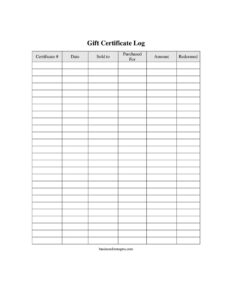
Gift Certificate Log
Track every gift certificate sold and redeemed with this free Gift Certificate Log template, available as a free PDF and DOCX download.
PDF
DOCX
9 downloads
0
likes
Download Files
- DOCX
A Gift Certificate Log is a simple tracking sheet that records every gift certificate your business issues, who bought it, who it was for, its value, and whether it has been redeemed. Most businesses use one to prevent fraud and double-redemption while keeping a clear paper trail of outstanding liabilities. You can download this Gift Certificate Log free in both PDF and DOCX formats, with no signup required.
What Is a Gift Certificate Log?
A Gift Certificate Log is an internal record-keeping document that lists each gift certificate a business sells along with its key details. It is typically maintained by the owner, front-desk staff, or bookkeeper, and it documents the certificate number, sale date, purchaser, recipient, dollar amount, and redemption status. Rather than relying on scattered receipts or memory, the log centralizes all gift certificate activity in one place. This makes it easy to verify that a presented certificate is genuine, confirm it has not already been used, and reconcile outstanding balances at month-end. For small retailers, salons, restaurants, and service providers, it is a practical tool for accountability and basic financial control.
When Do You Need a Gift Certificate Log?
Any business that sells paper or printed gift certificates benefits from keeping a running log. Common situations include:
- Retail shops that issue physical certificates during holidays and want to track which ones are still outstanding.
- Salons and spas selling treatment vouchers that must be matched to a purchaser and recipient.
- Restaurants and cafes offering gift certificates that staff need to verify before accepting at the register.
- Service providers such as photographers, trainers, or tutors who sell prepaid sessions as certificates.
- Event or experience businesses that need to confirm a certificate has not already been redeemed before booking.
- Bookkeeping and audits, where the log helps you account for unredeemed certificates as a liability on your books.
Whenever cash changes hands for a future promise of goods or services, a log keeps that promise organized and traceable.
What a Gift Certificate Log Should Have
A useful log captures enough detail to identify each certificate uniquely and confirm its status at a glance. The essential elements are a sequential certificate number for tracking, the date of sale, the name of the purchaser, the name of the intended recipient, the monetary amount, and a clear redemption indicator. Together these fields let you answer the three questions that matter most: Is this certificate real? How much is it worth? Has it already been used? A good log also has room for many rows so you can record dozens of certificates on one sheet and total your outstanding value at the bottom.
How to Fill Out a Gift Certificate Log
- Certificate #: Assign each certificate a unique sequential number (for example, GC-001, GC-002) and write it in this column the moment you sell it. Match it to the number printed on the physical certificate.
- Date: Record the date the certificate was sold. This helps with expiration tracking and monthly reconciliation.
- Sold to: Enter the name of the person who purchased the certificate, along with a phone number or email if you collect it.
- Purchased for: Write the name of the intended recipient, if known. This is helpful when a recipient calls about a lost certificate.
- Amount: Note the face value of the certificate in dollars. Keep the format consistent across rows for easy totaling.
- Redeemed: Leave this blank at the time of sale. When the certificate is used, mark it redeemed and add the redemption date so it cannot be accepted twice.
How the Log Reduces Fraud and Errors
The redemption column is the heart of fraud prevention. Before accepting any certificate, staff should locate its number in the log and confirm it has not already been marked redeemed. This single check stops the most common gift certificate problem: the same number being used more than once, whether by mistake or intentionally. Sequential numbering also makes counterfeits obvious, because a certificate number that does not appear in your log is immediately suspect. For added security, store the log securely and limit who can add or edit entries, so the record stays trustworthy.
Tracking Outstanding Value and Liabilities
Unredeemed gift certificates represent money your business has collected but not yet earned, which accountants treat as a liability until the goods or services are delivered. By scanning the redeemed column, you can quickly add up the value of all outstanding certificates at any point. This figure is useful at month-end and year-end for accurate bookkeeping, and it helps you anticipate future demand on inventory or staff time. Many businesses review the log periodically to follow up on aging certificates and to confirm their records match the physical stubs on hand.
Paper vs. Digital Logs
This template works well as a printed sheet kept at the point of sale, where staff can update it by hand the instant a certificate is sold or redeemed. The DOCX version lets you maintain a digital copy, sort entries, and run formulas to total amounts if you prefer. Many businesses keep both: a printed log at the counter for immediate entries and a digital master that is updated at the end of each day. Whichever you choose, consistency is what makes the log reliable.
Common Mistakes to Avoid
- Skipping numbers or reusing them, which breaks the audit trail and makes verification unreliable.
- Forgetting to mark a certificate redeemed, the leading cause of double redemption and disputes.
- Leaving the purchaser or recipient blank, which makes it hard to resolve lost-certificate claims.
- Inconsistent amount formatting that makes totaling outstanding value slow and error-prone.
- Not recording the sale date, which complicates expiration tracking and reconciliation.
- Letting multiple staff edit the log loosely without a routine, so entries get missed or duplicated.
Frequently Asked Questions
What is a Gift Certificate Log used for? It is an internal tracking sheet that records every gift certificate your business sells, including its number, sale date, purchaser, recipient, amount, and redemption status. Its main purpose is to prevent double redemption and fraud while keeping an accurate record of outstanding certificate value. Businesses also use it for bookkeeping and reconciliation.
How do I fill out a Gift Certificate Log? Each time you sell a certificate, add a new row with a unique certificate number, the sale date, the buyer’s name, the recipient’s name, and the dollar amount, leaving the redeemed column blank. When the certificate is later used, mark it redeemed and note the date. This keeps the log current and prevents the same certificate from being accepted twice.
Is a Gift Certificate Log a legal document? No, it is an internal business record rather than a contract or legally binding instrument. However, it can serve as supporting documentation for your accounting and may help resolve disputes about whether a certificate was issued or redeemed. Keeping it accurate and consistent makes it far more useful.
Does a Gift Certificate Log need to be notarized? No, there is no need for notarization or witnesses. It is a record kept by your business for its own tracking and accounting purposes, so you can complete it entirely in-house.
How much does this Gift Certificate Log template cost? Nothing — it is completely free to download from Business Forms Pro in both PDF and DOCX formats, with no signup or payment required. You can print it for counter use or edit the DOCX version to fit your business.
Can I track gift certificate expiration dates with this log? Yes, although the template focuses on sale and redemption details, the sale date column lets you calculate expiration based on your policy. If you want a dedicated expiration field, you can add a column to the editable DOCX version. Always check your local rules, since some places regulate or restrict gift certificate expiration.
This Gift Certificate Log template is provided as a general example for informational purposes only and does not constitute legal, financial, or tax advice. Rules governing gift certificates and gift cards — including expiration and disclosure requirements — vary by jurisdiction. Consult a qualified professional to ensure your practices comply with applicable laws in your area.
Need to work out sales tax? Use our free Sales Tax Calculator to add or remove sales tax from any amount in seconds.
Official resource: for the rules that apply to your situation, see the U.S. Small Business Administration.
Related Forms
- Credit Application
- Order Authorization Form
- Competitive Analysis
- Request For Appointment
- Price Quote Request Form
- Announcing Sales Campaign
Browse more in Sales.