
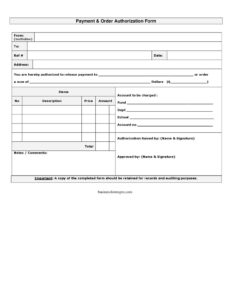
Order Authorization Form
Download a free Order Authorization Form template in PDF and DOCX to approve payments, charge the right account, and document purchases for audits.
PDF
DOCX
0
likes
Download Files
- DOCX
An Order Authorization Form is a document used to formally approve a purchase or release payment to a named recipient, recording the items, amounts, and the account to be charged. Organizations most commonly use it to control spending and create a clear paper trail before money leaves an account. You can download this Order Authorization Form free in both PDF and DOCX formats — no signup required.
What Is an Order Authorization Form?
An Order Authorization Form is an internal control document that authorizes payment or an order on behalf of an institution. It is typically raised by a staff member who needs to make a purchase and approved by a supervisor or budget holder who has spending authority. The form documents who the payment goes to, the sum involved, an itemized breakdown of what is being ordered, and which fund, department, or account will be charged. Because it carries signatures from both the person raising the request and the person approving it, it serves as evidence that the expenditure was reviewed and sanctioned. Schools, nonprofits, and businesses rely on it to keep purchasing transparent, accountable, and audit-ready.
When Do You Need an Order Authorization Form?
This form is useful any time a purchase or payment must be approved before it is processed. Common situations include:
- Ordering supplies or equipment for a department where a budget holder must sign off first.
- Releasing payment to a vendor or contractor for goods or services already delivered.
- School or university purchases charged to a specific fund, department, or program account.
- Reimbursing or paying an individual a defined sum that needs management approval.
- Documenting one-off expenses that fall outside a standing purchase order or recurring invoice.
- Creating an audit trail so finance can match approved spending against account balances during a review.
What an Order Authorization Form Should Have
A complete and useful authorization form leaves no ambiguity about who approved what and where the money came from. The essential elements are the originating institution and the recipient, a reference number and date, a clear itemized list with quantities and prices, the total amount, the specific account to be charged, and dual signatures from the requester and approver. A short notes or comments area allows context to be added, and a record-retention reminder ensures the completed form is filed for accounting and auditing purposes. Without these components, finance teams cannot verify that spending was authorized or trace it to the correct budget line.
How to Fill Out an Order Authorization Form
- Enter the From (institution) field with the name of the organization or department issuing the authorization.
- Complete the To field, naming the recipient, vendor, or payee.
- Assign a Ref # for tracking and add the Date the form is raised.
- Fill in the Address of the recipient or supplier.
- In the items table, list each line with its No (quantity), Description, Price, and Amount, then calculate the Total.
- Complete the authorization statement: “You are hereby authorized to release payment to {name} or order a sum of {number} dollars.” Insert the payee name and the dollar figure.
- Specify the account to be charged by entering the Fund, Dept, School, and Account no.
- Add any Notes/Comments that explain or justify the order.
- Have it signed under Authorization Raised by (name and signature) and Approved by (name and signature).
Account Coding and Why It Matters
The account section — fund, department, school, and account number — is the part finance teams care about most. These codes determine which budget the expense draws down and how it is reported. Entering the wrong fund or account number can cause a payment to post against the wrong cost center, distort budget reporting, and create headaches at reconciliation. If you are unsure which codes apply, check with the budget holder or your accounting office before submitting the form. Accurate coding also speeds up processing, because the finance team does not have to return the form for correction.
Record Retention and Audit Readiness
As the form itself notes, a copy of the completed authorization should be retained for records and auditing purposes. Keep the signed form together with the related invoice, receipt, or delivery note so the full transaction can be reconstructed later. During an internal or external audit, reviewers will look for the dual signatures, the matching reference number, and proof that the charged account was correct. Storing these forms in an organized system — by reference number or date — makes audits faster and demonstrates strong financial controls.
Common Mistakes to Avoid
- Missing the approver signature — an unsigned form has no authority and may be rejected by finance.
- Leaving the account fields blank, which prevents the charge from being posted to the right budget.
- Math errors where line amounts do not add up to the stated total.
- Vague descriptions that make it impossible to verify what was ordered.
- Reusing or skipping reference numbers, which breaks the audit trail.
- Failing to keep a copy on file for later reconciliation or review.
Frequently Asked Questions
What is an Order Authorization Form used for? It is used to formally approve a purchase or authorize the release of payment to a named recipient. It records the items, the total amount, the account to be charged, and the signatures of the person requesting and the person approving the expenditure.
How do I fill out an Order Authorization Form? Start by entering the issuing institution, the recipient, a reference number, and the date. Then list the ordered items with quantities and prices, calculate the total, specify the fund and account to be charged, and obtain signatures from both the person raising the request and the approver.
Does an Order Authorization Form need to be signed by two people? This template includes both an “Authorization Raised by” and an “Approved by” signature line, reflecting a common separation-of-duties control. Many organizations require both to ensure the person making the request is not the same person approving the spending, but your internal policy determines the exact requirement.
Is an Order Authorization Form legally binding? It functions primarily as an internal control and record rather than a standalone contract. Once signed by an authorized approver, it commits the organization to the documented expenditure according to its own policies, though enforceability of any underlying purchase depends on your agreements and local rules.
How much does this Order Authorization Form cost? Nothing — it is completely free to download from Business Forms Pro in both PDF and DOCX formats. You can use the PDF as-is or edit the DOCX version to add your logo, account fields, or approval workflow.
How long should I keep a completed authorization form? Keep it for as long as your organization’s record-retention and audit policies require, and store it alongside the related invoice or receipt. This ensures the transaction can be verified during financial reviews and audits.
This Order Authorization Form template is a general example provided for informational purposes only and does not constitute legal, financial, or tax advice. Internal control, approval, and record-retention requirements vary by organization and jurisdiction — consult a qualified accounting or compliance professional before relying on this form.
Need to work out sales tax? Use our free Sales Tax Calculator to add or remove sales tax from any amount in seconds.
Official resource: for the rules that apply to your situation, see the U.S. Small Business Administration.
Related Forms
- New Customer Form
- Customer Referral Form
- Price Quotes List
- Request For Appointment
- Cancel Back Order letter
- Layaway Plan Record
Browse more in Sales.