
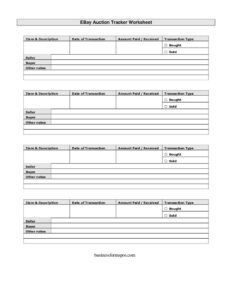
Ebay Auction Worksheet
Track every eBay sale and purchase with this free eBay Auction Worksheet template, available as a free download in PDF and DOCX, no signup required.
PDF
DOCX
3 downloads
0
likes
Download Files
- DOCX
An eBay Auction Worksheet is a simple tracking sheet that records the items you buy and sell on eBay, the dates, the amounts, and notes about each transaction. People most often use it to keep an organized running log of their eBay activity for budgeting, bookkeeping, and tax season. You can download this worksheet free in PDF and DOCX, with no signup required.
What Is an eBay Auction Worksheet?
An eBay Auction Worksheet is a manual record-keeping document used by eBay buyers and sellers to log each transaction in one place. Rather than digging through email confirmations and account history, you capture the essentials on a single page: what the item was, when the deal closed, how much money changed hands, whether you bought or sold it, and who the other party was. Casual sellers, small resellers, hobbyists, and side-hustle entrepreneurs use it to stay organized. Because it lists both purchases and sales side by side, the worksheet doubles as a basic profit-and-loss snapshot, helping you see at a glance whether your eBay activity is making or losing money over a given period.
When Do You Need an eBay Auction Worksheet?
This worksheet earns its keep any time your eBay activity grows past a handful of transactions. Consider using it in these situations:
- Reselling for profit: You buy inventory at garage sales or thrift stores and flip it on eBay, and you need to compare cost against sale price.
- Tax preparation: You want a tidy record of income and expenses to hand to an accountant or to reference when filing.
- Decluttering your home: You are selling off personal belongings and want to track what sold, when, and for how much.
- Managing returns and disputes: You need a quick reference of buyer and seller names and transaction dates if a problem arises.
- Budgeting a collection: You collect cards, coins, or memorabilia and want to monitor how much you spend buying versus what you recoup selling.
- Running a small storefront: You handle dozens of monthly transactions and need a lightweight ledger before moving to dedicated software.
What an eBay Auction Worksheet Should Have
A useful worksheet captures every detail you would need to reconstruct a transaction months later. At minimum it should include a column for the item and its description, the date the transaction occurred, the dollar amount paid or received, an indicator of whether you bought or sold the item, the transaction type, the name of the seller or buyer involved, and a free-form notes field. Rows should be evenly spaced so you can total amounts at the bottom, and the layout should be clear enough to scan quickly. The template provided here includes all of these core fields and leaves room for additional notes per line.
How to Fill Out an eBay Auction Worksheet
- Item & description: Write the title of the listing and a short description, such as “Vintage Polaroid camera, working, with case.” Be specific enough to recognize it later.
- Date of transaction: Enter the date the sale or purchase closed, not the date you listed it. Use a consistent format like MM/DD/YYYY.
- Amount paid/received: Record the dollar figure. For a sale, note what you received; for a purchase, note what you paid. Decide in advance whether you are logging the gross amount or the net after fees and stay consistent.
- Transaction type: Note the nature of the deal, such as auction, Buy It Now, Best Offer, or refund.
- Bought / Sold: Mark whether this row is a purchase or a sale so totals separate cleanly.
- Seller: If you bought the item, record the seller’s eBay username or name.
- Buyer: If you sold the item, record the buyer’s username here.
- Other notes: Add anything useful — shipping cost, tracking number, dispute status, or whether feedback was left.
Turning the Worksheet Into a Profit Tracker
The worksheet becomes far more powerful when you use the bought and sold columns to calculate margins. At the end of a week or month, total the amounts in the “bought” rows and the “sold” rows separately. Subtract your purchases and any costs noted in the other-notes field from your sales to estimate net gain. If you flip items, pair each purchase with its eventual sale so you can see the markup on individual pieces. Many resellers keep a separate worksheet for each month, then carry forward the bottom-line totals into an annual summary. This habit makes tax time dramatically easier and helps you decide which categories of merchandise are worth your effort and which are not.
Tips for Accurate Record-Keeping
Fill out the worksheet the same day a transaction closes, while the details are fresh and the eBay confirmation is still in your inbox. Decide once whether amounts are gross or net and never switch mid-sheet, because mixing the two will distort your totals. Keep shipping costs, eBay fees, and payment-processing fees in the notes column so you can account for them later. If you sell across multiple platforms, label the worksheet clearly so eBay activity does not get confused with other marketplaces. Finally, save a backup of the completed file and consider scanning paper copies so your records survive a lost notebook or computer crash.
Common Mistakes to Avoid
- Logging only sales: Forgetting to record purchases makes your eBay activity look more profitable than it really is.
- Inconsistent amounts: Mixing gross and net figures in the same column produces useless totals.
- Vague descriptions: “Camera” is not enough; you will not remember which one months later.
- Missing dates: Without accurate dates you cannot match the worksheet to your eBay statements or assign income to the right period.
- Ignoring fees: Leaving out eBay and shipping costs inflates your apparent margins.
- Never totaling: A worksheet you never sum up is just a list — add up the columns to get real insight.
Frequently Asked Questions
What is an eBay Auction Worksheet used for? It is a tracking sheet for logging your eBay buys and sells in one place, including the item, date, amount, and the other party. People use it for budgeting, bookkeeping, and preparing for tax season. It gives you a clear picture of your eBay activity without searching through your account history.
How do I fill out the eBay Auction Worksheet? Add one row per transaction, entering the item and description, the date, the amount paid or received, the transaction type, whether you bought or sold it, and the buyer or seller name. Use the notes column for fees, tracking, or dispute details. Keep your formats consistent so you can total the columns later.
Is this worksheet free to download? Yes. This eBay Auction Worksheet is completely free to download in both PDF and DOCX formats, with no signup or account required. You can print the PDF or open the DOCX to customize columns to fit how you sell.
Does this worksheet connect to my eBay account? No, it is a standalone template you fill in manually. It does not sync with eBay or import data automatically, which means it works for any seller regardless of plan and keeps your records entirely in your own hands.
Can I use this for taxes? The worksheet is a helpful way to organize income and expense information that may be relevant at tax time, but it is not a tax document itself. Keep your original eBay records and receipts, and consult a tax professional about reporting obligations in your area.
Can I customize the worksheet? Absolutely. Download the DOCX version to add columns for fees, profit, category, or shipping carrier, or to remove fields you do not need. Many sellers create a fresh copy each month and keep an annual summary alongside it.
This eBay Auction Worksheet template is a general example provided for informational purposes only and does not constitute legal, financial, or tax advice. Recordkeeping and tax requirements vary by jurisdiction and individual circumstances — consult a qualified accountant or tax professional for guidance specific to your situation.
Need to work out sales tax? Use our free Sales Tax Calculator to add or remove sales tax from any amount in seconds.
Official resource: for the rules that apply to your situation, see the U.S. Small Business Administration.
Related Forms
- Sales Report By Location
- Rebate Tracker
- Exercise Option
- Vendor Performance Warning Letter
- Competitive Analysis
- Election To Cancel Contract
Browse more in Sales.