
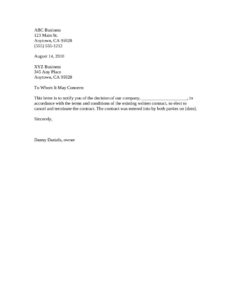
Election To Cancel Contract
Download a free Election To Cancel Contract letter template in PDF and DOCX to formally notify the other party you are terminating an agreement. Free download.
DOCX
1 downloads
0
likes
Download Files
- DOCX
An Election To Cancel Contract is a formal written letter one party sends to another to give notice that it is exercising its right to cancel and terminate an existing agreement. People most often use it to create a clear paper trail when ending a business contract under the terms already agreed to by both sides. You can download this template free in PDF and DOCX with no signup required.
What Is an Election To Cancel Contract?
An Election To Cancel Contract is a notice letter that documents a company’s or individual’s decision to end a written contract before, at, or after a date specified in that contract. It is typically issued by the party choosing to terminate and addressed to the counterparty. The letter references the original contract, identifies the parties, states the cancellation decision plainly, and is signed by an authorized representative. Its purpose is to put the other side on formal notice, satisfy any written-notice requirement in the agreement, and protect the sender by proving when and how the termination was communicated. It is short by design — clarity and timing matter far more than length.
When Do You Need an Election To Cancel Contract?
This letter comes into play whenever a written agreement gives you the option to walk away and you want that decision on record. Common situations include:
- A supplier or vendor contract contains a termination or cancellation clause and you are choosing to exercise it.
- A service provider has not delivered as promised and your contract allows cancellation for cause or convenience.
- You are ending an ongoing arrangement (maintenance, marketing, consulting) before its scheduled renewal.
- Your business is changing direction and an existing commitment no longer fits your needs.
- You negotiated an early-termination or buyout option and want to invoke it in writing.
- A contract requires written notice within a specific window, and you need a dated document to prove compliance.
In each case, the letter serves the same goal: a clean, professional, time-stamped record of your election to cancel.
What an Election To Cancel Contract Should Have
A complete cancellation notice leaves no doubt about who is ending what, and when. The key elements are the sender’s full business name and address, the date the letter is written, the recipient’s name and address, and a clear opening salutation. The body should name the company making the election, state explicitly that it is choosing to cancel and terminate the contract, reference the original contract and the date both parties entered into it, and confirm that the cancellation is made in accordance with the agreement’s terms. Finally, it needs a signature block with the name and title of the person authorized to sign on the company’s behalf. Keeping these elements present and accurate is what makes the notice effective.
How to Fill Out an Election To Cancel Contract
- Enter your business header. Replace the sample “ABC Business, 123 Main St., Anytown, CA 95928, (555) 555-1212” with your own company name, address, and phone number.
- Add the date. Update the date line (shown as “August 14, 2010”) to the actual day you are sending the letter, since timing can affect notice deadlines.
- List the recipient. Replace “XYZ Business, 345 Any Place, Anytown, CA 95928” with the counterparty’s name and full mailing address.
- Set the salutation. Keep “To Whom It May Concern:” or substitute a specific contact name if you have one.
- Name the canceling party. Fill in the blank “the decision of our company, ____________________” with your exact legal business name.
- Reference the contract date. Replace “[date]” with the date both parties originally entered into the contract.
- Sign and identify yourself. Replace “Danny Daniels, owner” with the name and title of the authorized signer, then sign above the printed name.
How to Deliver the Notice So It Counts
Many contracts specify exactly how notice must be delivered — by certified mail, by email to a designated address, or to a particular person. Before sending, re-read the notice clause of your agreement and follow it precisely. When possible, send the letter in a way that gives you proof of delivery, such as certified mail with a return receipt or an email with a read confirmation. Keep a copy of the signed letter and the delivery record together in your files. If the contract requires a specific number of days of advance notice, count the days carefully and send early enough to meet the deadline.
Election To Cancel vs. a Breach Notice
An Election To Cancel Contract is generally used when you have a contractual right to terminate — you are choosing to exercise an option already written into the deal. That is different from a notice of breach or default, which typically alleges the other side failed to perform and may demand they fix the problem first. The template here is written as a straightforward election, not an accusation. If your situation involves the other party’s failure to perform, you may need additional language or a different document. Always match the letter to the right that your contract actually gives you.
Common Mistakes to Avoid
- Leaving the company-name blank or the contract-date placeholder unfilled, which makes the notice ambiguous.
- Ignoring the contract’s notice clause — wrong delivery method or address can make the cancellation ineffective.
- Sending the letter too late to meet a required advance-notice period.
- Failing to keep a dated copy and proof of delivery for your records.
- Having someone without authority sign on behalf of the company.
- Adding emotional or accusatory language that could complicate matters; keep the tone factual and professional.
Frequently Asked Questions
What is an Election To Cancel Contract? It is a formal letter notifying the other party that you are exercising your right to cancel and terminate an existing written contract. It identifies the parties, references the original agreement, states the decision to cancel, and is signed by an authorized representative.
How do I fill out the Election To Cancel Contract template? Replace the sample header with your business details, update the date and recipient information, insert your company name in the blank, fill in the date the contract was entered into, and sign with the proper name and title. Then deliver it according to your contract’s notice requirements.
Is this cancellation letter legally binding? A notice itself does not create new obligations; its effect depends on the rights granted in your underlying contract. If your agreement allows cancellation and you follow its notice procedures, the letter can be an effective exercise of that right. Review your contract closely to confirm.
Does an Election To Cancel Contract need to be notarized or witnessed? Most cancellation letters do not require notarization or witnesses. However, some contracts specify formalities for notices, so check your agreement and follow any stated requirements.
How should I send the cancellation letter? Send it using the method your contract requires, and choose a method that provides proof of delivery, such as certified mail with a return receipt. Keep a signed copy and the delivery confirmation in your records.
How much does this template cost? Nothing — you can download the Election To Cancel Contract template free in PDF and DOCX from Business Forms Pro, with no signup required. You can edit and reuse it for different agreements as needed.
This Election To Cancel Contract template is provided as a general example for informational purposes only and is not legal advice. Contract and notice requirements vary by jurisdiction and by the terms of your specific agreement. Consult a qualified attorney before relying on this document for an important matter.
Need to work out sales tax? Use our free Sales Tax Calculator to add or remove sales tax from any amount in seconds.
Official resource: for the rules that apply to your situation, see the U.S. Small Business Administration.
Related Forms
- Credit Application
- Customer Referral Form
- New Customer Form
- Sales Phone Log
- Rejected Goods Notification
- Request To Return Merchandise
Browse more in Sales.