
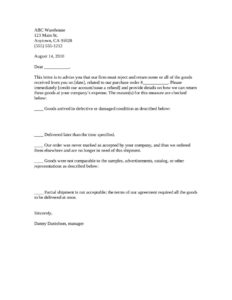
Rejected Goods Notification
Download a free Rejected Goods Notification template to formally reject defective, late, or non-conforming deliveries and request a refund or credit.
DOCX
1 downloads
0
likes
Download Files
- DOCX
A Rejected Goods Notification is a formal letter a buyer sends to a supplier to reject and return some or all of a delivered shipment, most often because the goods arrived defective, late, or did not match what was ordered. It documents the reason for rejection and requests a refund or account credit. You can download this template free in PDF and DOCX formats with no signup required.
What Is a Rejected Goods Notification?
A Rejected Goods Notification is a written notice from a purchaser to a seller stating that goods received under a specific purchase order are unacceptable and will be returned. It is typically issued by a purchasing manager, warehouse supervisor, or accounts payable department once a delivery has been inspected. The letter records what was wrong with the shipment, references the original purchase order, and instructs the supplier to issue a credit or refund and cover the cost of return shipping. Because it is dated and tied to a specific order, it serves as evidence that the buyer rejected the goods promptly and on legitimate grounds, which can be important if a dispute arises later.
When Do You Need a Rejected Goods Notification?
This letter is useful any time a delivery falls short of the terms you agreed to. Common situations include:
- Damaged or defective goods — items arrive broken, malfunctioning, spoiled, or otherwise unfit for use.
- Late delivery — the shipment arrives after the deadline specified in your order, and timing was material to the purchase.
- Unconfirmed orders — your purchase order was never formally accepted, you sourced the goods elsewhere, and you no longer need the shipment.
- Goods that don’t match representations — the items differ from the samples, catalog photos, advertisements, or specifications you relied on when ordering.
- Unacceptable partial shipments — your agreement required everything to be delivered together, but only part of the order arrived.
- Wrong items or quantities — you received products you never ordered or counts that don’t match your purchase order.
What a Rejected Goods Notification Should Have
To be clear and enforceable, the notice should identify all the parties and the transaction precisely. Include your company name and address, the supplier’s name, and the date of the letter. Reference the delivery date and the original purchase order number so there is no ambiguity about which shipment is being rejected. State plainly that you are rejecting some or all of the goods, give the specific reason, and describe the defect or discrepancy in enough detail to support your claim. Finally, state what you want the supplier to do — issue a refund or credit your account — and request instructions for returning the goods at the seller’s expense. A signature from an authorized manager lends the document weight.
How to Fill Out a Rejected Goods Notification
- Enter your company’s name, full address, and phone number at the top so the supplier knows who is rejecting the goods (the template shows “ABC Warehouse, 123 Main St., Anytown, CA” as a placeholder).
- Add the date you are sending the letter.
- Address the letter to the supplier or the appropriate contact in the salutation line (“Dear ___________”).
- Fill in the delivery date the goods were received and your purchase order number in the opening paragraph.
- Choose whether you want the supplier to credit your account or issue a refund by selecting the bracketed option that applies.
- Check the box for each reason that applies: defective or damaged goods, late delivery, an order never marked accepted, goods not comparable to samples or representations, or an unacceptable partial shipment.
- Where the form invites a description, write specific details — what was damaged, how the items differ from the samples, or how the delivery missed the deadline.
- Sign and print the name and title of the authorized person (e.g., Danny Danielson, manager).
Tips for Sending and Following Up
Send the notification as soon as possible after inspecting the shipment. Most commercial agreements expect buyers to reject non-conforming goods within a reasonable time, and prompt notice strengthens your position. Keep a dated copy of the letter and any supporting evidence, such as photographs of damaged items, the packing slip, and your original purchase order. If you ship the goods back, hold onto the return tracking and any correspondence confirming the supplier agreed to cover the cost. Where a contract value is significant, sending the letter by a trackable method — certified mail or email with a read receipt — creates a clear record of when the supplier was notified.
How It Differs From a Complaint or Return Request
A general complaint letter expresses dissatisfaction, while a return authorization request asks permission to send something back. A Rejected Goods Notification is more decisive: it formally exercises a buyer’s right to refuse goods that do not conform to the order and demands financial remedy. It pairs naturally with your purchase order and any inspection report, and it should reflect the remedies allowed under your purchase terms.
Common Mistakes to Avoid
- Leaving out the purchase order number or delivery date — without these, the supplier cannot match the rejection to the correct shipment.
- Being vague about the defect — “the goods are bad” is weak; describe exactly what is wrong.
- Waiting too long — delayed rejection can be read as acceptance and weaken your claim.
- Failing to specify the remedy — clearly state whether you want a refund or a credit.
- Not requesting return instructions at the seller’s expense — otherwise you may absorb shipping costs.
- Forgetting to keep a copy — you need a record of what you sent and when.
Frequently Asked Questions
What is a Rejected Goods Notification used for? It is a formal letter that tells a supplier you are refusing some or all of a delivered shipment and explains why. It documents the reason — such as damage, lateness, or non-conformity — and requests a refund or account credit. It also asks the seller to arrange and pay for the return of the goods.
How do I fill out the form? Enter your company details, the date, the supplier’s name, the delivery date, and the purchase order number. Then check the reason or reasons for rejection, describe the problem where prompted, choose refund or credit, and have an authorized person sign. The whole letter takes only a few minutes to complete.
Is a Rejected Goods Notification legally binding? The letter itself is a notice, not a contract, but it can carry legal weight as evidence that you rejected non-conforming goods within a reasonable time. Your rights to reject and seek a remedy generally depend on your purchase agreement and applicable commercial law, which varies by jurisdiction.
Does it need to be notarized or witnessed? No. A Rejected Goods Notification does not require notarization or witnesses. A signature from an authorized representative of your company is normally sufficient.
When should I send the notification? Send it as soon as you have inspected the goods and confirmed the problem. Prompt notice helps preserve your right to reject and demonstrates that you did not accept the goods by keeping them too long.
How much does this template cost? Nothing. You can download the Rejected Goods Notification template free in PDF and DOCX formats, with no signup or payment required, and edit it to fit your situation.
This template is provided as a general example for informational purposes only and does not constitute legal, financial, or business advice. Rights and obligations relating to rejecting goods vary by jurisdiction and by the terms of your contract. Consult a qualified attorney or professional for guidance on your specific situation.
Need to work out sales tax? Use our free Sales Tax Calculator to add or remove sales tax from any amount in seconds.
Official resource: for the rules that apply to your situation, see the U.S. Small Business Administration.
Related Forms
- Transmittal Letter
- Price Quotes List
- Amortization Schedule
- Announcing Sales Campaign
- Daily Sales Log
- Price Quote Request Form
Browse more in Sales.