
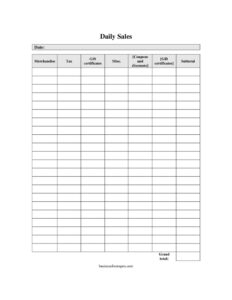
Daily Sales Log
Track daily revenue, tax, and discounts with this free Daily Sales Log template. Organize merchandise sales and totals with a free PDF or DOCX download.
PDF
DOCX
9 downloads
1
likes
Download Files
- DOCX
A Daily Sales Log is a simple worksheet that records every category of revenue your business takes in during a single day, from merchandise sales to tax collected and discounts applied. Retailers, cafés, and small shops use it most often to reconcile the register at closing time and keep an accurate running picture of daily performance. You can download this Daily Sales Log free as a PDF or editable DOCX, with no signup required.
What Is a Daily Sales Log?
A Daily Sales Log is a structured record that breaks down a single business day’s transactions into clear categories such as merchandise, tax, gift certificates, coupons, and miscellaneous income. It is typically completed by a shift manager, cashier, or owner at the end of the day, using register tapes, point-of-sale reports, and receipts as source data. The log documents not only how much money came in, but where it came from and what was subtracted through promotions. Kept consistently, these daily sheets become the building blocks for weekly summaries, sales tax filings, and year-end accounting, giving you an audit-friendly paper trail for every operating day.
When Do You Need a Daily Sales Log?
This form earns its keep any time you need a clean, repeatable way to capture the day’s numbers. Common situations include:
- Closing out the register at the end of a retail shift and reconciling cash against recorded sales.
- Tracking taxable merchandise separately so you can file sales tax accurately each period.
- Recording gift certificate sales and redemptions that affect your liability rather than immediate revenue.
- Logging coupons, markdowns, and promotional discounts to measure how campaigns affect daily totals.
- Capturing miscellaneous income—such as shipping fees, deposits, or service charges—that doesn’t fit a standard product category.
- Building a consistent daily history that you can roll up into weekly, monthly, and annual sales reports.
What a Daily Sales Log Should Have
A useful Daily Sales Log keeps every entry traceable and totals easy to verify. At minimum it should include the date for the record, a line for gross merchandise sales, a separate line for sales tax collected, entries for gift certificates and miscellaneous income, a deduction line for coupons and discounts, and a subtotal that ties the figures together. Each category should be its own field so nothing is buried inside a single lump sum. Clear labels matter, because the person filling it out at closing may not be the person who reviews it later. A consistent layout across every day also makes month-end reconciliation far quicker.
How to Fill Out a Daily Sales Log
- Date: Enter the calendar day these figures cover. Use one log per business day so records never overlap.
- Merchandise: Record total product sales before tax. Pull this from your point-of-sale report or register tape.
- Tax: Enter the sales tax collected on taxable items. Keeping it separate makes filing your tax return straightforward.
- Gift certificates: Note gift certificates sold or redeemed during the day. Track sales and redemptions clearly, since they affect revenue timing differently.
- Misc.: Add any income that doesn’t fit a standard category—shipping charges, deposits, or small service fees.
- Coupons and discounts: Enter the total value of promotions, markdowns, and coupon redemptions applied that day, recorded as a deduction.
- Subtotal: Total the revenue lines, subtract the discounts, and confirm the figure matches your register count. Initial or sign the sheet to mark it complete.
Tips for Accurate Daily Sales Tracking
Consistency turns a stack of daily logs into reliable business data. Complete the log at the same time each day—ideally right at close while details are fresh—and always reconcile the subtotal against the cash and card totals in your drawer or POS system before locking up. If you spot a discrepancy, note it on the sheet rather than forcing the numbers to match, so you can investigate later. Store completed logs in date order, whether in a binder or a digital folder, and consider scanning paper copies as a backup. Over time, comparing logs day to day reveals patterns: your busiest weekdays, the real impact of a coupon promotion, and seasonal swings you might otherwise miss.
Daily Sales Log vs. Other Sales Records
A Daily Sales Log differs from a weekly or monthly summary in scope: it captures a single day in granular detail, while summaries aggregate many days into trend reports. It also differs from an invoice or receipt, which documents one transaction with a specific customer. Think of the daily log as the bridge between individual transactions and your broader bookkeeping. It is not a substitute for formal accounting software, but it feeds that system with clean, categorized numbers and provides a quick manual cross-check whenever your software totals look off.
Common Mistakes to Avoid
- Lumping tax into merchandise totals, which makes sales tax filing error-prone and inflates your apparent revenue.
- Forgetting to log gift certificate redemptions, leading to double-counted or missing revenue.
- Skipping days during slow periods, which breaks the continuity you need for accurate trend analysis.
- Recording discounts as positive numbers instead of deductions, throwing off the subtotal.
- Failing to reconcile the subtotal against the actual cash and card count before closing.
- Storing logs loosely so pages get lost, dated incorrectly, or filed out of order.
Frequently Asked Questions
What is a Daily Sales Log used for? It is used to record and categorize all the revenue a business takes in during one day, including merchandise, tax, gift certificates, and miscellaneous income, minus coupons and discounts. The log helps you reconcile the register, track performance, and prepare accurate tax and accounting records.
How do I fill out the subtotal correctly? Add your revenue lines—merchandise, tax, gift certificates, and miscellaneous—then subtract the coupons and discounts. Compare the resulting subtotal to the cash and card totals counted in your register to confirm everything matches before you close out.
Should tax be recorded separately from merchandise? Yes. Keeping sales tax on its own line is strongly recommended because it is money you collect on behalf of a tax authority, not earned revenue. Separating it makes filing your periodic sales tax return far simpler and reduces errors.
Is a Daily Sales Log legally required? A specific log format is usually not required by law, but most jurisdictions require businesses to keep accurate records of sales and tax collected. A consistent daily log is one practical way to meet those recordkeeping expectations—check your local rules for retention periods.
How long should I keep completed sales logs? Retention requirements vary by location and tax authority, but many businesses keep sales and tax records for several years to support filings and potential audits. Confirm the exact timeframe that applies to you and store the logs in date order for easy retrieval.
Is this Daily Sales Log template free to download? Yes. You can download this Daily Sales Log free in both PDF and editable DOCX formats with no signup required. Use the PDF for quick printing or the DOCX if you want to customize the categories to fit your business.
This Daily Sales Log template is a general example provided for informational purposes only and is not legal, financial, or tax advice. Recordkeeping and tax requirements vary by jurisdiction—consult a qualified accountant or tax professional to ensure your practices meet applicable rules.
Need to work out sales tax? Use our free Sales Tax Calculator to add or remove sales tax from any amount in seconds.
Official resource: for the rules that apply to your situation, see the U.S. Small Business Administration.
Related Forms
- Gift Certificate Log
- Customer Referral Form
- Commission Summary
- Cancel Stop Payment And Honor Check
- Small Parts Choking Hazard Warning Tag
- Price Quotes List
Browse more in Sales.