
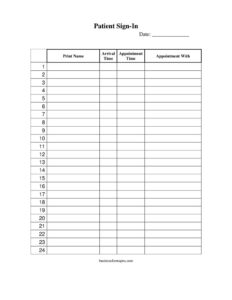
Patient Sign In Sheet
Use this free patient sign in sheet template to track arrivals, appointment times, and providers at your front desk — free PDF and DOCX download.
PDF
DOCX
1 downloads
0
likes
Download Files
- DOCX
A patient sign in sheet is a simple front-desk form that patients complete on arrival to record their name, the time they checked in, and who they are scheduled to see. It is the most common way medical, dental, and therapy offices confirm attendance and manage the order of care. You can download it free in PDF and DOCX with no signup required.
What Is a Patient Sign In Sheet?
A patient sign in sheet is a single-page log kept at a clinic, hospital, or private practice reception desk. As each patient walks in, they print their name and note when they arrived alongside their scheduled appointment time and the provider they are seeing. The form is typically managed by front-desk or intake staff, who use it to track who has checked in, gauge wait times, and call patients in the correct order. It creates a quick, chronological record of the day’s visits that supports scheduling, billing follow-up, and basic accountability — without requiring complex software or login credentials.
When Do You Need a Patient Sign In Sheet?
This form earns its place at almost any care setting where patients arrive in person. Common situations include:
- A family medicine or pediatric clinic managing a steady flow of morning and afternoon appointments.
- A dental office that needs to know which hygienist or dentist each arriving patient is scheduled with.
- A physical therapy or chiropractic practice running back-to-back sessions across multiple providers.
- An urgent care or walk-in clinic that calls patients in by arrival order rather than appointment slot.
- A specialist office (dermatology, optometry, cardiology) tracking on-time versus late arrivals.
- A vaccination drive, health screening, or community clinic that needs a lightweight attendance log.
What a Patient Sign In Sheet Should Have
A useful patient sign in sheet stays clean and quick to complete while capturing everything the front desk needs. The essentials are a clear date for the day’s log, a line for each patient to print their name legibly, an arrival time column so staff can see check-in order, an appointment time column for comparison, and an “appointment with” column to identify the assigned provider. Numbered rows help staff reference patients quickly, and adequate spacing keeps handwriting readable. Because these sheets can expose patient names to others, many offices use a privacy-conscious layout or a cover strip — but the core fields remain the same simple, repeatable set.
How to Fill Out a Patient Sign In Sheet
Patients complete the form themselves at the front desk, usually in just a few seconds. Walk through each field in order:
- Date: Confirm the date at the top of the sheet reflects the current day. Staff typically write or stamp this once each morning so every row shares the same date.
- Print name: Have the patient print their full name clearly on the next open line. Printing rather than signing keeps the list legible for staff calling patients back.
- Arrival time: The patient (or front-desk staff) records the actual time of check-in, such as 9:42 AM. This shows the true order in which people arrived.
- Appointment time: Enter the time the visit was scheduled for. Comparing this with arrival time instantly flags early, on-time, or late patients.
- Appointment with: Note the provider’s name or initials — for example, Dr. Lee or hygienist J.M. — so staff route each patient to the correct room or team.
Once the row is complete, the patient takes a seat and waits to be called.
Privacy and Patient Confidentiality
Because a patient sign in sheet lists names in plain view, privacy is a real consideration. In many regions, healthcare providers are expected to limit the personal information that other patients can see. A best practice is to keep the form to the minimum needed — name, times, and provider — and avoid columns for reason of visit, date of birth, or insurance details. Some offices use peel-off label strips so each name is removed after check-in, or a clipboard angled away from the waiting room. Completed sheets should be stored securely and disposed of according to your office’s records policy. Confidentiality rules vary by jurisdiction, so confirm what applies to your practice.
Tips for a Smoother Front Desk
A few habits make the sign in sheet far more useful. Start a fresh sheet each day and write the date once so rows stay consistent. Keep a working pen tethered to the clipboard to avoid bottlenecks. Train staff to glance at the “appointment with” column when calling patients so the right provider’s queue moves smoothly. Use the gap between arrival time and appointment time to spot patterns — if patients regularly arrive long before their slot, your scheduling may need adjusting; if many arrive late, a reminder system may help. At day’s end, reconcile the sheet against your schedule to catch no-shows for follow-up.
Common Mistakes to Avoid
- Skipping the date: An undated sheet is hard to file or reference later, especially when reconciling no-shows or billing.
- Illegible names: Encourage printing, not cursive signatures, so staff can read and call patients correctly.
- Leaving arrival time blank: Without it, you lose the ability to manage walk-in order and measure wait times.
- Confusing arrival and appointment time: Keep the columns clearly labeled so patients fill in the right one.
- Collecting too much personal data: Adding sensitive fields like diagnosis or insurance numbers creates needless privacy risk in a public-facing log.
- Leaving completed sheets exposed: Don’t let a full clipboard sit where every patient can read prior names — secure or remove it.
Frequently Asked Questions
What is a patient sign in sheet used for? It is used at a clinic or office front desk to record that a patient has arrived, capture their check-in and appointment times, and note which provider they are seeing. Staff rely on it to manage the order of care, track wait times, and follow up on no-shows.
How do I fill out a patient sign in sheet? Find the next open row, print your full name, write the time you arrived, add your scheduled appointment time, and note the provider you are seeing. The whole process takes only a few seconds, and front-desk staff can help if any column is unclear.
Does a patient sign in sheet need to be signed or notarized? No. It is an informal arrival log, not a legal or consent document, so it requires no notarization or witness. Patients simply print their name rather than providing a formal signature.
Is a patient sign in sheet a privacy concern? It can be, because names are visible to others in the waiting area. Keep the form limited to basic check-in fields, consider peel-off label strips or a shielded clipboard, and store completed sheets securely in line with your local privacy rules.
How much does this patient sign in sheet template cost? Nothing — it is completely free to download from Business Forms Pro in both PDF and DOCX formats with no signup required. You can print it as-is or edit the DOCX version to add your practice name or logo.
Can I customize the sign in sheet for my practice? Yes. The DOCX version lets you adjust column widths, add a header with your clinic’s name, or tailor the “appointment with” labels to match your providers. Keep edits minimal to protect patient privacy and keep the form fast to complete.
This template is a general example provided for informational purposes only and is not legal, medical, or compliance advice. Privacy and records requirements vary by jurisdiction and by the type of practice. Consult a qualified professional to ensure your patient intake and recordkeeping practices meet the rules that apply to you.
Related Forms
- Childcare Check-In Sheet
- Vendor Registration Form
- Bowling Sponsorship Form
- Mailing List Sign Up Sheet
- Restaurant Reservation List
- Petition Form
Browse more in Sign In / Sign Up Sheets.