
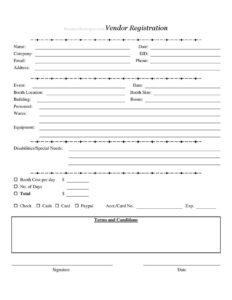
Vendor Registration Form
Use this free Vendor Registration Form template to sign up vendors for events, assign booths, and collect payment details — free download in PDF and DOCX.
PDF
DOCX
4 downloads
0
likes
Download Files
- DOCX
A Vendor Registration Form is the document event organizers use to enroll sellers, exhibitors, and food or craft vendors for a market, fair, expo, or trade show. The most common reason people use one is to capture each vendor’s contact details, assign a booth, and record how much is owed and how it will be paid — all on a single sheet. You can download this template free in both PDF and DOCX with no signup required.
What Is a Vendor Registration Form?
A Vendor Registration Form is a sign-up document issued by an event organizer, market manager, or venue coordinator and completed by a participating vendor. It records who the vendor is, the company they represent, what they plan to sell, the equipment they’ll bring, and the booth they’re being assigned. It also functions as a payment record, capturing the booth cost, number of days, total due, and payment method. Because it usually includes terms and conditions plus a signature, it doubles as a lightweight agreement between the vendor and the event. The form keeps registrations organized, prevents double-booked booths, and gives staff a quick reference during setup and on event day.
When Do You Need a Vendor Registration Form?
Any event that hosts paying sellers benefits from a structured intake sheet. Common situations include:
- Craft fairs and artisan markets where dozens of makers need booths assigned by location and size.
- Farmers markets and weekend pop-ups that recur and need to track vendors over multiple days.
- Trade shows and business expos where exhibitors require specific building and room placements.
- Food festivals where vendors bring cooking equipment and have special power or space needs.
- Community events, school fundraisers, and church bazaars that collect a per-day booth fee.
- Conventions and seasonal markets where organizers need a paper trail of payment and signed terms.
What a Vendor Registration Form Should Have
A complete form ties identity, logistics, and money together. It should clearly identify the vendor and their company, the event and dates they’re registering for, and the exact booth being assigned. It needs a description of the wares being sold and the equipment being brought so staff can plan power, space, and safety. A field for disabilities or special needs ensures accessibility is handled in advance. Finally, the payment section — booth cost, number of days, total, payment method, and account details — turns the form into a billing record, while the terms and conditions and signature lines make the registration binding.
How to Fill Out a Vendor Registration Form
- Enter the vendor’s Name and the Date of registration at the top.
- Add the Company name and the EID (employer or exhibitor ID) if applicable.
- Provide contact details: Email, Phone, and mailing Address.
- Name the Event and its Date so the registration is tied to the right occasion.
- Record the assigned Booth Location, Booth Size, Building, and Room.
- List Personnel staffing the booth, the Wares being sold, and any Equipment being brought.
- Note any Disabilities/Special Needs so accommodations can be arranged.
- Fill in the Booth Cost per day $ and the No. of Days, then calculate the Total $.
- Mark the payment method — Check, Cash, Card, or Paypal — and enter the Acct./Card No. and Exp. date if paying electronically.
- Review the Terms and Conditions, then add the vendor Signature and Date.
Assigning Booths and Planning Logistics
The booth fields are where this form earns its keep. By recording Booth Location, Booth Size, Building, and Room for every vendor, organizers build a master layout that prevents two sellers from claiming the same spot. The Equipment field flags whether a vendor needs electrical access, water, or extra clearance — important for food vendors with grills or fryers. The Personnel field tells security and registration staff how many wristbands or badges to prepare. Capturing Wares helps avoid placing direct competitors side by side and keeps prohibited items off the floor. Filling these in accurately during registration means setup day runs smoothly with far fewer last-minute reshuffles.
Handling Payment and Terms
The payment section converts a sign-up sheet into a billing record. Always confirm the Booth Cost per day times the No. of Days equals the Total before accepting payment, and reconcile each entry against your deposit log. For Card or PayPal payments, store the Acct./Card No. securely and shred or redact paper copies after processing to protect sensitive data. The Terms and Conditions block should spell out cancellation and refund policies, setup and teardown times, liability, and conduct expectations. Because the vendor signs and dates the form, it creates a clear record that they agreed to those terms — useful if a dispute arises later.
Common Mistakes to Avoid
- Leaving booth fields blank — an unassigned location causes confusion and conflicts on event day.
- Not verifying the total — double-check that cost per day multiplied by the number of days matches the Total.
- Skipping the Wares or Equipment fields, which leaves staff unprepared for power, space, or safety needs.
- Forgetting the signature and date, which leaves the terms unenforceable.
- Storing full card numbers insecurely — protect or destroy sensitive payment data after processing.
- Ignoring the Disabilities/Special Needs field, missing a chance to arrange accommodations early.
Frequently Asked Questions
What is a Vendor Registration Form used for? It is used by event organizers to enroll vendors, collect their contact and company details, assign a booth, and record payment. It also serves as a signed acknowledgment of the event’s terms and conditions, keeping every vendor’s information in one organized place.
How do I fill out a Vendor Registration Form? Start with the vendor’s name, company, and contact details, then enter the event, dates, and assigned booth information. Describe the wares and equipment, note any special needs, calculate the total fee, choose a payment method, and finish with a signature and date.
Does a Vendor Registration Form need to be notarized? No, notarization is not typically required for vendor registration. A vendor’s signature and date are usually enough to confirm they accept the event’s terms, though specific requirements can vary by organizer and venue.
Is a signed Vendor Registration Form legally binding? When it includes terms and conditions and the vendor signs and dates it, the form can function as a binding agreement between the vendor and the event. The exact enforceability depends on the terms you include and applicable local laws, so review your wording carefully.
How much does this Vendor Registration Form cost? The template is completely free to download from Business Forms Pro in both PDF and DOCX formats, with no signup required. You only set the booth fees your event charges, which are entered in the cost-per-day and total fields.
Can I customize the form for my event? Yes. The DOCX version is fully editable, so you can add your logo, adjust the terms and conditions, change booth size options, or remove payment methods you do not accept to match your event’s needs.
This Vendor Registration Form template is a general example provided for informational purposes only and is not legal, financial, or tax advice. Event, payment, and contract requirements vary by jurisdiction and venue — consult a qualified professional before relying on this document.
Related Forms
- Daycare Sheet Individual
- Patient Sign In Sheet
- Daily Conference Room Reservation
- Class Registration Form
- Bowling Sponsorship Form
- Tournament Signup Sheet
Browse more in Sign In / Sign Up Sheets.