
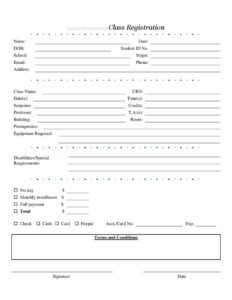
Class Registration Form
Download a free Class Registration Form template to enroll students, capture class details, and record payment — free PDF and DOCX download.
PDF
DOCX
1 downloads
0
likes
Download Files
- DOCX
A Class Registration Form is a single-page document that captures a student’s personal details, the specific class they are enrolling in, and how they intend to pay for it. The most common reason people use one is to formalize enrollment for a course, workshop, or semester offering in one organized place. You can download it free in both PDF and DOCX formats — no signup required.
What Is a Class Registration Form?
A Class Registration Form is a structured enrollment document used by schools, colleges, training centers, studios, and continuing-education programs to record who is signing up and for what. It is typically issued by the institution and completed by the student (or a parent/guardian for minors). The form documents the student’s identity, the course identifiers, scheduling details, prerequisites, any special accommodations, and the payment arrangement. Once signed, it serves as a record that the student requested a seat in a particular class and agreed to the program’s terms. Because it consolidates registration and payment information on one page, it reduces back-and-forth and gives administrators everything they need to confirm a place.
When Do You Need a Class Registration Form?
- A college or university needs to enroll students in a specific course by CRN for an upcoming semester.
- A community education program signs people up for evening or weekend workshops with set dates and times.
- A dance, art, music, or fitness studio registers students for a recurring class and collects fees on a per-day or monthly basis.
- A vocational or certification provider needs to confirm that registrants meet prerequisites before granting a seat.
- A summer program or camp gathers minors’ details, emergency contacts, and accommodation needs in one place.
- A tutoring center or test-prep service needs a signed agreement to the terms and conditions before instruction begins.
What a Class Registration Form Should Have
A complete Class Registration Form pairs accurate student identification with full course information and a clear payment record. The student section should establish identity and contact details. The class section should pin down exactly which offering is being joined, when it meets, and who teaches it. A payment section should state the amount and method, and a signature block should bind the student to the program’s terms. Including a field for prerequisites, required equipment, and disability or special-requirement notes ensures the institution can prepare appropriately and confirm eligibility before the first session.
How to Fill Out a Class Registration Form
- Enter the student’s Name, the current Date, and DOB, then add the Student ID No. if one has been assigned.
- Record the School and intended Major so the registration is filed under the correct program.
- Provide reliable contact details: Email, Phone, and mailing Address.
- Identify the course by Class Name and CRN (course reference number), then list the Date(s), Time(s), Semester, and number of Credits.
- Name the Professor and any T.A.(s), and note the Building and Room where the class meets.
- Confirm any Prerequisites, Equipment Required, and Disabilities/Special Requirements so the institution can verify eligibility and arrange support.
- Choose a payment structure — Per day $, Monthly installment $, or Full payment $ — and enter the Total $.
- Select a payment method (Check, Cash, Card, or PayPal) and supply the Acct./Card No. and Exp. date when paying electronically.
- Review the Terms and Conditions, then add the Signature and final Date.
Types of Class Registration
Not every program registers students the same way, and this form flexes to fit several models. Semester-based academic registration relies heavily on the CRN, credits, and professor fields, since students are joining a credit-bearing course within a defined term. Recurring class registration — common at studios and fitness centers — leans on the per-day and monthly installment fields because attendance is ongoing rather than tied to a single term. Short workshop registration uses specific date and time fields with a one-time full payment. By including all of these payment options on a single template, the form works for institutions that bill upfront, those that invoice monthly, and those that charge by session, without forcing you to redesign the document.
Handling Payments and Accommodations
The payment block is one of the most sensitive parts of this form, so treat it carefully. When card or PayPal details are collected, store completed forms securely and limit who can access them, since the Acct./Card No. and Exp. fields contain financial data. Double-check that the chosen payment structure matches the Total $ figure — a monthly installment amount and a full-payment amount should never both be filled in unless the form explains how they relate. The Disabilities/Special Requirements field deserves equal attention: prompt registrants to describe any accommodation needs early so accessible seating, materials, or interpreters can be arranged before the first class meeting.
Common Mistakes to Avoid
- Leaving the CRN blank or guessing it — registering in the wrong section is a frequent and avoidable error.
- Skipping the Prerequisites check, which can lead to a student being dropped after the term begins.
- Entering an out-of-date Email or Phone, so the student misses confirmation and schedule notices.
- Filling in more than one payment amount without clarifying the plan, creating billing confusion.
- Forgetting to read and accept the Terms and Conditions before signing.
- Leaving the Signature or final Date empty, which can make the registration incomplete.
Frequently Asked Questions
What is a Class Registration Form used for? It is used to enroll a student in a specific class while capturing their identity, the course details, and their payment arrangement on one page. Schools, studios, and training providers use it to confirm a seat and keep an organized record of who registered for what.
How do I fill out a Class Registration Form? Start with the student’s personal and contact information, then enter the class details such as the name, CRN, schedule, and instructor. Finish by selecting a payment method, entering the total, reviewing the terms, and signing and dating the form.
What is the CRN field? CRN stands for course reference number, a unique identifier that institutions assign to a specific section of a class. Entering the correct CRN ensures the student is registered for the exact section meeting at the time, room, and with the professor they intend.
Does a Class Registration Form need to be notarized? No, a class registration form generally does not require notarization. A student’s signature and date are usually sufficient to confirm the request and agreement to the terms, though individual institutions may have their own verification steps.
Is the payment information on this form secure? The form itself simply provides fields for payment details; security depends on how you handle the completed document. Keep forms containing card, account, or PayPal information in a protected location and limit access to authorized staff only.
How much does this Class Registration Form template cost? The template is completely free to download here in both PDF and DOCX formats, with no signup required. You can edit it to match your school or program’s branding, fee structure, and policies before distributing it to students.
This Class Registration Form template is a general example provided for informational purposes only and is not legal, financial, or tax advice. Enrollment policies, payment processing rules, and accessibility requirements vary by institution and jurisdiction — consult a qualified professional or your institution’s administration to confirm your specific requirements.
Related Forms
- Mailing List Sign Up Sheet
- Child Care Sign In Sheet
- Restaurant Reservation Request
- Potluck Sign Up Sheet
- Elevator Maintenance
- Group Meeting Attendance Log
Browse more in Sign In / Sign Up Sheets.