
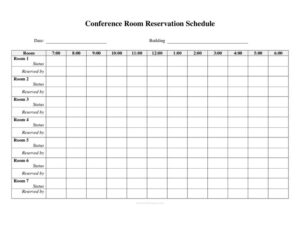
Daily Conference Room Reservation
Organize meeting space with a Daily Conference Room Reservation template that tracks hourly bookings by room — free download in PDF and DOCX.
PDF
DOC
3 downloads
0
likes
Download Files
- DOC
A Daily Conference Room Reservation sheet is a single-page schedule that tracks which meeting rooms are booked, by whom, and during which hours on a given day. Offices use it most often to prevent double-bookings and to give everyone a clear, at-a-glance view of room availability from morning to evening. You can download this template free in PDF and DOCX, with no signup required.
What Is a Daily Conference Room Reservation?
A Daily Conference Room Reservation is a posted or shared schedule that maps your meeting spaces against a list of hourly time slots for one calendar day. It is typically maintained by an office manager, receptionist, or administrative coordinator and posted near the rooms, at the front desk, or shared on an internal drive. The form documents the date, building, and room layout, then logs each reservation by time block, the room’s status, and who reserved it. Its purpose is simple but valuable: it turns informal, easy-to-forget verbal requests into a written record everyone can check before walking into a room or scheduling a client call.
When Do You Need a Daily Conference Room Reservation?
This form earns its keep anywhere multiple teams compete for limited meeting space. Common situations include:
- Busy office days when several departments need rooms for stand-ups, interviews, and client meetings within the same hours.
- Multi-room facilities where a single building has up to eight conference rooms that must be coordinated without confusion.
- Multi-building campuses where staff need to confirm both the building and the specific room before heading over.
- Recurring weekly meetings that need a protected time slot so other teams know the space is taken.
- Visitor and client appointments where you want a guaranteed, professional space reserved in advance.
- Shared coworking or nonprofit spaces where many groups draw from the same handful of rooms throughout the day.
What a Daily Conference Room Reservation Should Have
A complete reservation sheet captures enough detail to settle any dispute about who has a room and when. The essential elements are: the date the schedule covers; the building and room identifiers so there is no ambiguity on a multi-site campus; a row of hourly time slots running from early morning through evening; a clear way to mark each room’s status (reserved, available, or held); and the name of the person or team who reserved each block. Because this template lists Rooms 1 through 8 with paired Status and Reserved by fields, it doubles as both an hour-by-hour grid and a quick room-by-room summary, making it useful for small offices and larger facilities alike.
How to Fill Out a Daily Conference Room Reservation
- Enter the date at the top so the sheet clearly applies to one specific day. Start a fresh copy each morning.
- Record the building name or code if your organization operates more than one location.
- Note the room or rooms covered by this schedule, matching your internal naming convention.
- Use the hourly columns — 7:00, 8:00, 9:00, 10:00, 11:00, 12:00, 1:00, 2:00, 3:00, 4:00, 5:00, and 6:00 — to block out the times each meeting occupies. Shade or initial each reserved hour.
- Work down the room list from Room 1 through Room 8, filling the paired fields for each.
- Set the Status for every room — for example, “Reserved,” “Available,” “Held,” or “Maintenance.”
- Complete Reserved by with the name, team, or department holding each room so anyone checking knows exactly who to contact.
- Post or share the finished sheet where staff can see it, and update it whenever a booking changes.
Tips for Managing Room Bookings Smoothly
To keep the schedule reliable, designate one owner — usually a receptionist or office coordinator — who has final say over edits. Encourage staff to request slots through that person rather than scribbling on the posted copy, which keeps the record clean. Block out standing recurring meetings first thing each week so they don’t get overwritten. If you use the DOCX version, you can color-code statuses or rename Room 1 through Room 8 to match your actual room names, such as “Boardroom” or “Huddle Room.” Print a fresh page daily and archive yesterday’s sheet for a few weeks; the history is handy if two teams later disagree about who had a room.
Paper Sheet vs. Digital Calendar
Many offices run a digital booking calendar yet still post a printed reservation sheet near the rooms. The two serve different needs. A shared calendar is searchable and accessible remotely, but a posted paper sheet gives anyone walking the hallway an instant, unambiguous answer about whether a room is free right now. This template works well as that physical companion, or as a lightweight standalone system for smaller teams that don’t want the overhead of dedicated scheduling software. Whichever you use, keep one source authoritative so a room never gets promised twice.
Common Mistakes to Avoid
- Forgetting to date the sheet, which makes it impossible to tell whether a posted copy is today’s schedule or yesterday’s.
- Leaving the Reserved by field blank, so no one knows who to ask when a room appears double-booked.
- Omitting the building on multi-site campuses, sending people to the wrong location.
- Skipping the status column, leaving readers unsure whether a room is firmly reserved or just tentatively held.
- Editing the posted copy informally instead of routing changes through one coordinator, which creates conflicting versions.
- Not blocking the full duration of a meeting across every hourly slot it occupies, leading someone to book over the tail end of a session.
Frequently Asked Questions
What is a Daily Conference Room Reservation used for? It is used to schedule and track meeting room availability for a single day, showing which rooms are booked during each hour and who reserved them. The goal is to prevent double-bookings and give everyone a clear view of open space.
How do I fill out the hourly time slots? Mark or shade each hour a meeting occupies — from 7:00 in the morning through 6:00 in the evening — for the relevant room. Be sure to block every hour the meeting runs, not just its start time, so the entire reservation is visible.
Can I use this template for more than one building? Yes. The form includes a Building field alongside the Room field, so you can specify the location on a multi-site campus. For very large facilities, print a separate sheet for each building to keep things readable.
What should I write in the Status field? Use a short, consistent label such as “Reserved,” “Available,” “Held,” or “Maintenance.” Consistent wording across all rooms makes the sheet easy to scan at a glance.
Is this Daily Conference Room Reservation template free? Yes, it is completely free to download in both PDF and DOCX formats with no signup required. You can print the PDF as-is or open the DOCX to rename rooms and adjust columns to fit your office.
How often should I create a new sheet? Start a fresh copy each day so the schedule always reflects the current date and avoids carrying over outdated bookings. Archiving past sheets for a few weeks gives you a useful record if any scheduling questions come up later.
This template is a general example provided for informational purposes only and is not legal, financial, or administrative advice. Office policies and facility requirements vary by organization — adapt the form to your own procedures and consult the appropriate person at your workplace before relying on it.
Related Forms
- Event Registration Form
- Silent Auction Bid Sheet
- Sign In Sheet
- Conference Agenda
- Sign Up to Bring Items
- Sports Signup Sheet
Browse more in Sign In / Sign Up Sheets.