
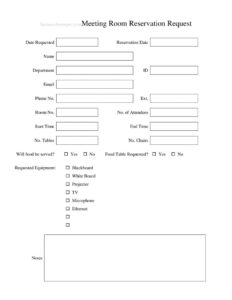
Meeting Room Reservation Request
Download a free Meeting Room Reservation Request template to book rooms, list attendees, and request equipment — free PDF and DOCX download, no signup.
PDF
DOCX
4 downloads
0
likes
Download Files
- DOCX
A Meeting Room Reservation Request is a short internal form employees use to book a shared conference or meeting space and specify exactly what they need — the date, time, number of attendees, furniture, and equipment. The most common reason people use it is to avoid double-booking a popular room while making sure the projector, microphone, and seating are ready before the meeting starts. It’s free to download here in both PDF and DOCX, with no signup required.
What Is a Meeting Room Reservation Request?
A Meeting Room Reservation Request is a standardized document that lets a staff member formally ask a facilities team, office manager, or front desk to hold a specific room for a defined block of time. It’s typically issued by the requester and approved by whoever controls the booking calendar. The form documents who is reserving, when, for how many people, and what setup and technology they require. Because it captures contact details, room number, and equipment needs in one place, it reduces back-and-forth emails and helps the support team prepare the space in advance. In organizations with several shared rooms, this form becomes the single record that keeps the calendar accurate and the rooms ready.
When Do You Need a Meeting Room Reservation Request?
This form is useful any time a shared space must be claimed and prepared ahead of an event. Common scenarios include:
- Scheduling a recurring team standup or department meeting in a fixed conference room.
- Hosting a client presentation that needs a projector, TV, or microphone configured in advance.
- Running a training session for a large group that requires extra tables and chairs.
- Booking an interview panel room with Ethernet access and a whiteboard for notes.
- Reserving a space for a catered lunch-and-learn where food will be served and a food table is needed.
- Holding a board or stakeholder meeting where seating capacity and A/V must be confirmed beforehand.
What a Meeting Room Reservation Request Should Have
A complete request makes it easy for the approver to confirm the booking without follow-up questions. The essentials include the requester’s identifying and contact information, the room being requested, the exact reservation date with start and end times, and the expected number of attendees. Equally important are the logistical details: how many tables and chairs are required, whether food will be served, and which equipment items — such as a projector, TV, microphone, blackboard, whiteboard, or Ethernet — must be set up. A notes field allows for any special instructions, and the date the request was submitted helps the facilities team prioritize on a first-come basis.
How to Fill Out a Meeting Room Reservation Request
- Date Requested: Enter the date you are submitting the form so the approver can process requests in order.
- Reservation Date: Write the actual day you need the room.
- Name, Department, ID: Provide your full name, your department, and your employee or member ID for verification.
- Email, Phone No., Ext.: List your email, direct phone number, and extension so the team can confirm or ask questions.
- Room No.: Specify the room you want, or note your preference if the choice is flexible.
- No. of Attendees: Estimate how many people will attend so the room’s capacity can be checked.
- Start Time / End Time: Enter the precise window you need the room, including setup and cleanup if relevant.
- No. Tables / No. Chairs: State how many tables and chairs the layout requires.
- Will food be served? / Food Table Requested?: Mark Yes or No for each so catering space can be arranged.
- Requested Equipment: Check the items you need — Blackboard, White Board, Projector, TV, Microphone, or Ethernet.
- Notes: Add any special setup instructions, accessibility needs, or timing details.
Equipment and Setup Tips
The equipment checklist is where many meetings succeed or stumble. If you plan to present slides, confirm whether the room uses a projector or a TV, and note in the comments whether you’ll bring your own laptop and adapter. Request the microphone for larger audiences or recorded sessions, and flag Ethernet when reliable wired internet matters more than Wi-Fi — for example, during live demos or video calls. Choose the blackboard or whiteboard based on how you’ll capture ideas, and ask for markers or chalk in the notes if supplies run low. For catered events, mark both the food-served and food-table fields so the team can protect surfaces and plan cleanup. Submitting the request early gives facilities time to source any equipment that isn’t already in the room.
How This Differs From a Simple Sign-In Sheet
A reservation request is a forward-looking booking document, while a sign-in or attendance sheet records who actually showed up after the meeting begins. The reservation form is approved before the event and drives room preparation; the sign-in sheet is filled in on the day for tracking and accountability. Many offices use both together — the reservation locks the room and the sign-in captures attendance. Keeping them separate keeps your records clean and makes it easy to see who requested a space versus who participated.
Common Mistakes to Avoid
- Leaving the reservation date or times blank, which prevents the approver from holding the room.
- Underestimating the number of attendees and being assigned a room that’s too small.
- Forgetting to mark equipment needs, then arriving to find no projector or microphone set up.
- Omitting your phone, extension, or email, so the facilities team can’t confirm or clarify.
- Not indicating food service, leaving no time to arrange a food table or cleanup.
- Submitting the request too late to secure a popular room or borrow equipment.
Frequently Asked Questions
What is a Meeting Room Reservation Request used for? It is used to formally book a shared meeting or conference room and specify the date, time, attendee count, furniture, and equipment needs. The form gives facilities staff everything they need to reserve the space and prepare it before your meeting begins.
How do I fill out the equipment section? Check each item you need from the list — blackboard, whiteboard, projector, TV, microphone, or Ethernet — and use the Notes field for anything not listed. Be specific about presentation needs so the room is configured correctly when you arrive.
Does this form need to be approved? In most organizations, yes. The completed request goes to a facilities team, office manager, or front desk who confirms availability and reserves the room. Approval timing varies, so submit your request well in advance for popular spaces.
Is the Meeting Room Reservation Request legally binding? No, it is an internal scheduling and logistics document, not a contract. It simply records and communicates a booking request within your organization according to its own policies.
How much does this template cost? It is completely free to download here in both PDF and DOCX formats, with no signup or payment required. You can edit the DOCX version to match your company’s rooms, departments, and equipment.
Can I customize the fields for my office? Yes. Because the DOCX is editable, you can add your logo, adjust room numbers, remove equipment you don’t have, or include extra fields like setup style or recurring-booking options.
This template is a general example provided for informational purposes only and is not legal, financial, or administrative advice. Booking policies, capacity rules, and equipment availability vary by organization and location — follow your own workplace procedures and consult the appropriate personnel for specific requirements.
Related Forms
- Silent Auction Bid Sheet
- Daycare Sheet Multiple
- Meeting Sign In Sheet
- Baseball Sponsorship Form
- Sign In Sheet
- Gifts Received List
Browse more in Sign In / Sign Up Sheets.