
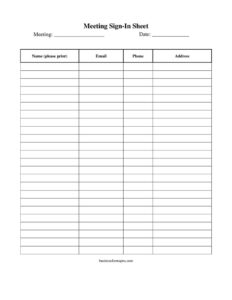
Meeting Sign In Sheet
Download a free Meeting Sign In Sheet template in PDF and DOCX to track attendance, contact details, and arrival times at any meeting — no signup required.
PDF
DOCX
19 downloads
0
likes
Download Files
- DOCX
A Meeting Sign In Sheet is a simple attendance document that records who attended a meeting, along with their contact details and the time they arrived. People most often use it to keep an accurate record of participation for minutes, follow-up, or compliance purposes. You can download this Meeting Sign In Sheet free in both PDF and DOCX formats, with no signup required.
What Is a Meeting Sign In Sheet?
A Meeting Sign In Sheet is a single-page form circulated at the start of a meeting so each attendee can write their name and details as they arrive. It is typically issued by the meeting organizer, secretary, chairperson, or an administrative assistant, and it documents exactly who was present, how to reach them, and when they joined. Organizations use it to confirm quorum, capture contact information, distribute follow-up materials, and create a verifiable paper trail. Whether for a board meeting, a community gathering, a project kickoff, or a routine staff huddle, the sign in sheet turns an informal attendance count into an organized, reusable record that can be filed alongside the agenda and minutes.
When Do You Need a Meeting Sign In Sheet?
Almost any gathering benefits from a clear attendance record. Common situations include:
- Board and committee meetings where confirming a quorum or documenting member presence is required by bylaws.
- Staff and team meetings to track who participated in updates, training, or policy briefings.
- Community and nonprofit gatherings such as HOA meetings, club sessions, or volunteer orientations.
- Client or vendor meetings where you want a record of attendees and their contact information for follow-up.
- Training sessions and workshops that require proof of attendance for certification or reimbursement.
- Public hearings or open forums where organizers must show who spoke or attended for transparency.
Types of Meeting Sign In Sheets
While the core purpose stays the same, sign in sheets adapt to different settings. A basic attendance sheet may capture only name and signature. A contact-collection sheet adds email and phone fields so organizers can send minutes or materials afterward. A compliance-focused sheet includes arrival and departure times, which matters for paid training, billable meetings, or regulatory documentation. This versatile template works for all three approaches — use as many columns as the situation calls for, and leave the rest blank.
What a Meeting Sign In Sheet Should Have
A complete sign in sheet gives readers enough context to interpret the record later. Key elements include:
- Meeting title or purpose so the sheet is identifiable months later.
- Date and location (or video link) of the meeting.
- Organizer or facilitator name for accountability.
- Numbered rows with columns for each attendee’s full name, organization or department, email, phone, signature, and time in.
- A signature column to verify the attendee personally signed in.
- Page numbers if attendance spans multiple sheets.
How to Fill Out a Meeting Sign In Sheet
Setting up and completing the sheet takes only a few minutes:
- Add the meeting title at the top so anyone reviewing the file knows which meeting it documents.
- Enter the date the meeting takes place, and the start time if relevant.
- Write the location — a room name, address, or virtual meeting platform.
- List the organizer or facilitator who is responsible for the meeting and the sheet.
- Place the sheet where attendees can reach it, near the entrance or pass it around as people settle in.
- Have each attendee print their full name in the first column so the record is legible.
- Ask attendees to add their organization or department so you can see who they represent.
- Collect email and phone number in the contact columns for follow-up and distribution of minutes.
- Have attendees sign or initial the signature column to confirm their presence.
- Record the time in if you are tracking arrival or partial attendance, then file the completed sheet with the meeting minutes.
Tips for Using and Storing Sign In Sheets
To get the most value from your records, decide before the meeting which columns you actually need and remove or ignore the rest so the sheet stays uncluttered. For recurring meetings, save a DOCX master copy with the standard header pre-filled and only update the date each time. After the meeting, scan or photograph the completed sheet and store the digital copy with the agenda and minutes in the same folder, which makes it easy to confirm quorum or attendance history later. If you collect contact information, be mindful of privacy expectations — store the sheets securely and only use the details for their stated purpose, such as sending follow-up notes or scheduling the next session.
How It Differs From a Guest List or Attendance Roster
A sign in sheet is filled in by the attendees themselves in real time, which is what gives it evidentiary value — each person’s own signature confirms they were there. A guest list, by contrast, is usually prepared in advance by the organizer and may not reflect who actually showed up. An attendance roster is often a pre-printed name list where you simply check people off. The sign in sheet sits between these: it is blank when the meeting begins and becomes a self-reported, signed record of actual participation by the end.
Common Mistakes to Avoid
- Leaving off the date and meeting title, which makes the sheet useless when filed with dozens of others.
- Accepting illegible handwriting — ask attendees to print clearly, especially for emails.
- Forgetting to circulate the sheet to latecomers, so the record undercounts attendance.
- Collecting contact details with no plan for how they will be stored or used.
- Losing the physical copy by not scanning it promptly after the meeting.
- Running out of rows for large groups — print extra pages and number them in advance.
Frequently Asked Questions
What is a Meeting Sign In Sheet used for? It is used to record who attended a meeting, collect their contact information, and document arrival times. Organizations rely on it to confirm quorum, follow up with participants, and keep an official record alongside the minutes.
How do I fill out a Meeting Sign In Sheet? Start by adding the meeting title, date, location, and organizer at the top. Then have each attendee print their name, organization, email, phone, and signature in the rows as they arrive, adding the time in if you are tracking arrivals.
Is a Meeting Sign In Sheet legally binding? It is generally a record-keeping document rather than a contract, so it does not create legal obligations on its own. However, the signed attendance record can serve as supporting evidence of who was present, which may matter for governance, compliance, or dispute purposes.
Does a sign in sheet need to be notarized or witnessed? No. A meeting sign in sheet does not require notarization or a separate witness because each attendee’s own signature serves as their confirmation of presence.
Can I customize this template for my meeting? Yes. Because it downloads in editable DOCX as well as PDF, you can add or remove columns, insert your organization’s logo, and pre-fill the recurring header details before printing.
How much does this Meeting Sign In Sheet cost? Nothing — it is completely free to download in both PDF and DOCX from Business Forms Pro, with no signup or account required.
This Meeting Sign In Sheet template is a general example provided for informational purposes only and does not constitute legal, financial, or compliance advice. Record-keeping and privacy requirements vary by jurisdiction and organization, so consult a qualified professional to confirm your specific obligations.
Related Forms
- Vendor Registration Form
- Weekly Conference Room Reservation
- Gifts Received List
- Daycare Sheet Multiple
- Daycare Sheet Individual
- Team Entry Form
Browse more in Sign In / Sign Up Sheets.