
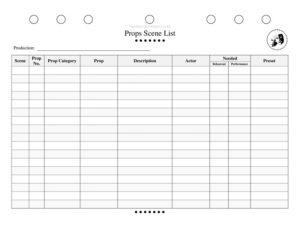
Props Scene List
Track every stage prop by scene with this free Props Scene List template, organizing props, actors, and presets — free download in PDF and DOCX.
PDF
DOCX
12 downloads
0
likes
Download Files
- DOCX
A Props Scene List is a scene-by-scene inventory that tracks every prop a theatrical production needs, who handles it, and where it must be placed before each entrance. Stage managers and props masters rely on it most often to keep complex shows organized during rehearsals and performances, and you can download it free in PDF and DOCX with no signup required.
What Is a Props Scene List?
A Props Scene List is a working document used by a production’s props department and stage management team to catalog every prop required throughout a show, broken down by scene. It records what each prop is, its assigned number, the category it belongs to, which actor uses it, and whether it is needed in rehearsal, performance, or as a preset item placed onstage before the action begins. Unlike a master props inventory, which simply lists everything the show owns, this list is organized chronologically by scene so the team can prepare, track, and reset props in the exact order the performance demands. It becomes the single source of truth for prop continuity.
When Do You Need a Props Scene List?
Any production with more than a handful of props benefits from a structured list. Common situations include:
- Pre-production planning — when a props master breaks down a script and itemizes every object mentioned or implied scene by scene.
- Building a props table — to know exactly which numbered items go on the stage-left and stage-right tables for each act.
- Tracking presets — when furniture, dressing, or hand props must be positioned onstage before the curtain rises or during a scene change.
- Coordinating with actors — so each performer knows which props they collect, carry, and return, reducing dropped or forgotten items.
- Rehearsal versus performance needs — distinguishing stand-in rehearsal props from the final performance pieces (for example, a real glass replaced by a shatter-safe version).
- Touring and remounts — when a show moves to a new venue and the crew needs a portable, complete record of every prop and its placement.
What a Props Scene List Should Have
A complete list ties each prop to a scene, a number, a handler, and a status. The essential elements are the production title for context, the scene reference, a unique prop number for quick communication, a prop category that groups similar items, the prop name itself, a clear description, the responsible actor, and indicators for whether the prop is needed, required in rehearsal, required in performance, and whether it is a preset. Together these columns let any crew member glance at one row and know what the prop is, where it belongs, and who is accountable for it.
How to Fill Out a Props Scene List
- Production — enter the show title at the top so the sheet is unmistakable when several productions share a workspace.
- Scene — note the act and scene (for example, “Act 1, Scene 2”) for each row so props are grouped in performance order.
- Prop No. — assign a unique number to every prop; numbers speed up labeling, props-table layout, and radio calls during a run.
- Prop Category — classify the item, such as hand prop, set dressing, food, weapon, or furniture.
- Prop — write the prop’s short name, like “silver candlestick” or “leather satchel.”
- Description — add details that prevent confusion: size, color, condition, or any special handling notes.
- Actor — record the performer or character who uses or handles the prop.
- Needed — check or mark whether the prop is required for that scene at all.
- Rehearsal — indicate if the prop (or a rehearsal stand-in) must be available during rehearsals.
- Performance — mark whether the finished prop is required for live performances.
- Preset — note if the prop must be positioned onstage before the scene begins rather than carried on.
Organizing Presets and the Props Table
The Preset column is one of the most valuable parts of this form because it separates props that the crew must place onstage in advance from those an actor brings on. Use it to build a preset checklist for each scene change, then cross-reference the Prop No. column so your stage-left and stage-right props tables can be taped out and labeled with matching numbers. When everyone uses the same numbering system, calling “missing prop 14” over comms instantly tells the crew which item to find. Keeping presets clearly flagged also makes the show easier to reset cleanly between performances.
Rehearsal Props Versus Performance Props
Many productions cannot use final props from day one. Breakable, expensive, food, or weapon props are often replaced with rehearsal substitutes until late in the process. The separate Rehearsal and Performance columns let you flag exactly which version is required and when, so the props department knows what to source early and what to swap in before opening. This distinction protects fragile pieces, keeps perishable items fresh, and ensures actors still get hands-on practice with a stand-in that matches the size and weight of the real thing.
Common Mistakes to Avoid
- Skipping prop numbers — without unique numbers, props tables and comms become confusing during fast changes.
- Vague descriptions — “book” is not enough; specify the title, color, or whether it must open to a marked page.
- Forgetting presets — leaving the preset column blank causes missing or misplaced items at curtain.
- Not updating after changes — directors cut and add props in rehearsal, so revise the list and date your versions.
- Omitting the responsible actor — accountability prevents a prop from being left in a dressing room or dropped offstage.
- Mixing rehearsal and performance items — failing to distinguish the two leads to fragile or perishable props being used too early.
Frequently Asked Questions
What is a Props Scene List used for? It is a stage management tool that catalogs every prop in a production scene by scene, recording what each prop is, who handles it, and where it must be placed. It keeps the props department, crew, and actors coordinated throughout rehearsals and performances. It also serves as a reference when resetting the show between performances.
Who fills out the Props Scene List? Typically the props master or stage manager creates it during script breakdown, then updates it as the production evolves. Assistant stage managers and the running crew use it nightly to set, track, and reset props. On smaller productions one person may handle the entire list.
What is the difference between this list and a master props inventory? A master inventory simply lists everything the show owns or has acquired, while a Props Scene List organizes props in performance order by scene. This scene-based structure shows when and where each item is needed, including presets, which a flat inventory does not capture.
How does the Preset column work? Mark the Preset column for any prop that must be positioned onstage before a scene begins rather than carried on by an actor. The crew uses these flags to build preset checklists for the top of the show and for each scene change, ensuring nothing is missing when the lights come up.
Is the Props Scene List legally binding? No, it is an internal production and organizational document, not a contract or legal agreement. Its purpose is purely practical: keeping your props tracked and your crew on the same page during a run.
How much does this template cost? Nothing — it is completely free to download here in both PDF and DOCX formats with no signup required. You can print the PDF for the props table or edit the DOCX to add columns, scenes, or your production’s branding.
This template is a general example provided for informational purposes only and does not constitute professional, legal, or production-management advice. Production needs and theatrical practices vary by venue and company — adapt the form to your specific show and consult your production team or a qualified professional as needed.
Related Forms
- Line Notes Breakdown
- Costume Changes
- Focus Chart
- Rehearsal Sign-In Sheet
- Audition Checklist
- Multiple Location Schedule
Browse more in Theater.