
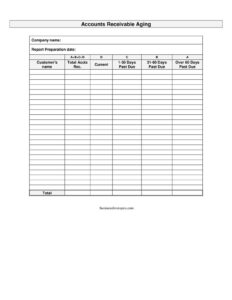
Accounts Receivable Aging
Track unpaid customer invoices by age with our free Accounts Receivable Aging report template — organize current and past due balances and free download.
PDF
DOCX
0
likes
Download Files
- DOCX
An Accounts Receivable Aging report is a simple financial tool that lists every customer who owes your business money and sorts those balances by how long the invoices have been outstanding. The most common reason businesses use it is to spot overdue accounts before they become uncollectible and to prioritize collection efforts. This template is free to download in PDF and DOCX, with no signup required.
What Is an Accounts Receivable Aging Report?
An Accounts Receivable Aging report is a snapshot of all money owed to your company by customers, grouped according to how overdue each balance is. It is typically prepared by a bookkeeper, accountant, or small business owner and is used by finance teams, credit managers, and lenders to assess the health of a company’s receivables. The report documents who owes you, how much, and whether each amount is still current or has slipped into past due status. It serves as both a collection management tool and an early warning system, helping you understand which customers pay on time and which require follow-up before their unpaid balances threaten your cash flow.
When Do You Need an Accounts Receivable Aging Report?
This report is useful any time you extend credit to customers and need a clear picture of what is owed. Common situations include:
- Monthly financial review — running the report at the end of each month to monitor outstanding balances and cash flow trends.
- Collections prioritization — identifying which customers are most overdue so you can focus calls, reminders, and demand letters where they matter.
- Applying for financing — lenders and factoring companies often request an aging report to evaluate the quality of your receivables.
- Setting credit limits — deciding whether to extend more credit to a slow-paying customer or require payment upfront.
- Year-end accounting — supporting your accountant in estimating bad debt and reconciling the books for tax season.
- Investor or board reporting — demonstrating to stakeholders how efficiently the business converts sales into cash.
What an Accounts Receivable Aging Report Should Have
A complete aging report gives anyone reading it an instant understanding of your outstanding balances. At minimum it should include the company name so the document is clearly attributed, the report date so readers know the period the data reflects, and a line for each customer with an outstanding balance. Each customer line should separate amounts that are current from those that are past due, and ideally include the invoice or account total. A well-built report also leaves room for subtotals and a grand total, so you can see the overall amount owed at a glance. Clear column labels and consistent date references keep the report reliable when compared month over month.
How to Fill Out an Accounts Receivable Aging Report
- Company name: Enter your business’s legal or trading name at the top so the report is properly identified, especially if it will be shared with a lender or accountant.
- Date: Record the date you are preparing the report. This is the “as of” date — every balance shown reflects what was owed on that day, so consistency matters when comparing periods.
- Customer’s name: List each customer who has an outstanding balance on its own line. Use the same name spelling you use in your accounting system to avoid duplicates.
- Current: Enter the portion of the customer’s balance that is not yet past due — invoices still within your payment terms, such as net 30. These amounts are healthy and expected.
- Past due: Enter the portion of the balance that has passed its due date. If you want more detail, break this into ranges such as 1–30, 31–60, 61–90, and 90+ days. The further right a balance sits, the higher the collection risk.
- Total: Sum each customer’s current and past due amounts, then total all customers to see your full receivables picture.
Understanding the Aging Buckets
The power of an aging report comes from how it groups overdue balances into time ranges, often called “buckets.” A balance in the current column is on track and requires no action. Once an invoice passes its due date, it moves into past due and the clock starts. Many businesses split past due into 1–30, 31–60, 61–90, and over 90 days. Balances under 30 days late usually need only a gentle reminder, while anything beyond 90 days signals serious risk and may eventually be written off as bad debt. Watching how balances drift from one bucket to the next over time tells you whether your collection process is working or whether certain customers consistently pay late.
Tips for Using the Report Effectively
Run the report on a regular schedule — weekly or monthly — so trends become visible rather than surprises. Compare the current month against prior months to see whether overdue totals are growing. Use the report to drive action: assign follow-up tasks for the oldest balances, send statements to customers with multiple open invoices, and flag accounts that may need to be placed on credit hold. Sharing a clean, dated report with your accountant also makes year-end bad-debt estimates far more accurate.
Common Mistakes to Avoid
- Forgetting the report date — without a clear “as of” date, the numbers are impossible to interpret or compare.
- Mixing current and past due amounts — lumping everything into one column defeats the purpose of an aging report.
- Inconsistent customer names — spelling the same customer differently creates duplicate lines and inflates or hides balances.
- Not reconciling to your books — if totals don’t match your accounting system, the report loses credibility.
- Ignoring old balances — letting amounts sit in the 90+ day bucket without action increases the chance they become uncollectible.
- Running it too rarely — an aging report is only useful if it’s current; stale data leads to missed collection opportunities.
Frequently Asked Questions
What is an Accounts Receivable Aging report used for? It is used to track unpaid customer invoices grouped by how overdue they are. Businesses rely on it to prioritize collections, monitor cash flow, estimate bad debt, and support loan or financing applications.
How do I fill out the aging report template? Enter your company name and the report date at the top, then list each customer with an open balance. For every customer, record the amount that is current and the amount that is past due, then total the columns to see your overall receivables.
What does “current” versus “past due” mean? Current refers to invoices that are still within your agreed payment terms and not yet late. Past due refers to balances that have passed their due date and may require follow-up or collection action.
How often should I prepare an aging report? Most businesses run it monthly as part of their financial close, though weekly reviews help if you have many credit customers. Regular reporting makes overdue trends easier to spot and act on.
Is this report a legally binding document? No, an aging report is an internal accounting summary, not a contract or legal agreement. It documents balances for management and reporting purposes but does not itself create or enforce a debt.
How much does this template cost? It is completely free to download in PDF and DOCX formats with no signup required. You can use it as-is or customize the columns and aging buckets to fit your business.
This template is provided as a general example for informational purposes only and does not constitute accounting, financial, tax, or legal advice. Reporting standards and requirements vary by jurisdiction and business type — consult a qualified accountant or financial professional before relying on this report for decision-making.
Official resource: for the rules that apply to your situation, see the Consumer Financial Protection Bureau.
Related Forms
- Home Business Worksheet
- Lump Sum Payment Planning Form
- Charity Cash Envelope
- Payment Calculator per $100000
- Blank Cash Envelope
- Fun Cash Envelope
Browse more in Money.