
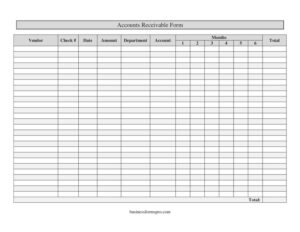
Accounts Receivable Form
Track customer payments and outstanding balances with our free Accounts Receivable Form template — download instantly in PDF and DOCX, no signup required.
PDF
DOCX
4 downloads
0
likes
Download Files
- DOCX
An Accounts Receivable Form is a simple ledger document used to record incoming payments and track money owed to your business. Companies most often reach for it to log a check received against a specific account and keep a running total of what’s still outstanding. You can download this template free in both PDF and DOCX formats — no signup required.
What Is an Accounts Receivable Form?
An Accounts Receivable Form is a record-keeping tool that captures the details of payments your business expects to receive or has already received from customers, clients, or vendors. It is typically used by bookkeepers, accounting clerks, small business owners, and office administrators to document each transaction in one place. The form ties a payment — such as a check — to the relevant account, department, and date so the money can be properly applied. Rather than relying on scattered notes or memory, this form creates a clean paper trail that supports reconciliation, follow-up on overdue balances, and month-end reporting. It works equally well as a standalone log or as a companion to accounting software.
When Do You Need an Accounts Receivable Form?
This form is useful any time money is flowing into your business and you need a clear record of it. Common situations include:
- Recording a check received from a customer or vendor and applying it to the correct account.
- Tracking outstanding invoices so you know which balances remain unpaid and for how many months.
- Month-end reconciliation, when you need to match payments against invoices before closing the books.
- Allocating revenue across departments, so each unit’s incoming funds are reported accurately.
- Following up on overdue accounts, using the running total and months columns to spot aging balances.
- Preparing for an audit or review, where a documented trail of every payment received is essential.
What an Accounts Receivable Form Should Have
A complete and useful Accounts Receivable Form should clearly identify who paid, how they paid, when, and how much, along with where the money should be applied. The essential elements are the payer or vendor name, a payment reference such as a check number, the date of the transaction, the amount, and the account and department it belongs to. A field for the number of months helps you track aging or recurring balances, and a total line lets you summarize the activity at a glance. Together these fields make each entry self-explanatory and easy to cross-reference against bank statements and invoices.
How to Fill Out an Accounts Receivable Form
Work through the fields in order, completing one row per payment:
- Vendor: Enter the name of the customer, client, or vendor who issued the payment. Use the exact name that appears on the check or invoice so entries are easy to match later.
- Check #: Record the check number from the payment instrument. If payment came another way, note the reference number or method here instead.
- Date: Write the date you received the payment, or the date on the check. Stay consistent with which date you use across all entries.
- Amount: Enter the dollar figure for this single payment, exactly as written on the check.
- Department: Indicate which department or business unit the payment relates to, so revenue is attributed correctly.
- Account: Specify the account the payment should be applied to — typically the customer account or general ledger account number.
- Months: Note the number of months the balance covers or how long it has been outstanding, useful for recurring billing or aging.
- Total: Tally the amounts to produce a running or column total, giving you a clear summary of receipts.
Tips for Keeping Accurate Receivables Records
Consistency is what makes a receivables log trustworthy. Always record a payment as soon as it arrives rather than batching from memory at the end of the week. Use the check number and date together as a unique identifier so duplicate entries are easy to catch. When a balance covers multiple billing periods, use the months field to make the aging obvious — this turns the form into an early-warning system for slow-paying accounts. At month-end, reconcile your totals against your bank deposit records and your invoicing system. Any discrepancy should be investigated before you close the period, because small mismatches compound quickly across dozens of transactions.
How This Differs From an Accounts Payable Form
It’s easy to confuse receivables with payables, but they sit on opposite sides of the ledger. An Accounts Receivable Form tracks money coming in — payments your business is owed or has collected from customers and vendors. An Accounts Payable Form tracks money going out — bills and invoices your business must pay to its own suppliers. Although the two forms can share similar fields like vendor, amount, and date, keeping them as separate documents prevents accidental commingling of incoming and outgoing funds and makes your reporting far cleaner.
Common Mistakes to Avoid
- Leaving the account or department blank, which makes it impossible to attribute revenue correctly later.
- Recording the wrong check number, breaking the link between the form and your bank records.
- Mixing payment dates and deposit dates, which creates confusion during reconciliation.
- Forgetting to update the running total, so the summary no longer reflects actual receipts.
- Delaying entry until details are forgotten, leading to missing or inaccurate records.
- Not noting the months covered, which hides aging balances and overdue accounts.
Frequently Asked Questions
What is an Accounts Receivable Form used for? It is used to record payments your business receives and to track outstanding balances owed by customers or vendors. Each entry captures who paid, the check number, the amount, and the account it applies to, creating a clear record for reconciliation and follow-up.
How do I fill out the months field? Use the months field to indicate how many months a balance covers or how long it has been outstanding. For recurring billing, enter the number of periods the payment represents; for aging, enter how many months the balance has gone unpaid.
Is this form legally binding? An Accounts Receivable Form is an internal record-keeping document, not a contract, so it does not create legal obligations on its own. Its value lies in providing an accurate, organized trail of payments that supports your invoices, bookkeeping, and any audit.
Does an Accounts Receivable Form need to be notarized? No. This is an accounting record completed by your own staff and does not require notarization or witnesses. Keep it accurate and consistent so it can be relied upon during reconciliation and reviews.
Can I use this form alongside accounting software? Yes. Many small businesses use a printed or digital form to capture payments as they arrive, then transfer the entries into their accounting system. The form serves as a quick, reliable source document and backup.
How much does this template cost? Nothing — this Accounts Receivable Form template is completely free to download in PDF and DOCX formats with no signup required. You can edit the DOCX version to add your business name, logo, or extra columns to fit your workflow.
This template is provided as a general example for informational purposes only and does not constitute legal, financial, accounting, or tax advice. Bookkeeping practices and reporting requirements vary by jurisdiction and business type — consult a qualified accountant or financial professional for guidance specific to your situation.
Official resource: for the rules that apply to your situation, see the Consumer Financial Protection Bureau.
Related Forms
- Christmas Cash Envelope
- Utilities Annual Use Tracker With Budget
- Roommate Utilities Tracker
- Payment Calculator per $100
- Petty Cash Voucher
- Consumer Equity Form
Browse more in Money.