
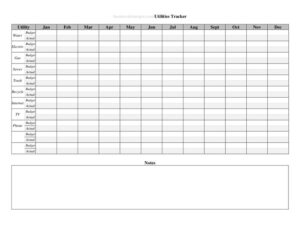
Utilities Annual Use Tracker With Budget
Track electric, water, gas, and internet costs all year with a free Utilities Annual Use Tracker With Budget template — free download in PDF and DOCX.
PDF
DOCX
3 downloads
0
likes
Download Files
- DOCX
A Utilities Annual Use Tracker With Budget is a simple worksheet that records your monthly utility consumption and spending across an entire year so you can spot trends, catch billing errors, and stick to a household or business budget. People most often use it to see exactly where their electric, water, gas, and internet money goes month to month. It’s free to download in both PDF and DOCX, with no signup required.
What Is a Utilities Annual Use Tracker With Budget?
A Utilities Annual Use Tracker With Budget is a year-long log that pairs your usage (kilowatt-hours, gallons, therms, data) with your cost for each utility, month by month, alongside a budgeted target. Homeowners, renters, landlords, small-business owners, and property managers use it to compare what they planned to spend against what they actually paid. Rather than digging through a shoebox of bills, you keep one consolidated sheet that shows each service in its own row or column. By the end of the year it becomes a clear financial snapshot — total spent, average per month, peak seasons, and how your real numbers measured against your budget.
When Do You Need a Utilities Annual Use Tracker With Budget?
This tracker earns its place any time utility costs need watching or explaining. Common situations include:
- Building a household budget and needing realistic monthly figures for electricity, water, gas, trash, and internet.
- Cutting expenses after a price increase or rate change, where you want to confirm whether usage or rates drove the jump.
- Renting out property and tracking utilities you cover so you can adjust rent or tenant charges fairly.
- Running a small business or home office and separating deductible utility costs for bookkeeping at tax time.
- Comparing providers or plans by gathering twelve months of data before you switch suppliers.
- Troubleshooting a suspicious bill, where a year of side-by-side numbers reveals an error or a meter problem.
What a Utilities Annual Use Tracker Should Have
A complete tracker is built around a few essentials. There should be a clear label for each utility you pay — electricity, gas, water and sewer, trash, internet, phone, and any others. Each utility needs a place for the monthly usage amount in its native unit and the monthly cost in dollars. A budget column or row lets you set a target figure for each service. The sheet should total each month and each utility for the year, and include a space to note the difference between budgeted and actual amounts. Finally, room for notes — rate changes, weather events, or one-time fees — turns raw numbers into a story you can act on.
How to Fill Out a Utilities Annual Use Tracker With Budget
- Enter the year and household or property name at the top so the sheet is easy to file and reference later.
- List your utilities in the first column — electricity, water, gas, trash, internet, phone — adding rows for anything specific to you.
- Set a monthly budget for each utility based on last year’s average or your best estimate, and write it in the budget field.
- Record usage each month from the bill: kWh for power, gallons or units for water, therms or CCF for gas, and so on.
- Enter the actual cost billed for that utility that month, including taxes and fixed fees.
- Calculate the variance by subtracting the budget from the actual amount, noting whether you were over or under.
- Add notes for unusual months — a heat wave, a rate hike, or a guest staying over.
- Total each column and row at year-end to see annual spend per utility and combined monthly totals.
Reading Your Results and Acting on Them
The real value comes after the data is in. Scan each utility’s row for the highest months; spikes in summer often point to cooling, while winter peaks usually mean heating. Compare actual totals against your budget line to see which services you consistently underestimate. If your internet cost never moves but is high, that’s a candidate for renegotiation. If electricity climbs while usage stays flat, your rate may have changed. Use the variance column to set a smarter budget for next year — round up on the utilities that always run over and tighten the ones with room to spare.
Tips for Accurate Tracking
Keep the tracker somewhere you’ll see it, and update it the same day each bill arrives so nothing slips through the cracks. Always pull figures straight from the official statement rather than estimating, and record usage and cost together so you can tell apart a rate change from a behavior change. If you pay on a budget-billing or equal-pay plan, note both the flat payment and the true usage so the year-end reconciliation makes sense. For shared rentals, snap a photo of each bill and store it with the tracker as backup.
Common Mistakes to Avoid
- Recording only cost, not usage — without the units you can’t tell whether a higher bill came from rates or consumption.
- Skipping months and leaving gaps that make annual totals and averages meaningless.
- Ignoring taxes and fixed fees, which understates what you truly pay.
- Setting an unrealistic budget that you never adjust, so the variance column stays useless.
- Mixing billing periods — log each bill in the month it covers, not the month it arrives, and stay consistent.
- Forgetting to note one-time charges, like a deposit or reconnection fee, which can distort a single month.
Frequently Asked Questions
What is a Utilities Annual Use Tracker With Budget? It is a year-long worksheet that logs your monthly utility usage and cost beside a budget target for each service. It helps you see spending trends, compare planned versus actual amounts, and plan better. You can use it for a home, a rental, or a small business.
How do I fill out the tracker? Start by entering the year and listing each utility, then set a monthly budget for each one. As bills arrive, record both the usage and the cost, calculate the variance against your budget, and add notes for anything unusual. At year-end, total each row and column for a complete annual picture.
What information do I need from my utility bills? You’ll want the billing period, the usage amount in the bill’s units (kWh, gallons, therms, or data), and the total cost including taxes and fixed fees. Having the statement in hand keeps your numbers accurate. Keep the bills or photos of them as backup.
Can I use this tracker for a rental property or business? Yes. Landlords use it to monitor utilities they cover, and business owners use it to separate and document deductible utility expenses. The same year-long format works for any property where you want a clear cost record.
Is this template free to download? Yes, this Utilities Annual Use Tracker With Budget is completely free to download in both PDF and DOCX formats. There’s no signup required. Use the editable DOCX version if you’d like to add or remove utility rows.
Does using this tracker guarantee I’ll lower my bills? No tool can lower bills on its own, but tracking makes savings far easier to find. By seeing exactly where money goes month to month, you can spot waste, renegotiate plans, and set realistic targets. The tracker gives you the data; acting on it produces the savings.
This template is a general example provided for informational purposes only and does not constitute financial, tax, or accounting advice. Budgeting needs and utility billing practices vary by provider and location, so consult a qualified professional for guidance specific to your situation.
Official resource: for the rules that apply to your situation, see the Consumer Financial Protection Bureau.
Related Forms
- Fixed Expenses Worksheet
- Credit Change Notice
- Accounts Receivable Ledger
- Accounts Receivable Aging
- Truth In Lending Statement
- Weekly Sales Commission Tracker
Browse more in Money.