
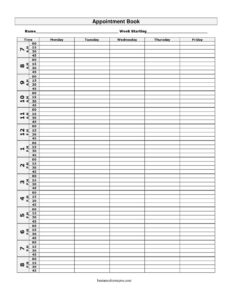
Appointment Book
Free Appointment Book template to schedule clients by time and weekday in Monday-Friday columns — organized, easy to use, free download in PDF and DOCX.
PDF
DOCX
2 downloads
0
likes
Download Files
- DOCX
An Appointment Book is a simple weekly scheduling sheet that lets you map clients, meetings, and tasks to specific time slots across Monday through Friday. People most often use it to keep a clean, at-a-glance record of who is booked when, so no double-bookings or missed appointments slip through. You can download this Appointment Book free in both PDF and DOCX, with no signup required.
What Is an Appointment Book?
An Appointment Book is a structured time-management document that organizes a single work week into rows of time slots and columns for each weekday. It is used by anyone who books people into specific times — salon stylists, dental and medical front-desk staff, consultants, tutors, therapists, repair technicians, and small-business owners. Rather than relying on memory or scattered notes, the book documents the day’s schedule in one place: the time of each slot, the day it falls on, and who or what is booked into it. With time down the left side and Monday through Friday across the top, it gives a fast visual snapshot of how full or open the week is.
When Do You Need an Appointment Book?
This template fits almost any situation where people are scheduled into fixed time slots. Common scenarios include:
- Salons and barbershops — booking haircuts, color, and styling clients into back-to-back time slots throughout the week.
- Medical and dental offices — front-desk staff scheduling patient visits, cleanings, and follow-ups across the workweek.
- Consultants and freelancers — reserving discovery calls, client meetings, and project check-ins without overlapping commitments.
- Tutors and music teachers — blocking out recurring weekly lessons for different students at set times.
- Therapists and counselors — managing standing weekly sessions while keeping cancellations and openings visible.
- Repair and home-service technicians — slotting service calls and installations into the day to plan travel and workload.
Types of Appointment Scheduling
Although this template covers a standard Monday-to-Friday week, the way you use it can vary. Some users keep fixed-interval slots, where every line is the same length — for example, every 30 or 60 minutes. Others use flexible slots, jotting the start time and adjusting the duration per client, which suits services that run different lengths. You might also keep one book per practitioner in a multi-staff setting, or a single shared book divided by initials. Choose the approach that matches your appointment lengths and team size, and stay consistent week to week so the schedule is easy to read at a glance.
What an Appointment Book Should Have
A useful Appointment Book is clear, consistent, and complete. The essential elements are a defined time column listing each bookable slot in order, separate columns for Monday through Friday, and enough space in each cell to write a name and a short note. For practical use, it also helps to add the week-of date somewhere on the sheet, a legend or shorthand for service types, and contact details for clients in a margin or back page. Legibility matters most: anyone glancing at the book should immediately see which slots are taken and which are open.
How to Fill Out an Appointment Book
- Set your time slots. In the time column on the left, list each bookable interval from the start of your day to the end — for example 9:00, 9:30, 10:00, and so on — keeping the spacing consistent.
- Confirm the week. Note the week-of date at the top so the sheet is tied to a specific Monday-to-Friday period and won’t be confused with another week.
- Book Monday. In the Monday column, write the client or task name in the row matching the agreed time.
- Book Tuesday through Thursday. Repeat for the Tuesday, Wednesday, and Thursday columns, adding a short note (service type, phone number, or location) where the cell allows.
- Book Friday. Fill the Friday column the same way, and leave empty cells blank so open slots are obvious.
- Review and adjust. Scan the full grid for double-bookings, cross out cancellations cleanly, and re-slot moved appointments before the week begins.
Tips for Getting the Most From Your Appointment Book
A few habits make the book far more reliable. Build in short buffer slots between appointments so running late on one client doesn’t cascade through the whole day. Use a consistent shorthand — initials for staff, a symbol for new versus returning clients, and a marker for deposits taken — so the page stays readable. If you print the DOCX version, you can customize the time intervals before printing to match your exact hours. Keep last week’s filled sheets as a simple record of who came in and when, which is handy for follow-ups and for spotting your busiest days.
Common Mistakes to Avoid
- Inconsistent time intervals — mixing 15-, 30-, and 60-minute slots without labeling them makes the grid confusing and invites overlaps.
- Overwriting cancellations — scribbling new names over old ones creates clutter; cross out cleanly or erase fully instead.
- Forgetting the week-of date — without it, two similar sheets are easy to mix up, leading to wrong-week bookings.
- Cramming notes into tiny cells — leave room for a name and a phone number so you can reach the client if plans change.
- No buffer time — back-to-back slots with zero gap mean one delay pushes the rest of the day off schedule.
- Keeping only one copy — a single paper book is easy to lose; photograph or scan filled pages, or keep the editable file backed up.
Frequently Asked Questions
What is an Appointment Book used for? It is used to schedule clients, patients, or meetings into specific time slots across a Monday-to-Friday week. It gives you and your team a single, at-a-glance view of the week so you avoid double-booking and missed appointments. It works for salons, clinics, tutors, consultants, and any service that runs on a calendar.
How do I fill out the Appointment Book? List your time slots down the left column, then write each client’s name in the cell where their day and time intersect. Add a short note like service type or phone number if the cell allows, and leave open slots blank so availability stays obvious.
Can I change the time slots to match my hours? Yes. Download the DOCX version and edit the time column to your exact opening hours and preferred intervals — for example 15-, 30-, or 60-minute slots — before printing. The PDF is ready to print as-is for standard daytime scheduling.
Is an Appointment Book a legal document? No. It is an internal organizational tool for managing your schedule, not a contract or binding agreement. It can still serve as a helpful informal record of when clients were seen, but it does not create legal obligations on its own.
How much does this Appointment Book template cost? It is completely free. You can download it in PDF and DOCX from Business Forms Pro with no signup, no fees, and no watermark, and reuse it for as many weeks as you need.
Can multiple staff members share one Appointment Book? Yes, though it works best when you add staff initials to each entry or print a separate sheet per person. For small teams, a shared book with clear shorthand keeps everyone on the same page; larger teams may prefer one book per practitioner.
This Appointment Book template is provided as a general example for informational and organizational purposes only. It is not legal, financial, or professional advice, and scheduling or record-keeping requirements may vary by industry and jurisdiction. Consult a qualified professional for guidance specific to your situation.
Official resource: for the rules that apply to your situation, see the U.S. Small Business Administration.
Related Forms
- Hotel Reservation Form
- Daily Delivery Schedule
- Market Map Services
- Room Reservation Form
- Venue Reservation Request
- Annual Salary Increase
Browse more in Office.