
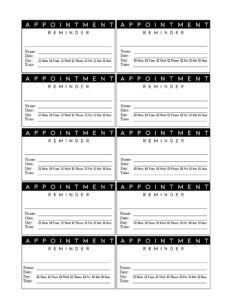
Appointment Reminder Card
Download a free Appointment Reminder Card template to confirm visit dates and times and reduce no-shows, in PDF and DOCX with no signup.
PDF
DOC
0
likes
Download Files
- DOC
An Appointment Reminder Card is a small printed card that confirms an upcoming visit by recording the date, time, and location of a scheduled appointment. Businesses hand it to clients or patients at the end of a visit so they remember to return, and you can download this one free in PDF and DOCX with no signup required.
What Is an Appointment Reminder Card?
An Appointment Reminder Card is a compact take-home document — often the size of a business card or index card — that a receptionist, assistant, or service provider fills out at the conclusion of an appointment. It captures the essential details of the next visit: who the appointment is with, when it takes place, and where to go. Dental offices, salons, veterinary clinics, physical therapists, mechanics, and tutors all use them to keep schedules running smoothly. The card serves as a physical prompt that clients can stick on a fridge, tuck into a wallet, or pin to a corkboard, helping reduce forgotten appointments and last-minute cancellations.
When Do You Need an Appointment Reminder Card?
This card is useful any time a customer leaves with a future booking. Common scenarios include:
- Healthcare and dental visits — confirming a six-month cleaning, a follow-up exam, or a recurring treatment series.
- Salons and spas — booking the client’s next haircut, color, or facial before they walk out the door.
- Veterinary clinics — scheduling vaccinations, wellness checks, or post-surgical follow-ups for a pet.
- Auto repair and service shops — reminding customers of a scheduled tire rotation, oil change, or inspection.
- Therapy, tutoring, and counseling — reinforcing standing weekly or biweekly session times.
- Professional services — giving accountants, consultants, or attorneys’ clients a tangible note of their next meeting.
Anywhere repeat visits matter, a reminder card turns a verbal “see you next month” into a concrete record the client can rely on.
What an Appointment Reminder Card Should Have
A complete reminder card stays brief but covers every detail the client needs to show up on time. At minimum it should include the business or practice name, the patient or client name, the date and day of the week, the appointment time, and the location or room. Adding the provider’s name, a phone number for rescheduling, and a short cancellation policy makes the card far more useful. Many cards also leave space for the type of service or a quick note. The goal is a card that answers “who, what, when, and where” at a glance, with contact information close at hand if plans change.
How to Fill Out an Appointment Reminder Card
Because reminder cards are short, accuracy matters more than length. Work through the card in this order:
- Business name and logo: Confirm your practice or company name appears at the top so the client knows who the card is from.
- Client or patient name: Write the recipient’s name clearly to avoid mixing up cards at a busy front desk.
- Appointment date: Enter the full date, including the day of the week, to reduce confusion (for example, “Tuesday, March 12”).
- Appointment time: Record the exact time and note AM or PM. Arrival instructions, such as “please arrive 10 minutes early,” can go here.
- Provider or service: Name the doctor, stylist, technician, or service so the client knows what to expect.
- Location or room: Add the address, suite, or room number if the business has multiple sites.
- Contact and rescheduling line: Fill in the phone number and any cancellation window so the client can reach you if something changes.
Double-check the date and time against your booking system before handing the card over.
Tips for Reducing No-Shows
A reminder card works best as part of a broader follow-up routine. Pair the printed card with a phone, text, or email reminder a day or two before the appointment for a layered approach. Keep a stack of pre-printed cards at the front desk so staff can fill them out quickly. Print the business phone number prominently so clients who need to reschedule call rather than simply not show up. If you book recurring visits, consider handing out a card for each upcoming date so clients can plan ahead. Clear handwriting and a consistent date format also prevent the small errors that lead to missed visits.
Customizing the Template for Your Business
Because this card comes in editable DOCX format, you can adapt it to your industry in minutes. A dental office might add fields for the type of cleaning and the hygienist’s name, while a salon could include the stylist and service. Veterinary clinics often add a line for the pet’s name alongside the owner’s. You can drop in your logo, brand colors, and a short tagline, then print several cards per page to save paper. Keep the layout uncluttered — the more crowded the card, the easier it is to misread the time or date.
Common Mistakes to Avoid
- Omitting the day of the week, which makes it easy for clients to misremember the date.
- Leaving off AM or PM, a frequent cause of clients arriving twelve hours early or late.
- Forgetting the contact number, so clients have no easy way to reschedule.
- Illegible handwriting, especially on numbers — print clearly or use a stamp.
- Not verifying against the calendar, leading to double-bookings or wrong times.
- Skipping the location or room for practices with more than one site, leaving clients lost on arrival.
Frequently Asked Questions
What is an Appointment Reminder Card used for? It is a small take-home card that confirms a client’s next scheduled visit, listing the date, time, provider, and location. Businesses give it out to help customers remember appointments and to cut down on no-shows and late cancellations.
How do I fill out an Appointment Reminder Card? Write the client’s name, then the full date including the day of the week, the exact time with AM or PM, the provider or service, and the location. Add a phone number for rescheduling and double-check every detail against your booking system before handing it over.
Is an Appointment Reminder Card legally binding? No, it is simply a courtesy reminder and not a contract. It documents an agreed-upon appointment time but does not create any legal obligation by itself.
Can I customize this card for my industry? Yes. The DOCX version is fully editable, so you can add your logo, brand colors, and industry-specific fields such as a pet’s name, a stylist, or a treatment type, and print multiple cards per sheet.
How much does this template cost? It is completely free to download here in both PDF and DOCX formats, with no signup or account required. You can print as many copies as your business needs.
Should I also send digital reminders? A printed card pairs well with a text, email, or phone reminder sent a day or two before the visit. Using both a physical card and a digital nudge gives clients the best chance of remembering their appointment.
This template is provided as a general example for informational purposes only and does not constitute legal, medical, or professional advice. Appointment and record-keeping practices vary by industry and jurisdiction, so consult a qualified professional to ensure your processes meet any applicable requirements.
Official resource: for the rules that apply to your situation, see the U.S. Small Business Administration.
Related Forms
- Meeting Agenda List
- Office Supplies Request Form
- Room Reservation Form
- Meeting Agenda Portrait
- Postal Holidays
- Appointment Request Form
Browse more in Office.