
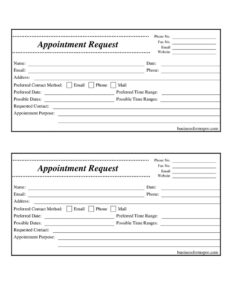
Appointment Request Form
Download a free Appointment Request Form template in PDF and DOCX to collect contact details, preferred dates, and the purpose of each meeting quickly.
PDF
DOCX
2 downloads
0
likes
Download Files
- DOCX
An Appointment Request Form is a simple document that lets a client, patient, or contact ask to schedule a meeting by supplying their details, preferred dates, and the reason for the appointment. People most often use it to gather complete booking information in one place so staff can confirm a time without back-and-forth phone tag. It’s free to download here in both PDF and DOCX formats, with no signup required.
What Is an Appointment Request Form?
An Appointment Request Form is a structured intake document used by offices, clinics, salons, consultants, and service providers to capture everything needed to schedule a meeting. Rather than relying on a hurried phone call, the requester writes down their name, contact information, preferred contact method, desired dates and time ranges, and the purpose of the appointment. Staff then review the request and confirm a slot that works. The form benefits both sides: the requester clearly states what they want, and the business has a written, dated record to work from. It is not a confirmed booking on its own — it is a request that the office reviews, approves, and schedules.
When Do You Need an Appointment Request Form?
This form fits any setting where appointments are scheduled but not always available on demand. Common situations include:
- Professional services: A new client requests a consultation with an accountant, attorney, or financial advisor and lists the topic in advance.
- Healthcare and wellness: A patient asks for a checkup or follow-up, giving several possible dates so the office can match an open slot.
- Salons and personal care: A customer requests a service and a preferred time range, allowing the front desk to book around existing appointments.
- Sales and demos: A prospect requests a product demonstration and notes a preferred contact method for the confirmation.
- Government or institutional offices: A visitor requests a meeting that requires staff review before a time is assigned.
- Repeat or recurring meetings: An existing contact lists multiple possible dates to make rescheduling easy.
What an Appointment Request Form Should Have
A complete Appointment Request Form balances the requester’s information with the provider’s contact details. At a minimum it should capture who is asking, how to reach them, when they would like to meet, and why. The provider’s phone, fax, email, and website let the requester follow up. The requester’s name, date of the request, email, phone, and address identify them clearly. Fields for a preferred contact method and one or more possible dates and time ranges give scheduling flexibility, while a purpose field tells staff how much time to set aside. Including alternatives — possible dates and possible time ranges — reduces the chance of a back-and-forth before a time is confirmed.
How to Fill Out an Appointment Request Form
- Provider details: At the top, confirm or fill in the office Phone No., Fax No., Email, and Website so the requester knows how to reach you.
- Name: Enter the full name of the person requesting the appointment.
- Date: Record the date the request is being submitted.
- Contact information: Provide the requester’s Email, Phone, and Address so staff can confirm and follow up.
- Preferred Contact Method: Check or note whether the requester prefers Email, Phone, or Mail for the confirmation.
- Preferred Date: Write the single date the requester most wants.
- Preferred Time Range: Note the ideal window, such as morning, afternoon, or a specific span like 2–4 p.m.
- Possible Dates and Possible Time Ranges: List one or more backup dates and windows to give the office flexibility if the first choice is full.
- Requested Contact: Identify the specific person, department, or staff member the appointment should be with, if known.
- Appointment Purpose: Briefly describe the reason for the meeting so staff can allocate the right amount of time and prepare.
Tips for Faster Scheduling
The value of this form comes from completeness. Encourage requesters to list more than one possible date and time range — the more options provided, the faster the office can lock in a slot that suits both parties. Clear purpose notes help too: a line like “annual tax review, two prior-year returns to discuss” tells staff to block more time than a quick question would need. On the provider side, log every request with its submission date so nothing slips through, and confirm using the requester’s stated preferred contact method to avoid missed messages.
Request Versus Confirmed Appointment
It is worth being clear with requesters that submitting this form does not guarantee a booking. The form is an inquiry; the appointment is only set once the office reviews availability and sends a confirmation. To prevent misunderstandings, many businesses add a short note explaining that a staff member will respond within a set time frame — for example, one business day — using the chosen contact method. This keeps expectations realistic and reduces no-shows caused by people assuming a time was reserved when it was still pending.
Common Mistakes to Avoid
- Leaving the contact method blank: Without a preferred method, staff may try the wrong channel and delay confirmation.
- Listing only one possible date: A single option often forces extra back-and-forth when that slot is taken.
- Vague purpose entries: “Meeting” tells staff nothing; a short specific reason helps them prepare and allot time.
- Skipping the request date: Without a submission date, it’s hard to prioritize or track how long a request has been waiting.
- Incomplete contact details: A missing phone or email means no way to confirm the appointment.
- Treating it as a confirmed booking: Both sides should remember the form is a request until the office responds.
Frequently Asked Questions
What is an Appointment Request Form used for? It is used to collect everything an office needs to schedule a meeting in one document: the requester’s contact details, their preferred and alternate dates and times, their preferred contact method, and the purpose of the visit. This lets staff confirm a time efficiently instead of trading messages.
Is submitting this form the same as booking an appointment? No. The form is a request that the office reviews against its availability. The appointment is only confirmed once a staff member responds and assigns a time, ideally using the requester’s stated preferred contact method.
How do I fill out the preferred and possible dates? Enter your single best choice in the preferred date and time range fields, then add one or more backup options in the possible dates and possible time ranges fields. Offering several alternatives speeds up scheduling when your first choice is unavailable.
Does an Appointment Request Form need to be signed or notarized? No. It is an everyday scheduling document, not a legal contract, so it does not require a signature or notarization. Simply complete the fields and submit it however the office accepts requests.
Can I customize this template for my business? Yes. Download the DOCX version to add your logo, adjust the fields, or include a note about your typical response time, then save the PDF version for a fixed printable form. Both formats are free to edit and reuse.
How much does this Appointment Request Form cost? It is completely free to download here in PDF and DOCX with no signup required. You can use it as-is or tailor it to your office’s scheduling process at no charge.
This Appointment Request Form template is a general example provided for informational purposes only and is not legal, medical, or professional advice. Scheduling practices and any related privacy or record-keeping requirements vary by industry and jurisdiction — consult a qualified professional for guidance specific to your situation.
Official resource: for the rules that apply to your situation, see the U.S. Small Business Administration.
Related Forms
- Bank Holidays
- Employee Attendance Record
- Postal Holidays
- Driver Delivery Schedule
- Project Schedule
- Client Information Worksheet
Browse more in Office.