
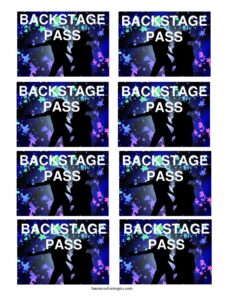
Backstage Pass
Create a professional backstage pass with our free template, controlling access at concerts and events; free download in PDF and DOCX.
PDF
DOC
2 downloads
0
likes
Download Files
- DOC
A Backstage Pass is a credential that grants the holder access to restricted areas behind the scenes at a concert, festival, theater production, or live event. People most commonly use a backstage pass to identify crew, performers, media, and VIP guests while keeping unauthorized visitors out of sensitive zones. This template is free to download in both PDF and DOCX formats — no signup required.
What Is a Backstage Pass?
A backstage pass is an access credential issued by an event organizer, promoter, venue, or production company to control who may enter areas that are off-limits to the general public. It documents the holder’s name, their role or access level, the event details, and the dates the pass is valid. Backstage passes are typically worn on a lanyard or clipped to clothing so that security staff can verify them at a glance. Beyond simple identification, the pass functions as a security tool: it defines exactly which zones a person is cleared to enter, from the stage wings and green room to loading docks and dressing rooms.
When Do You Need a Backstage Pass?
A backstage pass is essential any time an event has restricted areas and a mix of staff, talent, and guests who need different levels of access. Common scenarios include:
- Concerts and music tours — issuing passes to band members, roadies, sound engineers, and touring crew who need to move freely between the stage and back areas.
- Festivals — managing thousands of personnel across multiple stages, vendor zones, and artist compounds with color-coded or role-based passes.
- Theater and stage productions — controlling access to dressing rooms, wardrobe, and the wings during rehearsals and performances.
- Press and media access — granting photographers and journalists limited entry to photo pits, interview rooms, or media risers.
- Corporate and conference events — providing speakers, AV technicians, and organizers behind-the-scenes access to staging and prep areas.
- VIP and meet-and-greet packages — offering paying fans or special guests time in designated backstage spaces with performers.
Types of Backstage Passes
Not every pass grants the same access, and most professional events use tiers to keep zones secure. An All Access (AAA) pass typically allows entry to every area. A Working or Crew pass covers operational zones needed by staff. A Photo/Media pass limits the holder to designated press areas, often for specific time windows. A Guest or VIP pass provides a controlled experience without full operational access. Defining these tiers clearly on the pass — through wording, color, or access level — prevents confusion and keeps restricted areas genuinely restricted.
What a Backstage Pass Should Have
A complete and effective backstage pass should clearly communicate identity and authorization at a glance. Key elements include the event or tour name, the holder’s name or role, the access level or zone permissions, the date or date range the pass is valid, and a visual design that is hard to counterfeit. Many organizers add a logo, a unique pass number, a signature line for an authorizing official, and a space for a photo on higher-security passes. The goal is for security staff to verify legitimacy quickly without slowing down movement.
How to Fill Out a Backstage Pass
Because this is a flexible, general-purpose credential, customize each field to match your event and security needs. Follow these steps:
- Add the event or tour name at the top so the pass is clearly tied to a specific show or run of dates.
- Insert your logo or artwork to make the pass recognizable and harder to duplicate.
- Enter the holder’s name or leave it blank if passes are assigned at check-in.
- Specify the role or title — for example, Crew, Artist, Media, or Guest.
- Set the access level (such as All Access, Working, or VIP) so security knows which zones are permitted.
- Fill in the valid date or date range to prevent reuse on other days.
- Assign a pass number for tracking and to flag duplicates.
- Add an authorizing signature from the organizer or production manager where applicable.
Once complete, print on durable stock, laminate if needed, and attach to a lanyard or clip.
Tips for Designing Secure Passes
Security and clarity matter more than decoration. Use distinct colors for each access tier so staff can sort credentials from a distance. Keep the most important information — access level and date — large and high-contrast. For higher-risk events, consider adding a serial number, a holographic sticker, or a printed photo to deter forgery. Print on heavyweight cardstock or laminate the pass so it survives a long day of wear. If you reuse a design across multiple events, change the color, date, or a visible code each time so old passes cannot be recycled. Brief your security team on what a valid pass looks like before doors open.
Common Mistakes to Avoid
- Forgetting the date or date range, which lets passes be reused at future events without authorization.
- Using one design for everyone, making it impossible for security to distinguish access levels.
- Leaving the access level vague, so staff cannot tell which zones a holder may enter.
- Printing on flimsy paper that tears, smudges, or is easy to copy.
- Skipping pass numbers or tracking, which makes it hard to detect counterfeits or revoke a lost pass.
- Not briefing security staff on what a legitimate pass looks like before the event begins.
Frequently Asked Questions
What is a backstage pass used for? A backstage pass is used to control and verify who may enter restricted areas at an event, such as the stage, dressing rooms, or production zones. It identifies the holder’s role and access level so security staff can quickly allow or deny entry. Passes help keep performers, crew, and equipment safe from unauthorized access.
How do I make a backstage pass? Start with this free template, add your event name and logo, set the access level and valid dates, and assign a pass number if you want to track credentials. Print it on durable cardstock or laminate it, then attach it to a lanyard or clip. You can create different colors or tiers for crew, media, and VIP guests.
Is a backstage pass a legal document? No, a backstage pass is an access credential rather than a legal contract. It does not create binding obligations, but it does signal authorization granted by the event organizer or venue. Misusing or forging a pass can still lead to removal from the event or other consequences set by the organizer.
What access levels should I include? Common levels include All Access, Working/Crew, Photo/Media, and Guest/VIP. The right tiers depend on your event size and how many restricted zones you have. Clearly labeling each level and using distinct colors helps security enforce the boundaries quickly.
How much does this template cost? This backstage pass template is completely free to download from Business Forms Pro, in both PDF and DOCX formats. There is no signup, subscription, or hidden fee. You can edit and reuse it for as many events as you need.
How can I make passes harder to counterfeit? Use unique colors, serial numbers, and an authorizing signature, and consider adding a printed photo or a holographic sticker for high-security events. Change a visible element such as the color or date for each event so old passes cannot be reused. Brief your security team in advance on exactly what a valid pass looks like.
This backstage pass template is provided as a general example for informational purposes only and does not constitute legal, security, or professional advice. Access-control and event-safety requirements vary by venue, jurisdiction, and event type — consult the appropriate venue management, security professionals, or local authorities to ensure your credentialing meets all applicable rules.
Related Forms
- Visitor Badges
- Volunteer Badges
- Change Of Address Form
- Membership Cancellation Form
- Basic Entry Form White
- Entry Form
Browse more in Miscellaneous.