
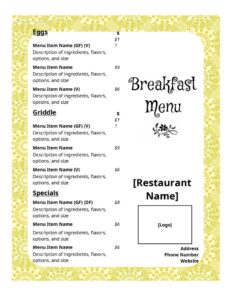
Breakfast Menu Casual
Create a clear, appetizing casual breakfast menu with this free template — organize dishes, prices, and add-ons, then download free in PDF or DOCX.
DOCX
2 downloads
0
likes
Download Files
- DOCX
A casual breakfast menu is a simple, easy-to-read listing of the breakfast dishes, drinks, and add-ons your café, diner, or coffee shop offers. Most people use it to present morning food in a relaxed, approachable format that guests can scan quickly while seated. This template is free to download in PDF and DOCX, with no signup required.
What Is a Casual Breakfast Menu?
A casual breakfast menu is a printed or digital list that a restaurant, diner, café, bed-and-breakfast, or food truck uses to display its morning offerings. It is typically organized into friendly categories — eggs, griddle items, sides, beverages — with short descriptions and prices beside each item. Unlike a formal fine-dining menu, a casual breakfast menu favors plain language, generous spacing, and an inviting tone. It is used by owners, managers, and chefs to communicate what is available, set expectations on portions and price, and encourage add-ons. A well-built breakfast menu doubles as a marketing tool, steering guests toward signature plates and higher-margin items while making ordering fast and pleasant.
When Do You Need a Casual Breakfast Menu?
This template fits a wide range of morning-service situations. Common scenarios include:
- Opening a new café or diner and needing a clean menu before your first morning rush.
- Launching breakfast or brunch service at a restaurant that previously only opened for lunch and dinner.
- Updating prices or items seasonally when ingredient costs change or you rotate specials.
- Running a food truck or pop-up that serves a focused breakfast lineup and needs a printable board.
- Hosting a bed-and-breakfast or hotel where guests choose from a fixed morning selection.
- Catering a corporate breakfast or event and presenting attendees with the available choices.
Types of Casual Breakfast Menus
Even within the casual category, breakfast menus take several forms. A single-page table menu sits on each table or in a holder and lists everything at once. A chalkboard or counter menu works for quick-service spots where guests order at a register. A weekend brunch menu often adds heartier plates, cocktails, and shareable items. A continental or B&B menu keeps it short, focusing on pastries, fruit, and coffee. This template adapts to all of them — you choose the categories, the depth of descriptions, and how many items to include.
What a Casual Breakfast Menu Should Have
A complete breakfast menu balances clarity with appeal. The essential elements include:
- Business name and logo at the top for branding and recognition.
- Clear category headings such as Eggs & Omelets, From the Griddle, Sides, and Beverages.
- Item names that are short and recognizable.
- Brief descriptions highlighting key ingredients and preparation.
- Prices aligned consistently beside each item.
- Add-on and substitution options like extra bacon, egg whites, or gluten-free bread.
- Service hours or availability notes so guests know when breakfast is served.
- Dietary or allergen markers where helpful, such as vegetarian or contains-nuts symbols.
How to Fill Out a Casual Breakfast Menu
Because this is a flexible layout template, you customize the content to match your kitchen. Work through it section by section:
- Add your branding. Replace the placeholder header with your business name, logo, and an optional tagline that reflects your morning vibe.
- Set your category headings. Decide on groups like Eggs, Pancakes & Waffles, Breakfast Sandwiches, Sides, and Drinks.
- List each item. Type the dish name, then a one-line description noting standout ingredients and how it’s served.
- Enter prices. Place a clear price beside each item, keeping decimal alignment consistent down the column.
- Build an add-ons section. List extras such as additional eggs, avocado, cheese, or premium coffee with their upcharges.
- Note availability. Add breakfast hours, weekend-only items, or seasonal specials.
- Add dietary symbols. Mark vegetarian, vegan, or gluten-friendly options, and include an allergen disclaimer.
- Proofread and finalize. Check spelling, confirm prices, then save as PDF for printing or DOCX for further edits.
Design Tips for an Appetizing Layout
Presentation influences what guests order. Keep the menu uncluttered with generous white space so the eye moves easily from category to category. Use one or two readable fonts and reserve bold styling for item names. Place your highest-margin or signature plates near the top of a section or in a boxed callout, since diners tend to notice items at the top and bottom of a list. Limit each description to a single appetizing line — too much text slows reading. Choose warm, food-friendly colors and ensure any printed version is legible under the soft lighting common to morning service.
Pricing and Updating Your Menu
Review your menu prices regularly against ingredient costs to protect your margins. Because the DOCX version is fully editable, you can adjust prices, swap seasonal items, or add limited-time specials in minutes and reprint. Keep a master copy so you can track changes over time, and consider dating your menu file internally so you always know which version is current at the counter.
Common Mistakes to Avoid
- Overcrowding the page with too many items or long descriptions, which overwhelms guests.
- Inconsistent pricing alignment that makes the menu look unprofessional and hard to scan.
- Forgetting dietary and allergen notes, which frustrates guests with restrictions and creates safety concerns.
- Vague item names that leave diners guessing what they’ll receive.
- Leaving placeholder text from the template in the final printed version.
- Not stating service hours, leading to confusion when breakfast ends and lunch begins.
Frequently Asked Questions
What is a casual breakfast menu? It is a relaxed, easy-to-read listing of a restaurant’s morning food and drink offerings, organized by category with short descriptions and prices. It is meant to make ordering quick and approachable rather than formal. Cafés, diners, food trucks, and B&Bs all use this style of menu.
How do I fill out this breakfast menu template? Start by adding your business name and logo, then set your category headings such as Eggs, Griddle, and Beverages. List each dish with a brief description and price, add an add-ons section, and note your service hours. Proofread everything before saving and printing.
Can I edit the template after downloading? Yes. The DOCX version is fully editable in word processors, so you can change item names, descriptions, prices, fonts, and colors. Save a PDF copy when you’re ready to print or share a final version.
How much does this template cost? It is completely free to download from Business Forms Pro in both PDF and DOCX formats, with no signup or payment required. You can reuse and update it as often as you like.
Should I include allergen and dietary information? Including markers for vegetarian, vegan, gluten-friendly, or nut-containing items is strongly recommended for guest safety and convenience. Many regions also have labeling expectations for food businesses, so check the rules that apply to you.
How often should I update my breakfast menu? Review it whenever ingredient costs shift, when you rotate seasonal specials, or at least a couple of times a year. Because the file is editable, small changes like price adjustments take only minutes before reprinting.
This template is a general example provided for informational purposes only and does not constitute legal, financial, tax, or food-safety advice. Labeling, allergen disclosure, and pricing requirements vary by jurisdiction — consult a qualified professional or your local authority to ensure your menu meets applicable regulations.
Related Forms
- Order At Counter Sign
- Knife Sharpening Log
- Takeout Menu
- No Free Refills Sign
- Line Starts Here Sign
- Shift Preferences Log
Browse more in Restaurant.