
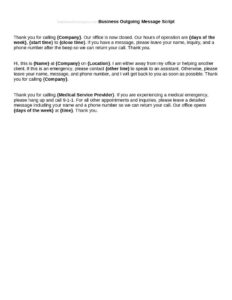
Business Outgoing Message Scripts
Create professional voicemail greetings with free Business Outgoing Message Scripts — clear, ready-to-use templates available as a free download in PDF/DOCX.
DOCX
2 downloads
0
likes
Download Files
- DOCX
Business Outgoing Message Scripts are ready-to-use templates that help you write professional voicemail greetings, after-hours recordings, and on-hold announcements for your phone system. Most people use them to replace a rushed, improvised greeting with a polished message that reflects their brand and tells callers exactly what to do. You can download these scripts free as PDF or DOCX, with no signup required.
What Is a Business Outgoing Message Script?
A Business Outgoing Message Script is a written template for the recorded message callers hear when they reach your phone line and you cannot answer. It is used by business owners, receptionists, customer service teams, and solo professionals to plan exactly what the recording will say before they hit record. The script documents the greeting, the reason the caller has reached voicemail or an automated line, alternative contact options, and a clear call to action. Rather than fumbling through an unscripted message, you read from a prepared draft, ensuring consistency across departments, professional tone, and complete information every time. It covers everyday voicemail, after-hours, holiday closures, and on-hold scenarios.
When Do You Need a Business Outgoing Message Script?
A prepared script ensures every caller hears the same clear, courteous message no matter who set up the line. Common situations include:
- Standard voicemail: When you cannot answer and want callers to leave their name, number, and reason for calling.
- After-hours greetings: Letting callers know your business is closed and when you will reopen.
- Holiday or seasonal closures: Announcing temporary closures and directing urgent inquiries elsewhere.
- On-hold messages: Reassuring callers they are in a queue and pointing them to online resources while they wait.
- Out-of-office or vacation coverage: Naming a backup contact while you are away.
- New phone system setup: Recording fresh greetings for a main line, departmental extensions, or a virtual receptionist menu.
Types of Outgoing Messages
Different lines call for different scripts. A main-line greeting introduces the company and offers a menu or directs to voicemail. A personal extension greeting identifies an individual and sets expectations for a callback. An after-hours message emphasizes hours and emergency options, while a holiday message is dated and temporary. An on-hold script blends reassurance with light promotion. Using the right type for each line keeps callers informed and reduces frustration.
What a Business Outgoing Message Script Should Have
A complete script gives the listener everything they need in under 30 seconds. Strong scripts include the following elements:
- A warm greeting that identifies the business or person by name.
- The reason the caller has reached the recording (unavailable, closed, in a queue).
- A clear instruction — leave a message, press a number, or visit the website.
- Information to leave such as name, phone number, and a brief reason for the call.
- Response expectations like a callback window or business hours.
- Alternative contact options for urgent matters, such as an email address or a second number.
- A polite closing that thanks the caller.
How to Fill Out a Business Outgoing Message Script
Work through the template line by line so your final recording reads smoothly aloud:
- Choose the scenario: Select the script type — voicemail, after-hours, holiday, or on-hold — that matches the line you are setting up.
- Enter the business or person name: Fill in the greeting field with the exact name callers will recognize, such as “Thank you for calling Maple Street Dental.”
- State your status: Note whether you are unavailable, closed, or assisting other callers.
- Add hours or callback window: Insert your operating hours or how soon you will return the call.
- Write the call to action: Tell the caller exactly what to do — leave a message after the tone, press an extension, or visit your site.
- List the details to leave: Prompt for name, number, and a short reason.
- Provide alternatives: Add an email, website, or emergency contact for urgent needs.
- Close warmly: Finish with a thank-you and read the full draft aloud to check timing.
Tips for Recording a Polished Message
A good script is only half the job — delivery matters too. Record in a quiet room with no background noise, speak slightly slower than your normal pace, and smile while you talk so your tone sounds welcoming. Keep the greeting between 15 and 30 seconds; callers lose patience with long recordings. Spell out any email address clearly and repeat important phone numbers. Listen back before saving, and re-record if you stumble or rush. Update your script whenever hours change, a staff member leaves, or a holiday approaches so callers never hear outdated information.
Adapting Scripts Across Departments
If your business has several lines, build a consistent family of greetings from a single template. Keep the opening identification line uniform so the brand voice is recognizable, then customize the middle section for each team — sales might add a promotion, support might point callers to a help center, and billing might list account hours. Standardizing the structure while varying the details makes your phone system feel cohesive and reduces the chance that one extension sounds far more professional than another.
Common Mistakes to Avoid
- Too long: Rambling greetings frustrate callers who just want to leave a message.
- Forgetting the call to action: Failing to tell callers what to do or what details to leave.
- Outdated information: Leaving old hours, names, or holiday notices that no longer apply.
- No alternative contact: Offering no path for urgent or after-hours needs.
- Mumbling or rushing: Recording too fast or in a noisy space so the message is hard to understand.
- Sounding impersonal: A flat, robotic tone that fails to reflect a welcoming brand.
Frequently Asked Questions
What is a Business Outgoing Message Script used for? It is a template for writing the recorded greeting callers hear when they reach your voicemail, an after-hours line, or an on-hold queue. Drafting the message in advance ensures it is clear, complete, and professional before you record it.
How long should an outgoing message be? Aim for 15 to 30 seconds. That is long enough to greet the caller, explain your status, and give a clear instruction without losing their patience. Reading your script aloud is the easiest way to test the timing.
Do I have to record exactly what the script says? No — the script is a starting point. Personalize the wording, names, hours, and contact details to fit your business, then adjust the phrasing until it sounds natural when spoken aloud.
What information should I ask callers to leave? Prompt callers for their name, a phone number, and a brief reason for their call. This helps you return the call efficiently and prioritize urgent matters without playing the message multiple times.
Can I use one script for every phone line? You can use one as a base, but it is best to tailor versions for voicemail, after-hours, holidays, and individual extensions. Keeping the opening identification consistent while customizing the details creates a cohesive, professional phone system.
Is this template free to download? Yes. The Business Outgoing Message Scripts template is completely free to download in PDF or DOCX format, with no signup required, so you can edit and record your greetings right away.
This template is a general example provided for informational purposes only and does not constitute legal, business, or professional advice. Telephone recording, disclosure, and accessibility requirements vary by jurisdiction — consult a qualified professional to ensure your messages comply with applicable rules.
Related Forms
Browse more in Script.