
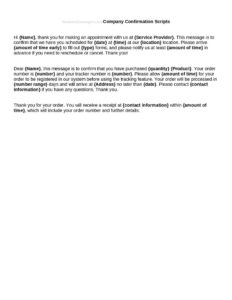
Company Confirmation Scripts
Download free Company Confirmation Scripts to verify appointments, orders, and account details with consistent, professional wording. Free template download.
DOCX
0
likes
Download Files
- DOCX
Company Confirmation Scripts are ready-to-use talking points that help your team verify appointments, orders, payments, or account details with callers in a clear, consistent way. The most common reason people use them is to make sure every staff member confirms the right information the same way, reducing errors and no-shows. You can download this template free in PDF and DOCX with no signup required.
What Is a Company Confirmation Script?
A Company Confirmation Script is a written guide that tells employees exactly what to say when confirming a transaction, booking, or piece of information with a customer or contact. It is typically issued by a manager, operations lead, or customer service supervisor and used by front-desk staff, call center agents, schedulers, and sales teams. The script documents the standard greeting, the details to verify, the questions to ask, and the closing statement. Its purpose is to ensure accuracy, protect against miscommunication, and present a professional, on-brand voice across every interaction. Because the same wording is used by everyone, confirmation scripts also make training faster and give managers a reliable baseline to review and improve over time.
When Do You Need Company Confirmation Scripts?
Confirmation scripts are useful any time a small wording mistake could cost time, money, or trust. Common situations include:
- Appointment reminders: Confirming the date, time, location, and provider before a scheduled visit to cut down on no-shows.
- Order verification: Reading back items, quantities, shipping address, and total before processing a purchase.
- Payment and billing: Verifying the amount, payment method, and authorization without exposing sensitive data unnecessarily.
- Account changes: Confirming a customer’s identity and the specific change requested before updating records.
- Delivery or service scheduling: Restating the window, contact name, and any access instructions.
- Event or reservation RSVPs: Confirming headcount, special requests, and the responsible contact.
Types of Confirmation Scripts
One template can hold several short scripts tailored to different moments. Inbound scripts guide agents who answer calls and need to confirm why the customer is reaching out. Outbound scripts guide proactive calls, such as reminding a client of an upcoming appointment. Voicemail and text scripts provide concise wording for when you can’t reach the person directly. Keeping these variations in one document means staff can switch between them quickly while still sounding consistent and professional.
What a Confirmation Script Should Have
A complete, usable confirmation script includes a friendly opening that identifies the company and the caller by name, a clear statement of the reason for the contact, the specific details to read back for verification, a short list of confirmation questions, a place to capture the customer’s response, a polite handling path for objections or corrections, and a professional closing with next steps. It should also include reminders about what information not to read aloud and a note on logging the outcome. Leaving room for branching responses—what to say if the customer agrees, disagrees, or needs to reschedule—turns a flat script into a practical tool.
How to Fill Out Company Confirmation Scripts
Because this template is a flexible script framework, customize it to match your business and the interaction you are confirming. Follow these steps:
- Name the script: Label each script for its purpose, such as “Appointment Reminder” or “Order Confirmation,” so staff find it instantly.
- Write the greeting: Add your company name and a placeholder for the agent’s name and the customer’s name.
- State the reason: Insert one clear sentence explaining why you are confirming, such as the appointment date or order number.
- List the verification details: Fill in the exact fields to read back—date, time, address, items, amounts—using brackets the agent fills live.
- Add confirmation questions: Write the yes/no or open questions that prompt the customer to confirm or correct.
- Map the responses: Provide wording for agree, disagree, and reschedule paths so no one improvises.
- Write the closing: Include a thank-you, a summary of next steps, and contact information for follow-up.
- Add logging notes: Tell staff how to record the call outcome and where.
Tips for Effective Confirmation Calls
Keep each script short enough to read naturally—long, robotic scripts make callers tune out. Encourage agents to use the customer’s name early and to pause for responses rather than reading straight through. Train staff to verify identity before sharing any account specifics, and to summarize at the end so both parties leave with the same understanding. Review your scripts every few months using real call feedback, and trim wording that causes confusion. A quick spoken “read-back” of key details is the single most effective way to catch errors before they become problems.
Privacy and Compliance Notes
When a script involves identity verification, payments, or personal data, only collect and repeat the minimum information needed, and avoid reading full card numbers or sensitive identifiers aloud where others may overhear. Some industries and regions have specific rules about call recording, consent, and disclosures—requirements vary by jurisdiction and sector, so check the rules that apply to your business before launching a script. Building a short consent or disclosure line into the greeting is a simple way to stay on the safe side.
Common Mistakes to Avoid
- Sounding robotic: Reading word-for-word with no warmth makes customers disengage—coach a natural delivery.
- Skipping the read-back: Failing to restate key details defeats the entire purpose of confirming.
- Over-collecting data: Asking for or repeating sensitive information that isn’t needed creates risk.
- No branching paths: Leaving agents with nothing to say when a customer disagrees leads to inconsistent handling.
- Forgetting to log outcomes: If confirmations aren’t recorded, you lose the trail when disputes arise.
- Never updating scripts: Outdated wording referencing old products or policies confuses customers and staff alike.
Frequently Asked Questions
What is a company confirmation script used for? It is used to verify appointments, orders, payments, or account details with customers using consistent, approved wording. The goal is to reduce errors, prevent no-shows, and present a professional voice across your whole team. It works for both inbound and outbound calls as well as texts and voicemails.
How do I customize the script for my business? Start by replacing the bracketed placeholders with your company name, the details you need to verify, and your specific confirmation questions. Then write short response paths for when a customer agrees, disagrees, or needs to reschedule. Test the script on a few real calls and refine the wording that feels awkward.
Do confirmation scripts need to be read word-for-word? No. The script is a guide, not a rigid statement; agents should sound natural and adapt the tone to the conversation. The important parts to keep exact are the verification details and any required disclosures, which protect accuracy and compliance.
Are these scripts legally binding? A confirmation script itself is an internal communication tool and is not a contract. However, what is said during a confirmation can affect agreements, so make sure the wording is accurate and check any call-recording or consent rules that apply to your industry.
Can I use one template for different types of confirmations? Yes. Most businesses keep several short scripts—appointment reminders, order confirmations, account changes—in a single document and label each clearly. This lets staff switch between situations quickly while keeping a consistent style.
How much do these confirmation scripts cost? They are completely free to download from Business Forms Pro in both PDF and DOCX formats, with no signup required. You can edit the DOCX version freely to match your branding, products, and procedures.
This template is a general example provided for informational purposes only and is not legal, financial, or compliance advice. Call-recording, consent, and data-handling requirements vary by jurisdiction and industry; consult a qualified professional to confirm your scripts meet the rules that apply to you.
Related Forms
- Company Error Scripts
- Business Outgoing Message Scripts
- Cold Call Scripts
- Appointment Reminder Scripts
Browse more in Script.