
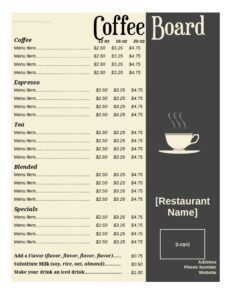
Coffee Menu
Download a free Coffee Menu template to list drinks, sizes, and prices clearly for your cafe — free download in editable PDF and DOCX formats.
DOCX
4 downloads
0
likes
Download Files
- DOCX
A Coffee Menu is a printed or digital list that shows the espresso drinks, brewed coffees, and add-ons a cafe sells along with their sizes and prices. The most common reason people use one is to give customers a clear, attractive way to browse and order while keeping pricing consistent at the counter. You can download this Coffee Menu template free in editable PDF and DOCX formats, with no signup required.
What Is a Coffee Menu?
A Coffee Menu is a customer-facing document used by coffee shops, cafes, kiosks, food trucks, and restaurants to present their beverage offerings in an organized way. It is typically issued by the business owner or manager and displayed at the counter, on a tabletop, or as a printed handout. The menu documents each drink, the available sizes, any milk or flavor options, and the corresponding prices. Its purpose is to help customers make decisions quickly, set accurate expectations about cost, and support staff in taking orders correctly. A well-built coffee menu also reinforces your brand and showcases signature or seasonal drinks that you want to sell more often.
When Do You Need a Coffee Menu?
A coffee menu is useful any time you are selling beverages to the public and want pricing and options to be clear. Common situations include:
- Opening a new cafe or coffee shop and needing a counter or wall menu before your first day of service.
- Running a mobile coffee cart or food truck where a compact, easy-to-read board guides quick ordering lines.
- Updating prices after a change in bean costs, milk prices, or supplier fees and reprinting an accurate list.
- Launching seasonal drinks such as pumpkin lattes in fall or iced specials in summer that need a dedicated section.
- Catering or pop-up events where a simple handout shows guests what coffee options are available.
- Adding a coffee program to a restaurant or bakery and wanting a standalone beverage list alongside the food menu.
Types of Coffee Menus
Coffee menus come in several formats depending on your space and service style. A counter menu sits near the register for customers waiting in line. A wall or chalkboard menu displays larger text for fast-paced shops. A printed handout or table tent works for sit-down cafes where guests browse at their seats. A digital screen menu rotates drinks and promotions. This template adapts easily to any of these — you can print it as-is, scale it up for a board, or use the layout as a base for a digital version.
What a Coffee Menu Should Have
A complete coffee menu organizes drinks logically and makes pricing impossible to miss. Strong menus typically include the cafe name or logo at the top, clearly grouped categories (espresso drinks, brewed coffee, cold drinks, extras), each drink name with a short description where helpful, available sizes, and the price for each size. Many also list milk alternatives, syrup flavors, and add-on charges. Keeping the layout clean with consistent fonts and aligned prices helps customers scan quickly and reduces ordering confusion at the counter.
How to Fill Out a Coffee Menu
This template is flexible, so adapt each section to your actual offerings as you complete it:
- Add your business name and logo at the top so the menu reflects your brand identity.
- Create category headings such as Espresso, Brewed Coffee, Cold Drinks, and Extras to group your items.
- List each drink name under the correct category — for example Cappuccino, Latte, Americano, Cold Brew, or Mocha.
- Write a short description for signature or less familiar drinks so customers know what to expect.
- Enter the sizes you offer (small, medium, large or 12oz, 16oz, 20oz) in clearly labeled columns.
- Add the price for each drink and each size, keeping decimal points aligned for easy reading.
- List add-ons and extras such as oat milk, extra shot, flavored syrups, or whipped cream with their charges.
- Note any specials or seasonal items in a highlighted section to draw attention.
- Review for accuracy, then save and print or export to your display.
Tips for an Effective Coffee Menu
Keep your menu focused — too many choices can slow down lines and overwhelm customers. Place your highest-margin or signature drinks near the top or in a featured box, since items at the start of a list often sell more. Use simple, appetizing descriptions rather than long paragraphs, and make sure prices are easy to find at a glance. If you offer milk alternatives or extra shots for an upcharge, state those clearly so there are no surprises at checkout. Finally, keep formatting consistent: the same font, spacing, and alignment throughout makes the menu look professional and trustworthy.
Common Mistakes to Avoid
- Forgetting to update prices after a cost change, leading to mismatches between the menu and the register.
- Listing drinks without sizes or prices, which forces customers to ask and slows down service.
- Overcrowding the layout with too many items and tiny text that is hard to read from the counter.
- Leaving off add-on charges for alternative milks or extra shots, causing confusion at payment.
- Using inconsistent formatting with mismatched fonts, uneven spacing, or misaligned prices.
- Not proofreading drink names and descriptions, which can make the menu look careless.
Frequently Asked Questions
What is a Coffee Menu? A Coffee Menu is a list of the coffee drinks, sizes, and prices a cafe or coffee shop offers to customers. It helps guests browse and order efficiently while keeping pricing consistent. It can be printed for a counter, scaled up for a wall board, or used as the basis for a digital display.
How do I fill out the Coffee Menu template? Start by adding your business name and logo, then create category headings for your drink groups. List each drink with its sizes and prices, add any descriptions for signature items, and include a section for extras like milk alternatives or flavor shots. Review everything for accuracy before printing or exporting.
Is this Coffee Menu template free? Yes. You can download this Coffee Menu template completely free in both PDF and DOCX formats, with no signup or account required. You are free to edit it, brand it, and reuse it for your business as often as you need.
Can I edit the menu to match my cafe’s branding? Absolutely. The DOCX version is fully editable, so you can change fonts, colors, add your logo, and rearrange categories to fit your brand. The PDF version is ideal if you want a clean, ready-to-print layout without further changes.
Should I include drink descriptions on the menu? Descriptions are optional but helpful for signature, seasonal, or less common drinks. A short, appetizing line can encourage customers to try something new, while familiar items like a plain latte usually need only the name. Keep descriptions brief so the menu stays easy to scan.
How often should I update my coffee menu? Update your menu whenever prices change, you add or remove drinks, or you launch seasonal specials. Many cafes review their menu at least seasonally to keep offerings fresh and pricing accurate. Regular updates prevent mismatches between what is listed and what you actually charge.
This Coffee Menu template is a general example provided for informational purposes only and does not constitute legal, financial, or business advice. Pricing strategies, labeling rules, and food-service requirements vary by location, so consult the appropriate local authorities or a qualified professional before relying on this document.
Related Forms
- No Outside Food Or Drink Sign
- See Host Table Sign
- Food Cooling Log
- Tips Appreciated Sign
- Line Starts Here Sign
- Refrigerator Inventory Log
Browse more in Restaurant.