
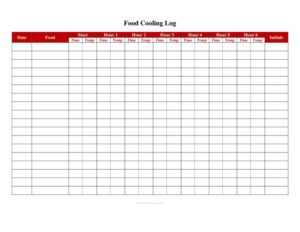
Food Cooling Log
Track safe cooling times and temperatures with our free Food Cooling Log template, available as a free download in PDF and DOCX for any kitchen.
PDF
DOC
25 downloads
0
likes
Download Files
- DOC
A Food Cooling Log is a simple kitchen record used to document how quickly cooked foods are chilled from hot to cold storage, proving that each batch passed through the temperature danger zone safely. Most restaurants and food businesses use it to comply with food safety rules and to prevent bacterial growth in cooked items. It’s free to download in PDF and DOCX with no signup required.
What Is a Food Cooling Log?
A Food Cooling Log is a monitoring document that records the temperature of a cooked food item at set time intervals as it cools. It is typically filled out by line cooks, prep staff, or kitchen managers and reviewed by a supervisor or the person in charge. The log captures the food name, the time and temperature when cooling started, follow-up readings, the cooling method used, and who performed each check. Because cooked food must move out of the temperature danger zone within specific time windows, the log provides written evidence that a kitchen followed safe procedures — useful for internal accountability, staff training, and health inspections alike.
When Do You Need a Food Cooling Log?
Any operation that cooks food in advance and chills it for later service should keep a cooling log. Common situations include:
- Cooling large batches of soups, stews, chili, sauces, or gravies after cooking for next-day service.
- Chilling cooked proteins such as roasts, chicken, ground beef, or pulled pork before refrigerated storage.
- Preparing cooked rice, pasta, beans, or potatoes that will be cooled and reheated later.
- Cooling food at a catering operation, school cafeteria, hospital kitchen, or commissary that produces meals in bulk.
- Demonstrating compliance during a routine health inspection or a HACCP plan audit.
- Documenting corrective action when a food item does not cool quickly enough and must be discarded or reheated.
What a Food Cooling Log Should Have
A complete and usable cooling log includes a few essential elements. It should identify the food item and the date it was cooked. It needs a clear starting temperature and time, plus columns for follow-up readings at defined intervals (for example, after the first cooling stage and after the second). It should note the cooling method used — such as an ice bath, shallow pans, or a blast chiller — and provide space for the employee initials of whoever took each reading. A final column for corrective action and a manager verification signature rounds out a thorough log.
How to Fill Out a Food Cooling Log
- Date and food item: Write the day’s date and the specific dish being cooled, such as “chicken noodle soup” or “braised beef.” Be precise so each batch is traceable.
- Starting temperature and time: Once the food comes off the heat, insert a clean, calibrated thermometer into the thickest part, then record the temperature and the exact time. This is your cooling start point.
- First interval reading: After the first cooling window, take another reading and log the temperature and time. This confirms whether the food is dropping through the upper danger zone fast enough.
- Second interval reading: Take a final reading once the food should have reached cold-holding temperature, and record both the time and temperature.
- Cooling method: Note the technique used — ice bath, ice paddle, shallow pans, or blast chiller.
- Employee initials: Have each staff member initial the readings they took.
- Corrective action and verification: If a reading is out of range, note the action taken, then have a manager review and sign off.
Understanding the Temperature Danger Zone
Cooling logs exist because bacteria multiply fastest in the middle temperature range between hot cooking heat and cold refrigeration. The goal of cooling is to move food through this range quickly and in stages — first dropping rapidly from cooking heat to a mid-point, then continuing down to safe cold-holding temperature within an overall time limit. Specific target temperatures and time windows are set by your local food code, so always confirm the exact figures that apply in your area. The log’s interval columns are designed to mirror these stages, giving you a written checkpoint at each step rather than a single guess at the end.
Tips for Faster, Safer Cooling
Recording temperatures is only half the job; the log also helps you spot whether your cooling methods are working. To speed cooling, divide large batches into shallow containers no more than a couple of inches deep, stir thick liquids with an ice paddle, leave space around containers in the cooler for air circulation, and avoid stacking hot pans. A blast chiller dramatically shortens cooling time when available. If your log repeatedly shows food cooling too slowly, treat it as a signal to change your method rather than simply recording the failure.
Common Mistakes to Avoid
- Filling in temperatures from memory at the end of a shift instead of measuring at each interval in real time.
- Using an uncalibrated or dirty thermometer, which produces inaccurate readings and can cross-contaminate food.
- Cooling food in deep, covered containers that trap heat and prevent the food from chilling fast enough.
- Leaving the corrective action column blank when a reading is out of range — inspectors want to see what you did about it.
- Skipping the start-time entry, which makes it impossible to prove the food cooled within the allowed window.
- Failing to have a manager verify the log, leaving no accountability or review built into the process.
Frequently Asked Questions
What is a food cooling log used for? It is used to document that cooked food was chilled quickly and safely through the temperature danger zone. Kitchens keep it as proof of safe handling for health inspections, HACCP plans, and internal quality control. It also helps managers identify when cooling methods need improvement.
How often should I record temperatures on the log? Record a temperature at the start of cooling and then at each defined interval until the food reaches safe cold-holding temperature. The exact intervals and target temperatures depend on your local food code, so follow the windows your jurisdiction requires. Logging at each stage rather than only at the end gives you actionable, verifiable data.
Who is responsible for filling out the cooling log? Typically the cook or prep employee who handled the food takes and records the readings, initialing each entry. A manager or the person in charge then reviews and verifies the completed log. Building in this review step creates accountability and catches problems early.
Is a food cooling log legally required? Many jurisdictions and food safety programs require temperature monitoring records as part of an active managerial control or HACCP system, though the exact format may vary. Even where a specific log isn’t mandated, keeping one demonstrates due diligence during inspections. Check your local health department’s requirements to be sure.
What should I do if food doesn’t cool fast enough? If a reading shows the food is not cooling within the required window, you generally must take corrective action — such as reheating and recooling using a faster method, or discarding the food if too much time has passed. Record exactly what you did in the corrective action column. This shows inspectors you responded appropriately.
Is this Food Cooling Log template free to download? Yes. This Food Cooling Log template is completely free to download in both PDF and DOCX formats with no signup required. You can print the PDF for the kitchen wall or edit the DOCX to match your menu items and cooling intervals.
This Food Cooling Log template is a general example provided for informational purposes only and does not constitute legal, regulatory, or food safety advice. Food code requirements, target temperatures, and recordkeeping rules vary by jurisdiction. Consult your local health department or a qualified food safety professional to ensure your practices comply with applicable regulations.
Related Forms
- Weekly Sales Report
- Brunch Menu
- Shift Change Form
- Reservations List
- Freezer Temperature Log
- Seat Yourself Sign
Browse more in Restaurant.