
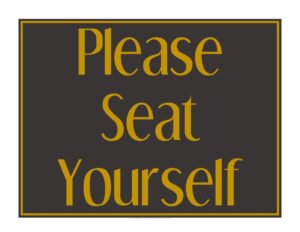
Seat Yourself Sign
Download a free Seat Yourself Sign template in PDF and DOCX to guide guests to open tables and keep your restaurant entrance running smoothly.
PDF 2
DOC
DOCX
5 downloads
0
likes
Download Files
- DOC
- DOCX
A Seat Yourself Sign is a simple printable notice that tells guests they may choose their own table without waiting for a host to seat them. Restaurants, cafes, and bars use it most often during off-peak hours or in casual settings where a full host stand isn’t staffed, and you can download it free in PDF and DOCX formats with no signup required.
What Is a Seat Yourself Sign?
A Seat Yourself Sign is a customer-facing notice placed at the entrance, host stand, or doorway of a dining establishment. Its job is to communicate clearly that guests are welcome to find and take any open table on their own rather than waiting to be greeted and escorted. It is typically used by restaurant owners, managers, and front-of-house staff to manage the flow of customers when no host is on duty. The sign documents your seating policy in a friendly, unambiguous way, reducing confusion at the door and helping guests feel comfortable settling in. Because it sets expectations the moment people arrive, a good seat-yourself sign keeps the entrance from becoming a bottleneck during busy or short-staffed periods.
When Do You Need a Seat Yourself Sign?
This sign is useful any time you want guests to seat themselves rather than wait for assistance. Common situations include:
- Off-peak hours when you cut back on host stand coverage but still want customers to feel welcomed.
- Casual or counter-service venues like cafes, diners, breakfast spots, and pubs where self-seating is the norm.
- Short-staffed shifts where the front-of-house team is stretched and can’t greet every guest at the door.
- Breakfast and lunch rushes where speed matters and a quick seat-yourself policy keeps lines moving.
- Outdoor patios or overflow areas that aren’t always actively managed by a host.
- Pop-ups, food halls, and temporary setups where a formal seating system isn’t practical.
In each of these cases, a visible sign prevents guests from hovering awkwardly at the entrance, unsure whether they should wait or walk in.
What a Seat Yourself Sign Should Have
Although a seat-yourself sign is short, the most effective ones share a few key elements. First, a clear headline such as “Please Seat Yourself” so the message is readable from a distance. Second, a brief instruction line that tells guests what to do next, such as choosing any open table or letting a server know they’ve arrived. Third, optional details like operating hours, where to order, or how to flag down staff for service. Many restaurants also add their logo or name to keep the sign on-brand, plus a friendly closing line that sets a welcoming tone. Good contrast, large fonts, and minimal clutter make the sign easy to read in passing.
How to Fill Out a Seat Yourself Sign
This template is designed to be quick to customize and print. Follow these steps:
- Add your restaurant name or logo at the top so guests know they’re in the right place and the sign matches your brand.
- Write or keep the main headline — typically “Please Seat Yourself” — in the largest, boldest text so it reads from across the room.
- Enter a short instruction line telling guests exactly what to do, such as “Choose any open table and a server will be right with you.”
- Add optional service notes, like where to place an order, whether menus are on the table, or how to get a server’s attention.
- Include hours or conditions if self-seating only applies at certain times, for example “Self-seating available before 5 PM.”
- Add a friendly closing line such as “Welcome — enjoy your visit!” to set a warm tone.
- Print and display the finished sign at the entrance, on the host stand, or at each unstaffed seating area.
Tips for Displaying Your Sign Effectively
Placement matters as much as wording. Position the sign at eye level near the entrance where guests naturally pause when they walk in. If your doorway is wide or busy, consider using more than one — one at the door and one at the host stand. Use a sturdy acrylic stand or frame so the sign stays upright and looks professional rather than taped to a wall. Keep the design consistent with your other signage and menus so it reinforces your brand. If your policy changes by time of day, print two versions so staff can swap them out quickly, or add the relevant hours directly to the sign to avoid confusion.
Seat Yourself vs. Wait to Be Seated
A seat-yourself sign is the opposite of a “Please Wait to Be Seated” sign, and using the right one prevents mixed messages. Choose a seat-yourself sign when you want to speed up entry and reduce the need for a dedicated host, which works well in casual venues and slower shifts. Choose a wait-to-be-seated sign when you need to control table assignments, balance server sections, or manage reservations and waitlists. Some restaurants keep both on hand and switch between them depending on staffing and how busy the dining room is. Whichever you use, the goal is the same: give guests clear, immediate direction the moment they arrive.
Common Mistakes to Avoid
- Tiny or low-contrast text that guests can’t read from the doorway, defeating the sign’s purpose.
- Burying the instruction so people see “Seat Yourself” but don’t know whether to order at the counter or wait for a server.
- Leaving the sign up during full host service, which creates confusion when a host is actually greeting guests.
- Forgetting to update hours when your self-seating window changes, leading to frustrated customers.
- Cluttering the sign with too many rules so the main message gets lost.
- Using a flimsy display that tips over or looks unprofessional at your entrance.
Frequently Asked Questions
What is a Seat Yourself Sign used for? It tells arriving guests they may choose and take any open table on their own instead of waiting to be seated by a host. Restaurants use it during off-peak hours, in casual settings, or when the front of house is short-staffed. It keeps the entrance clear and helps guests settle in quickly.
How do I customize this template? Open the DOCX version and replace the placeholder text with your restaurant name, headline, and any service instructions, then add your logo if you have one. You can adjust fonts, colors, and sizing to match your brand. When you’re done, print it and place it in a frame or stand at your entrance.
Is the Seat Yourself Sign template free to download? Yes. You can download it free in both PDF and DOCX formats with no signup or account required. The PDF is ready to print as-is, while the DOCX lets you edit the wording and design.
Should the sign include operating hours? Only if your self-seating policy applies during specific times. If guests can seat themselves all day, you can leave hours off for a cleaner look. If self-seating ends when full host service begins, adding a short note like “Self-seating before 5 PM” prevents confusion.
Where is the best place to display the sign? Position it at eye level near the entrance or on the host stand where guests naturally pause when they walk in. In larger or busier spaces, use more than one so the message is visible from multiple angles. A sturdy upright frame or acrylic stand looks more professional than tape.
Can I use this sign in a cafe or bar instead of a restaurant? Absolutely. The template works for any venue where guests seat themselves, including cafes, coffee shops, pubs, breweries, food halls, and patios. Just adjust the instruction line to match how your service works, such as ordering at the counter versus waiting for a server.
This template is provided as a general example for informational purposes only and is not legal, business, or operational advice. Signage practices and any applicable accessibility or local requirements vary by jurisdiction, so consult a qualified professional to ensure your setup meets your needs.
Related Forms
- Reservations List
- Employees Only Sign
- Kids Menu
- Refrigerator Inventory Log
- Half-Page Menu
- Pantry Inventory Log
Browse more in Restaurant.