
Credit Card Authorization Form
Free credit card authorization form template in PDF & DOCX. Learn what it is, when to use it, and how to fill one out securely — download a printable copy.
PDF
DOCX
2 downloads
0
likes
Download Files
- DOCX
A credit card authorization form is a document a cardholder signs to give a business permission to charge their card for a specific purchase or on a recurring basis. Download the free template below in PDF or DOCX. No signup or email required.
What Is a Credit Card Authorization Form?
A credit card authorization form is written permission from a cardholder allowing a business to charge their credit card. It captures the card details and the cardholder’s signature, creating a record that the charge was approved in advance. Businesses use it when the cardholder isn’t physically present to swipe or tap — for phone orders, recurring subscriptions, deposits, or when a third party is paying on someone’s behalf. Because the form proves the customer authorized the charge, it also helps protect the business against chargebacks and disputes down the line.
When Is a Credit Card Authorization Form Used?
- Recurring billing — subscriptions, memberships, or installment payments charged on a schedule
- Phone or mail orders — where the card can’t be physically presented
- Hotels and rentals — to hold a card on file for incidentals or security deposits
- Third-party payments — when one person authorizes a business to charge their card for someone else
- Standing authorizations — keeping a card on file for future invoices a customer pre-approves
What the Form Includes
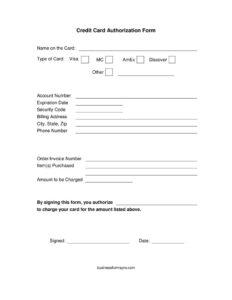
A complete authorization form ties a specific card to a specific permission. It records the name on the card, the card type (Visa, Mastercard, American Express, Discover, or other), the account number, expiration date, and security code, along with the billing address, city, state, and ZIP, and a phone number. It also references the order or invoice number the charge applies to, and ends with the cardholder’s signature and date authorizing the charge.
How to Fill Out a Credit Card Authorization Form
- Enter the name on the card exactly as it appears.
- Mark the card type — Visa, Mastercard, American Express, Discover, or other.
- Write the account number, expiration date, and security code.
- Add the billing address, city, state, ZIP, and a phone number for verification.
- Reference the order or invoice number (and the amount or billing frequency) the authorization covers.
- Have the cardholder sign and date the form to authorize the charge.
Keeping Card Data Secure
This form contains sensitive financial information, so handle it carefully. Don’t email a completed form as plain text or leave it lying around — store it securely and limit who can see it. As a rule, businesses should not keep the card’s security code (CVV) on file after the initial charge, since payment-security standards (PCI DSS) prohibit storing it. Many companies shred paper forms or securely delete digital copies once the authorization is no longer needed. Treat every completed form the way you’d want your own card details treated.
Common Mistakes to Avoid
- Storing the security code (CVV) after the charge, which violates PCI rules
- Emailing or texting completed forms in an insecure way
- Missing the cardholder’s signature, which is what makes the authorization valid
- Being vague about the amount or how often the card will be charged
- Keeping forms longer than necessary instead of securely disposing of them
One-Time vs. Recurring Authorizations
Not every authorization is the same, and the form should make clear which kind it is. A one-time authorization permits a single charge for a specific amount — a deposit, a phone order, or a one-off invoice — and expires once that charge is made. A recurring authorization permits repeated charges on a schedule, such as a monthly subscription or an installment plan, and stays in effect until the customer cancels it. Spell out the amount, the frequency, and the start and end conditions so there’s no ambiguity about what the cardholder agreed to. Clear terms protect both sides and make a charge far harder to dispute later.
What Makes an Authorization Valid
For the form to hold up, three things matter most: the cardholder’s own signature, accurate card and billing details, and a clear description of what’s being authorized. The signature is the linchpin — it’s the cardholder’s confirmation that they approved the charge. Matching billing-address details help the payment processor verify the card, and a specific reference to the amount or billing schedule prevents disputes about scope. An authorization that’s vague, unsigned, or used to charge more than was agreed can be challenged and reversed, which is why precision on this form is worth the extra moment.
Frequently Asked Questions
What is a credit card authorization form? It’s a document a cardholder signs to give a business permission to charge their credit card for a specific purchase or on a recurring basis.
How do I fill out a credit card authorization form? Enter the name on the card, card type, number, expiration, and security code, add the billing address and the order or invoice it applies to, then sign and date it. The template above has every field.
Is a credit card authorization form safe? It can be, if handled responsibly — store it securely, limit access, don’t retain the security code after the charge, and dispose of it safely when it’s no longer needed.
What is a hotel credit card authorization form? It’s the same form used by hotels to keep a guest’s card on file for room charges, incidentals, or a security deposit, often when someone else is paying for the stay.
How long is an authorization valid? It depends on what the cardholder agreed to — a one-time charge ends after that charge, while a recurring authorization lasts until the customer cancels it. State the terms clearly on the form.
Can a credit card authorization be canceled? Yes. For a recurring authorization, the cardholder can withdraw permission at any time by notifying the business, ideally in writing. The business should then stop charging the card and keep a record of the cancellation.
How much does this template cost? It’s free to download in PDF and DOCX.
Related Forms
Direct Deposit Authorization · Payment Record · Invoice · Order Form · Recurring Payment Agreement
This template is provided for general informational purposes only and is not legal or financial advice. Handling cardholder data carries security and compliance obligations (such as PCI DSS) — follow applicable rules for your business.
Related Forms
- Appointment of Proxy
- FOIA Request Appeal
- Service Call Book
- Repair Request
- Repair Under Warranty Request
- Maintenance Request
Browse more in Request and Authorization.