
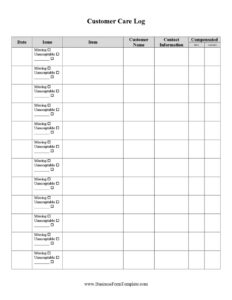
Customer Care Log
Download a free Customer Care Log template in PDF and DOCX to track customer interactions, issues, and follow-ups consistently across your team.
PDF
0
likes
Download Files
A Customer Care Log is a simple record-keeping document used to track every customer interaction, complaint, request, or follow-up in one organized place. People most often use it to make sure no customer issue slips through the cracks and to keep a written history of how each concern was handled. You can download this Customer Care Log free in both PDF and DOCX formats, with no signup required.
What Is a Customer Care Log?
A Customer Care Log is a structured sheet that captures the details of customer contacts and the actions taken in response. It is typically used by customer service representatives, front-desk staff, support teams, and small business owners who need to document who reached out, what they needed, and how the situation was resolved. The log serves as a running diary of service activity, recording the date, the customer’s name and contact details, the nature of the inquiry or complaint, the staff member who handled it, and the outcome. Because it sits within the log and inventory category, it functions as an operational reference rather than a contract — a tool for accountability, follow-up, and quality improvement over time.
When Do You Need a Customer Care Log?
Almost any business that interacts with customers can benefit from keeping a consistent log. Common situations include:
- Handling complaints: When a customer reports a problem, you log the issue and track it until it is fully resolved.
- Managing follow-ups: When a request requires a callback, refund, or replacement, the log reminds staff what is still open.
- Tracking recurring problems: Spotting the same complaint repeated across many entries helps identify a product or process flaw.
- Shift handovers: When one team member finishes a shift, the log lets the next person see what is pending without losing context.
- Measuring service quality: Reviewing entries over a week or month reveals response times and resolution rates.
- Supporting warranty or refund claims: A dated record of the conversation can verify what was promised and when.
Types of Customer Care Logs
While the core idea is the same, businesses adapt the format to their needs. A retail care log focuses on in-store complaints, returns, and exchanges. A phone or call-center log emphasizes call times, caller details, and resolution status. A service or repair log ties each interaction to a job number or product serial. A general support log, like this template, works across channels — phone, email, walk-in, or chat — by keeping flexible columns that fit any contact type. Choose the version that matches how your customers actually reach you, and keep the structure consistent so the data stays comparable.
What a Customer Care Log Should Have
A complete and useful Customer Care Log generally includes the following elements:
- Date and time of the interaction so entries can be ordered and timed.
- Customer name and contact details for follow-up and identification.
- Channel or method of contact (phone, email, in person).
- Description of the issue or request in clear, factual language.
- Action taken and any commitments made to the customer.
- Staff member responsible for handling the entry.
- Status and follow-up date showing whether the matter is open, pending, or resolved.
How to Fill Out a Customer Care Log
Work through the log one row at a time, completing each field as the interaction happens:
- Enter the date and time the customer made contact, so the record stays chronological.
- Record the customer’s name and a reference number or account ID if you use one.
- Add contact details such as phone number or email so a team member can reach back.
- Note the method of contact — for example, walk-in, telephone, email, or live chat.
- Describe the issue or request in a short, factual sentence; avoid opinions and stick to what was reported.
- Write down the action taken, including any refund, replacement, escalation, or promise made.
- Identify the staff member who handled the contact, for accountability and follow-up.
- Set the status (open, pending, resolved) and a follow-up date if the matter is not yet closed.
- Review and close the entry once the customer is satisfied, updating the status accordingly.
Tips for Keeping an Effective Log
Consistency is what turns a log from a chore into a useful tool. Fill in entries at the moment of contact rather than reconstructing them later, when details are easy to forget. Use plain, neutral wording so anyone reviewing the log can understand it without you present. Assign someone to review open items daily so nothing lingers past its follow-up date. If you keep the log digitally in the DOCX version, sort or filter by status to surface unresolved cases quickly, and archive completed sheets periodically so the active log stays readable.
Common Mistakes to Avoid
- Leaving the status blank, which makes it impossible to tell open issues from closed ones.
- Writing vague descriptions like “customer upset” without explaining the actual problem.
- Forgetting the follow-up date, so promised callbacks never happen.
- Omitting the staff name, leaving no one accountable for the entry.
- Recording subjective judgments instead of factual details of what was said and done.
- Letting the log fall out of date by filling it in days later or skipping minor contacts.
Frequently Asked Questions
What is a Customer Care Log used for? It is used to document customer interactions, complaints, and requests in one consistent place. The log helps teams track outstanding issues, follow up on promises, and review service quality over time. It is especially valuable when several staff members share responsibility for customers.
How do I fill out a Customer Care Log? Add one row per interaction, recording the date, customer name, contact details, method of contact, a factual description of the issue, the action taken, the staff member responsible, and the status. Update the status and follow-up date as the matter progresses. Close the entry once the customer’s concern is fully resolved.
Is a Customer Care Log a legal document? It is primarily an internal operational record rather than a contract or legally binding agreement. That said, accurate, dated entries can serve as helpful supporting evidence if a dispute later arises over what was promised. Treat it as a factual business record and keep it honest and consistent.
Who should keep the Customer Care Log? Anyone who interacts with customers can maintain it, including customer service reps, front-desk staff, support agents, and small business owners. In larger teams, it is best to assign a clear owner per shift or department so entries stay complete. Everyone who handles customers should know how to record an entry.
Should I keep the log on paper or digitally? Both work, and this template is available in PDF for printing and DOCX for digital use. A printed log is convenient at a counter or desk, while a DOCX or spreadsheet version makes it easy to sort, filter, and search past entries. Choose whichever fits your workflow and back up digital copies regularly.
How much does this Customer Care Log template cost? It is completely free to download from Business Forms Pro in both PDF and DOCX formats, with no signup required. You can use it as-is or customize the columns to match your business. There is no charge and no account needed.
This Customer Care Log template is provided as a general example for informational purposes only and does not constitute legal, financial, or professional advice. Record-keeping and data-handling requirements vary by jurisdiction and industry, so consult a qualified professional to ensure your practices meet applicable rules.
Related Forms
- Volunteer Hours Tracker
- Conference Call Log
- Sterilization Log
- Restroom Cleaning Checklist
- Home Inventory List of Possessions
- Key Assignment Inventory
Browse more in Log and Inventory.