
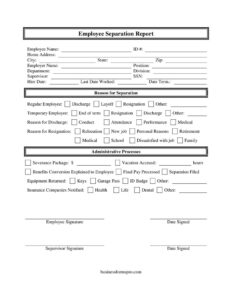
Employee Separation Report
Download a free Employee Separation Report template to document terminations, resignations, and final pay in PDF or DOCX — free download, no signup.
PDF
DOCX
1 downloads
0
likes
Download Files
- DOCX
An Employee Separation Report is the document an employer completes when an employee leaves the organization, capturing the reason for departure, final pay status, and the return of company property. Most companies use it to create a clean, consistent record every time someone resigns, retires, or is terminated. You can download this Employee Separation Report free in PDF and DOCX, with no signup required.
What Is an Employee Separation Report?
An Employee Separation Report is a structured HR form that documents the end of the working relationship between an employer and an employee. It is typically prepared by a supervisor or HR representative on or near the employee’s last day. The report records the type of separation (resignation, discharge, layoff, retirement, or end of term), the specific reason behind it, and a checklist confirming administrative steps such as final pay, benefits conversion, and equipment return. Both the employee and supervisor usually sign it. The completed form gives the company a defensible, organized record for payroll, benefits, unemployment claims, and internal reporting, and it helps ensure nothing falls through the cracks during offboarding.
When Do You Need an Employee Separation Report?
This form is useful any time an employee’s tenure ends, regardless of the circumstances. Common scenarios include:
- Voluntary resignation — an employee gives notice for a new job, relocation, school, family reasons, or general dissatisfaction.
- Involuntary discharge — termination for conduct, performance, or attendance problems that needs to be clearly documented.
- Layoffs or reductions in force — when positions are eliminated and the company must track who was separated and why.
- Retirement — a long-tenured employee leaves and benefits conversion and final pay must be handled carefully.
- End of a temporary assignment or contract — a temporary employee’s term concludes on schedule.
- Standardizing offboarding — HR wants one consistent record for every departure to support payroll, benefits, and unemployment processing.
Types of Separation Covered
The form distinguishes between several separation types so the record reflects exactly how the relationship ended. Resignation covers voluntary departures, with reason fields such as new job, relocation, personal reasons, family, school, or dissatisfaction with the job. Discharge covers involuntary terminations, with reasons like conduct, performance, or attendance. Layoff reflects positions eliminated for business reasons, retirement marks a planned exit, and end of term applies to temporary or fixed assignments. The form also identifies whether the worker was a regular employee or a temporary employee, which can affect benefits and severance handling.
What an Employee Separation Report Should Have
A complete report ties identity, timing, reason, and administrative cleanup together. Key elements include the employee’s full identifying details, the position and department, the hire and termination dates, the separation type and its specific reason, an equipment and access checklist, confirmation that final pay and benefits steps were handled, and signatures from both parties. Each of these pieces serves a purpose: identity and dates support payroll, the reason supports unemployment and legal records, the property checklist protects company assets, and the signatures confirm both sides acknowledged the separation details.
How to Fill Out an Employee Separation Report
- Enter employee identification. Record the Employee Name, Home Address (City, State, Zip), SSN, and ID #.
- Document the role. Fill in Position, Department, Division, and the Supervisor name.
- Record key dates. Add the Hire Date, the Last Date Worked, and the Date Term. (termination/separation effective date).
- Classify the worker. Indicate whether this is a Regular Employee or Temporary Employee.
- Select the separation type. Check Resignation, Discharge, Layoff, Retirement, or End of term, then note the Reason for Separation.
- Specify the reason. For resignations, mark New job, Relocation, Personal Reasons, Family, School, or Dissatisfied with job. For discharges, mark Conduct, Performance, or Attendance, and add any Other detail or Reason for Discharge / Reason for Resignation notes.
- Complete the property checklist. Confirm Equipment Returned, Keys, ID Badge, and Garage Pass.
- Confirm benefits and pay. Note Vacation Accrued, Final Pay Processed, Severance Package, and that Benefits Conversion Explained to Employee, covering Health, Dental, Medical, Life, and Insurance Companies Notified.
- Record administrative steps. Check Administrative Processes and Separation Filed.
- Sign and date. Capture the Employer Name, Employee Signature, Supervisor Signature, and Date Signed.
Handling Benefits and Final Pay
The benefits and pay portion of the form deserves special attention because it carries the most compliance risk. Use the Vacation Accrued field to record any unused paid time that may be owed, and check Final Pay Processed only once the last paycheck is confirmed. The Benefits Conversion Explained to Employee field documents that the worker was told how to continue or convert coverage — Health, Dental, Medical, and Life — and the Insurance Companies Notified box confirms carriers were updated. If a Severance Package applies, note it here. Final pay timing and benefit continuation rules vary widely by state and plan, so coordinate with payroll and your benefits administrator before signing off.
Protecting Company Property and Access
Offboarding is also about security. The Equipment Returned, Keys, ID Badge, and Garage Pass fields create a tangible record that physical and digital access were collected. Completing this section promptly helps prevent unauthorized building entry, protects sensitive data, and avoids disputes over missing assets. Many organizations pair this checklist with disabling email and system logins on the last date worked.
Common Mistakes to Avoid
- Leaving the reason vague. Always specify whether the separation was voluntary or involuntary and the precise reason — this matters for unemployment and legal records.
- Skipping the property checklist. Failing to confirm Keys, ID Badge, and Equipment Returned can lead to security gaps and asset loss.
- Forgetting final pay rules. Marking Final Pay Processed before verifying accrued vacation or state timing requirements can create wage-payment problems.
- Omitting benefits explanation. Not documenting that conversion options were explained leaves the company exposed if the former employee disputes coverage.
- Missing signatures. An unsigned report by the employee or supervisor weakens its value as a record.
- Inconsistent dates. Confusing the Last Date Worked with the Date Term. can distort pay and benefits calculations.
Frequently Asked Questions
What is an Employee Separation Report used for? It documents the end of employment, including the reason for leaving, final pay status, benefits handling, and returned property. Employers use it to keep consistent offboarding records that support payroll, benefits, and unemployment processing.
Who fills out the Employee Separation Report? Typically a supervisor or HR representative completes it, often with input from the departing employee. Both the employee and supervisor sign it to confirm the recorded details, though an employee who declines to sign can be noted accordingly.
Does an Employee Separation Report need to be signed by the employee? Employee signatures strengthen the record by showing the separation details were acknowledged, but signature requirements vary by employer policy. If an employee refuses or is unavailable, note that on the form rather than leaving it blank.
Is an Employee Separation Report legally required? No single federal rule mandates this exact form, but many states and employers require documentation of separations and timely final pay. Requirements vary by jurisdiction, so confirm your local rules before relying on it.
How much does this template cost? Nothing — this Employee Separation Report template is completely free to download in PDF and DOCX with no signup required. You can edit it to match your company’s policies and branding.
What is the difference between a separation report and a termination letter? A termination letter is addressed to the employee and communicates the decision, while a separation report is an internal record that captures the reason, final pay, benefits, and property checklist. Many employers use both together.
This Employee Separation Report template is a general example provided for informational purposes only and is not legal, financial, or tax advice. Employment, final pay, and benefits requirements vary by jurisdiction and plan — consult a qualified HR or legal professional before relying on this document.
Official resource: for the rules that apply to your situation, see the U.S. Department of Labor.
Related Forms
- Proof Of Employment
- Notice of Probation
- Job Application Comparison Chart
- Interview Schedule
- Employee Pay Rate and Title History Change
- Weekly Time Card With Approval
Browse more in Employment.