
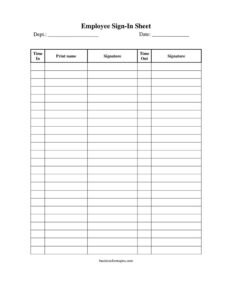
Employee Sign In Sheet
Download a free Employee Sign In Sheet template in PDF and DOCX to track staff attendance, arrival and departure times with no signup required.
PDF
DOCX
3 downloads
0
likes
Download Files
- DOCX
An Employee Sign In Sheet is a simple attendance log that staff complete to record when they arrive at and leave the workplace each day. The most common reason people use it is to keep an accurate, paper-based record of daily attendance and hours worked for a team, shift, or location. You can download this template free in both PDF and DOCX formats, with no signup required.
What Is an Employee Sign In Sheet?
An Employee Sign In Sheet is a single-page form, usually posted at a reception desk, time clock area, or shift entrance, where each worker enters their department, the date, their arrival time, printed name, signature, and departure time. It is typically created and maintained by an employer, supervisor, HR coordinator, or office manager to document who was present on a given day and for how long. The form serves as a quick reference for attendance, a backup to electronic time systems, and a written confirmation — through the employee’s own signature — that the recorded times are accurate. Because it is filled out in the employee’s own hand, it carries a personal accountability that automated swipes sometimes lack.
When Do You Need an Employee Sign In Sheet?
This form fits a wide range of everyday workplace situations where you need a clear, signed record of who was on site and when:
- Daily attendance tracking for small businesses, retail stores, or workshops that do not use an electronic time clock.
- Shift-based environments such as restaurants, warehouses, or care facilities where staff rotate in and out and supervisors need to confirm coverage.
- Temporary or seasonal staff who are not yet set up in a payroll or badge system but still need their hours documented.
- Backup during system outages when a digital timekeeping platform is down and you still need an auditable record.
- Multi-department offices where the dept. column lets you separate attendance by team or division on one sheet.
- Compliance and safety situations, such as confirming who was present during a given day for evacuation headcounts or visitor-versus-staff distinctions.
What an Employee Sign In Sheet Should Have
A complete and useful sign in sheet captures enough detail to be unambiguous without slowing people down. The essential elements are a clear title and the company or location name, a column for the department so entries can be grouped, the date the sheet covers, and a time in field for each arrival. It should also include a printed name column so handwriting is legible, a signature column that verifies the entry is genuine, and a time out field to mark departure. Well-designed sheets leave enough rows for a full team and enough horizontal space for readable handwriting. Keeping the layout clean and consistent makes the totals easy to read later when calculating hours.
How to Fill Out an Employee Sign In Sheet
Walk through the form field by field so every entry is complete and accurate:
- Dept.: Write the department, team, or area the employee belongs to — for example “Warehouse,” “Front Desk,” or “Accounts.” This helps supervisors sort attendance later.
- Date: Enter the calendar date the sheet covers. Use a single date per sheet for daily logs, or note the day for shift sheets that span a turnover.
- Time In: Record the exact arrival time as you sign in, including AM or PM. Write it when you arrive, not at the end of the day.
- Print Name: Print your full name clearly in block letters so it is easy to read and match to payroll records.
- Signature: Sign next to your printed name to confirm the arrival and departure times you have logged are correct.
- Time Out: When your shift ends, enter your departure time, again with AM or PM, to complete the record of hours present.
Tips for Keeping Accurate Records
Place the sheet where everyone passes when entering and leaving, and assign someone to start a fresh sheet each day. Encourage staff to write times honestly and in real time rather than estimating later. At the end of the day or shift, a supervisor can review the page for blanks — particularly missing time out entries, which are the most commonly forgotten field. Store completed sheets in a dated folder or binder so you can reference them if a payroll question arises. If you transfer the data into a spreadsheet or payroll system, keep the original signed sheet as supporting documentation.
Paper Sheet vs. Digital Time Clock
A printed Employee Sign In Sheet is fast to deploy, costs nothing, and requires no hardware or software, which makes it ideal for small teams, pop-up locations, and backup scenarios. A digital time clock automates calculations and reduces handwriting errors but requires setup and ongoing access. Many workplaces use both: the digital system for everyday tracking and the paper sheet as a fallback or for departments without terminals. The signature column on the paper version adds a layer of personal verification that swipe systems do not always provide, which can be valuable when accuracy is questioned.
Common Mistakes to Avoid
- Forgetting the time out — incomplete rows make it impossible to calculate hours and undermine the record.
- Illegible printed names — if HR can’t read it, the entry can’t be matched to payroll.
- Omitting AM/PM — ambiguous times lead to disputes over total hours worked.
- Signing in for someone else — “buddy punching” defeats the purpose and can create liability.
- Reusing one sheet across multiple days without clear dates, which makes records hard to audit.
- Filling in times from memory at day’s end instead of recording them in real time.
Frequently Asked Questions
What is an Employee Sign In Sheet used for? It is used to record daily attendance and working hours by having each employee log their department, arrival time, name, signature, and departure time. Employers use it to track who was present, support payroll, and keep a written backup to electronic systems.
How do I fill out an Employee Sign In Sheet? Enter your department and the date, write your arrival time in the time-in column, print your name, sign next to it, and record your departure time when you leave. Always include AM or PM so the hours are clear.
Is an Employee Sign In Sheet legally binding? The sheet itself is a record rather than a contract, but the signatures make it a credible piece of supporting documentation for hours worked. It can be used alongside payroll records, though specific recordkeeping requirements vary by jurisdiction.
Does this form need to be notarized or witnessed? No. An attendance sign in sheet does not require notarization or formal witnesses; the employee’s signature is sufficient to confirm their own entry. A supervisor may review or initial the sheet for added verification if your workplace prefers.
How much does this template cost? It is completely free to download from Business Forms Pro in both PDF and DOCX formats, with no signup or payment required. You can edit the DOCX version to add your company name, logo, or extra columns.
How long should I keep completed sign in sheets? Many employers retain attendance and payroll-related records for several years, but the exact retention period depends on local labor and tax rules. Store completed sheets in a dated, organized file so they are easy to retrieve if needed.
This template is provided as a general example for informational purposes only and is not legal, financial, or tax advice. Recordkeeping and labor requirements vary by jurisdiction, so consult a qualified professional to ensure your attendance practices meet applicable rules.
Related Forms
- Group Meeting Attendance Log
- Restaurant Reservation Request
- Sign In Sheet
- Petition Form
- Tournament Signup Sheet
- Football Sponsorship Form
Browse more in Sign In / Sign Up Sheets.