
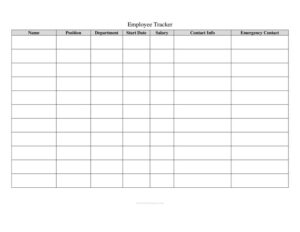
Employee Tracker
Use this free Employee Tracker template to log staff details, attendance, and performance in one place — free download in PDF and DOCX, no signup.
PDF
DOC
2 downloads
0
likes
Download Files
- DOC
An Employee Tracker is a simple spreadsheet-style form that lets managers, HR staff, and small business owners record and monitor key information about each member of their workforce in one organized place. The most common reason people use it is to keep accurate, up-to-date records of who works where, their contact details, attendance, and performance — without juggling scattered files. It’s completely free to download here in both PDF and DOCX formats, with no signup required.
What Is an Employee Tracker?
An Employee Tracker is a record-keeping tool used by employers and human resources teams to consolidate essential staff information into a single, easy-to-update document. It typically captures who each employee is, their role and department, start date, contact and emergency details, and ongoing data such as hours worked, leave taken, and review status. Rather than serving as a formal legal contract, the tracker functions as an internal management reference — a living roster that helps a business stay organized, plan staffing, monitor attendance trends, and quickly answer questions about any individual employee. It is especially valuable for small and growing teams that have outgrown memory and sticky notes but don’t yet use dedicated HR software.
When Do You Need an Employee Tracker?
This form earns its keep in many everyday workforce situations. Common scenarios include:
- Onboarding new hires — capturing names, roles, start dates, and contact information from day one so nothing slips through the cracks.
- Monitoring attendance and leave — logging sick days, vacation, and absences to spot patterns and ensure fair coverage.
- Managing a growing team — when a business expands beyond a handful of people and a clear roster becomes essential.
- Preparing for payroll — providing a quick reference for hours, pay rate, and employment status before processing wages.
- Conducting performance reviews — keeping a running record of review dates, ratings, and notes for each employee.
- Updating emergency or compliance records — ensuring contact details and required documentation stay current.
What an Employee Tracker Should Have
A useful Employee Tracker balances completeness with simplicity. At minimum, it should include each employee’s full name and a unique identifier or employee ID, their job title and department, and their employment status (full-time, part-time, contract, or temporary). It should also record the start date, manager or supervisor, work location, and core contact details such as phone, email, and address. Beyond basic identity, a strong tracker adds columns for attendance or leave balances, hours worked or pay rate, performance review dates, and a notes field for anything that doesn’t fit elsewhere. An emergency contact section is also valuable. Keeping the layout consistent — one row per employee — makes the document easy to sort, filter, and scan at a glance.
How to Fill Out an Employee Tracker
- Add employer or company details. Enter your company name and, if helpful, the department or team this tracker covers at the top of the form.
- Create one row per employee. Start with each person’s full legal name and assign a unique employee ID for easy reference.
- Record job information. Fill in the job title, department, and the name of the direct manager or supervisor.
- Enter employment status and dates. Note whether the role is full-time, part-time, or contract, and add the official start date.
- Add contact details. Include phone number, email address, and home address, plus an emergency contact name and number.
- Log compensation and hours. Record the pay rate or salary and standard weekly hours if your tracker covers payroll prep.
- Track attendance and leave. Update columns for vacation, sick days, or other absences as they occur.
- Note performance and reviews. Enter the most recent review date and any ratings or notes.
- Use the notes field for certifications, training, or reminders, then save and date the file for version control.
Keeping Employee Data Accurate and Private
Because an Employee Tracker holds sensitive personal information — addresses, pay rates, and emergency contacts — treat it as a confidential document. Store it securely, restrict access to those who genuinely need it, and avoid emailing unprotected copies. Update entries promptly whenever someone changes roles, gets a raise, or leaves the company, and archive records for departed employees according to your retention practices rather than deleting them immediately. Many regions have specific rules about how long employment records must be kept and how employee data must be safeguarded, so it’s wise to confirm what applies to your location. A simple habit of reviewing the tracker monthly keeps it reliable and prevents small errors from compounding over time.
Employee Tracker vs. Time Sheet vs. HR Software
It helps to understand where this form fits among related tools. A time sheet focuses narrowly on hours worked during a specific pay period, while an Employee Tracker offers a broader, ongoing snapshot of the entire workforce. Dedicated HR software automates much of this and adds features like self-service portals and automated alerts, but it carries a cost and a learning curve. For many small businesses, a well-maintained tracker template delivers most of the organizational benefit at no expense, and it can always be migrated into software later as the team scales. Think of the tracker as the dependable middle ground between memory and a full HR system.
Common Mistakes to Avoid
- Letting it go stale — an outdated tracker is worse than none; schedule regular updates.
- Inconsistent formatting — mixing date styles or status labels makes sorting and filtering unreliable.
- Storing it insecurely — leaving sensitive data in shared, unprotected folders risks privacy breaches.
- Duplicate or missing employee IDs — without unique identifiers, records get confused, especially with similar names.
- Overcrowding the form — cramming in too many columns makes it unwieldy; keep only what you’ll actually use.
- Forgetting emergency contacts — this information is easy to skip but critical when something goes wrong.
Frequently Asked Questions
What is an Employee Tracker used for? It’s an internal tool for organizing and monitoring workforce information, including employee details, attendance, hours, and performance. Businesses use it to stay organized, prepare for payroll, and quickly reference any team member’s record. It serves as a central roster rather than a legal contract.
How do I fill out an Employee Tracker? Start by adding your company details, then create one row for each employee with their name, ID, job title, department, and start date. Add contact and emergency information, employment status, pay details, and columns for attendance and reviews. Update each row as circumstances change to keep the document current.
Is an Employee Tracker a legal document? On its own, it is an internal management record rather than a binding legal contract. However, because it contains personal employee data, you should handle it in line with applicable privacy and record-keeping rules in your area. Always confirm local requirements for storing and retaining employment information.
How long should I keep employee records? Retention requirements vary by jurisdiction and by the type of record, with some documents needing to be kept for several years after employment ends. Rather than guessing, check the rules that apply to your location and industry. Archiving records securely is generally safer than deleting them early.
Can I customize this Employee Tracker template? Yes. The DOCX version is fully editable, so you can add or remove columns, rename fields, and adjust the layout to match how your business operates. Tailor it to track only the information you genuinely need.
How much does this Employee Tracker template cost? It is completely free to download here in both PDF and DOCX formats, with no signup or payment required. You can use it for your business right away and reuse it for as many employees as you like.
This Employee Tracker template is a general example provided for informational purposes only and does not constitute legal, financial, or HR advice. Employment record-keeping and data privacy requirements vary by jurisdiction. Consult a qualified professional to ensure your practices comply with the rules that apply to your business.
Official resource: for the rules that apply to your situation, see the U.S. Department of Labor.
Related Forms
- Consent to Release Personnel Information
- Consent To Drug Test
- Employee Warning Letter
- Job Application Form
- Employee Pay Rate and Title History Change
- Applicant Interview Schedule
Browse more in Employment.