
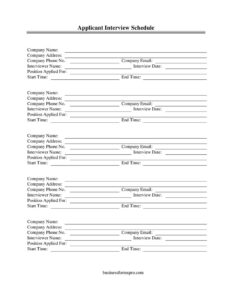
Applicant Interview Schedule
Use our free Applicant Interview Schedule template to organize candidate interviews with clear dates, times, and interviewers — free download in PDF and DOCX.
PDF
DOCX
7 downloads
0
likes
Download Files
- DOCX
An Applicant Interview Schedule is a simple document that lists when and with whom a job candidate will meet during the hiring process. Recruiters and hiring managers use it most often to confirm interview dates, start and end times, and the interviewer assigned to each session. It’s free to download here in both PDF and DOCX formats — no signup required.
What Is an Applicant Interview Schedule?
An Applicant Interview Schedule is a planning and communication tool that documents the logistics of one or more interviews for a specific candidate. It is typically issued by a company’s human resources team or hiring manager and shared with both the applicant and the interviewers involved. The form captures the essentials — the company’s contact details, the position applied for, the interview date, the start and end times, and the name of the interviewer conducting the session. Rather than relying on scattered emails or verbal arrangements, the schedule puts everything in one clean reference. It helps everyone arrive prepared, on time, and aware of exactly which role and which candidate the meeting concerns.
When Do You Need an Applicant Interview Schedule?
This form is useful any time you want to formalize and communicate interview logistics clearly. Common scenarios include:
- Confirming an interview time and date with a candidate after an initial phone screen.
- Coordinating a multi-stage process where an applicant meets several interviewers across different time slots.
- Sending a professional, branded schedule that includes your company name, address, phone, and email for easy contact.
- Giving interviewers a heads-up about who they are meeting, the position involved, and how long the session should run.
- Keeping an organized HR record of which applicants were interviewed, when, and by whom.
- Replacing informal back-and-forth messaging with a single, clear document that reduces no-shows and confusion.
What an Interview Schedule Should Have
A complete interview schedule should make the who, what, when, and where unmistakable. At minimum it should identify the hiring organization with its name and contact information, name the exact position applied for, and specify the interview date along with precise start and end times. It should also name the interviewer so the applicant knows who they will be speaking with and the interviewer knows to expect the candidate. Clear contact details give the applicant a way to ask questions or notify the company of any conflict in advance. When all of these elements are present, the schedule serves as both an invitation and an internal coordination record.
How to Fill Out an Applicant Interview Schedule
- Company Name: Enter the legal or trading name of the organization conducting the interview so the applicant immediately recognizes who is reaching out.
- Company Address: Provide the physical location where the interview will take place, or your office address if the meeting is virtual or off-site.
- Company Phone No.: Add a direct number the applicant can call with questions or to reschedule.
- Company Email: Include the email address for confirmations and follow-up correspondence.
- Position Applied For: State the exact job title the candidate is interviewing for, matching the original posting.
- Interview Date: Write the full calendar date of the interview to avoid any ambiguity.
- Start Time: Note the precise time the interview begins, and specify the time zone if the meeting is remote.
- End Time: Indicate the expected end time so both the candidate and interviewer can plan their day around the session.
- Interviewer Name: List the person who will be conducting the interview; add multiple entries if several interviewers are involved.
Tips for Coordinating Multiple Interviews
If a candidate is meeting several people, create one row or block per session, each with its own start time, end time, and interviewer name. Build in short buffers between sessions so a running-long conversation doesn’t cascade into delays. For panel-style or all-day interviews, list the sessions in chronological order and confirm that each interviewer has reviewed the schedule beforehand. Always send the completed schedule far enough in advance for the applicant to prepare, arrange travel or set up a video call, and request accommodations if needed. A brief note about parking, building entry, or the video meeting link can dramatically reduce day-of confusion.
Sharing the Schedule Professionally
Because the form includes your company’s name, address, phone, and email, it doubles as a polished first impression of your organization. Send it as a PDF to preserve formatting in emails, or share the DOCX version when you want to edit details quickly or merge multiple candidates into a recurring template. Encourage applicants to confirm receipt so you know the schedule arrived. Keeping a saved copy for each candidate also makes it easy to reference timelines later if you compare notes across the hiring team or need to document your process.
Common Mistakes to Avoid
- Leaving the time zone unstated for remote interviews, which can cause a candidate to join an hour early or late.
- Listing only a start time without an end time, so neither party knows how long to block off.
- Forgetting to name the interviewer, leaving the applicant unsure who to ask for on arrival.
- Using a vague or outdated job title that doesn’t match the posting the candidate applied to.
- Omitting a phone number or email, so the applicant has no easy way to confirm or reschedule.
- Sending the schedule too close to the interview date, leaving no time for preparation or conflict resolution.
Frequently Asked Questions
What is an Applicant Interview Schedule used for? It is used to communicate and confirm the logistics of a candidate’s interview, including the date, start and end times, the interviewer, and the company’s contact details. It keeps both the applicant and the interview team organized and reduces the risk of missed or double-booked sessions.
How do I fill out the interview schedule? Start by entering your company name and contact information, then add the position applied for, the interview date, the start and end times, and the interviewer’s name. If the candidate is meeting more than one person, repeat the time and interviewer details for each session in chronological order.
Is this form legally binding? No, an interview schedule is an informational and coordination document, not a contract. It does not guarantee employment or create any legal obligation; it simply records when and with whom an interview is planned.
Can I use this for virtual interviews? Yes. For remote interviews, use the address or notes area to include the video meeting link or dial-in details, and be sure to state the time zone alongside the start and end times so everyone joins at the correct moment.
How far in advance should I send it? Aim to send the schedule at least a few days before the interview so the candidate has time to prepare, arrange logistics, and notify you of any conflicts. Earlier notice also gives your interviewers time to review the candidate’s materials.
How much does this template cost? It is completely free to download here in both PDF and DOCX formats, with no signup or payment required. You can reuse it for every candidate and customize the fields to fit your hiring process.
This template is a general example provided for informational purposes only and does not constitute legal, HR, or employment advice. Hiring and interview practices and applicable requirements vary by jurisdiction — consult a qualified professional to ensure your process complies with local laws and regulations.
Official resource: for the rules that apply to your situation, see the U.S. Department of Labor.
Related Forms
- Employment Verification Letter
- Harassment Report Form
- Overtime Authorization Form
- Employee Pay Rate and Title History Change
- Bi-Weekly Time Card With Approval
- Disciplinary Action Form
Browse more in Employment.