
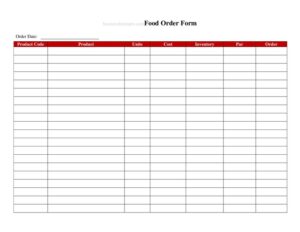
Food Order Form
Download a free Food Order Form template to capture customer meal orders, items, quantities and totals accurately — free PDF and DOCX download.
PDF
DOCX
7 downloads
0
likes
Download Files
- DOCX
A Food Order Form is a simple document restaurants, caterers, cafes and food vendors use to record exactly what a customer wants to order, in what quantity, and how much it costs. The most common reason people use it is to capture orders accurately so the kitchen prepares the right items and the customer is billed correctly. You can download this Food Order Form free in both PDF and DOCX formats, with no signup required.
What Is a Food Order Form?
A Food Order Form is a structured record that documents a customer’s food and beverage selections at the point of ordering. It is typically issued by a restaurant, takeaway, catering company, bakery, or food truck, and filled out by either staff taking the order or the customer themselves. The form documents the items requested, quantities, prices, any special instructions, and the customer’s contact or delivery details. Its core purpose is to create a clear, written reference that the kitchen, cashier, and delivery team can all rely on. By putting every detail in writing, a Food Order Form reduces miscommunication, speeds up preparation, and provides a paper trail for billing, refunds, or recurring catering arrangements.
When Do You Need a Food Order Form?
This form is useful in almost any situation where food is ordered ahead of, or separately from, immediate table service. Common scenarios include:
- Catering and event orders — recording a large multi-item order for a wedding, office lunch, or party well in advance of the event date.
- Takeaway and phone orders — capturing a customer’s items and pickup time when they call or order at the counter.
- Delivery services — documenting the order plus the delivery address, contact number, and any gate or apartment instructions.
- Bakery or specialty pre-orders — taking advance orders for custom cakes, bulk pastries, or seasonal items that need lead time.
- Office or recurring meal programs — managing weekly standing orders for staff lunches or meal-prep subscriptions.
- Pop-ups and food trucks — keeping a written queue of orders during busy service so nothing is missed.
Types of Food Order Forms
Although the basic structure is the same, Food Order Forms can be adapted to different operations. A dine-in order slip focuses on table number and course timing. A catering order form emphasizes event date, headcount, and delivery logistics. A takeaway form highlights pickup time and payment method, while a delivery form adds a full address and driver notes. Choosing the right layout — or combining elements — keeps your form relevant to how customers actually order.
What a Food Order Form Should Have
A complete Food Order Form should make it impossible to misread or mishandle an order. Key elements include the customer’s name and contact details, the order date and any required ready time, an itemized list of dishes with quantities and unit prices, a subtotal, taxes, and a grand total. It should also include space for special requests such as allergies, dietary restrictions, spice level, or substitutions, plus a field for the staff member who took the order. For delivery or pickup, add the method, address, and a payment status line. Clear labeling of every section ensures the kitchen, cashier, and customer are all working from the same information.
How to Fill Out a Food Order Form
- Enter the order date and time. Record when the order was placed and, importantly, the time it is needed for pickup, delivery, or the event.
- Add customer details. Write the customer’s full name and a phone number or email so you can confirm or follow up on the order.
- Specify the order type. Mark whether it is dine-in, takeaway, delivery, or catering, and add the table number or delivery address as needed.
- List each item. For every dish or drink, write the item name, the quantity, and the unit price. Use a separate line per item to keep things readable.
- Note special instructions. Capture allergies, dietary needs, cooking preferences, and substitutions next to the relevant item.
- Calculate the totals. Add up line totals to reach a subtotal, then apply tax, delivery fees, or discounts to produce the final total.
- Record payment and staff. Indicate the payment method and whether it is paid or pending, and note the name of the employee who took the order.
Tips for Accurate Order Taking
Always read the completed order back to the customer before finalizing it — confirming items, quantities, and the ready time prevents the most common disputes. Use clear handwriting or fill out the DOCX version on a screen to avoid kitchen confusion. Keep a numbered or dated copy of every form so you can quickly locate an order if a customer calls back. For catering, confirm large orders in writing a day or two ahead and note any deposit taken. Standardizing how staff complete the form across shifts keeps your records consistent and easy to audit.
Common Mistakes to Avoid
- Forgetting the ready time. An order without a clear pickup, delivery, or event time invites missed deadlines and unhappy customers.
- Skipping allergy and dietary notes. Leaving out a stated allergy can have serious consequences — always record it prominently.
- Math errors in totals. Double-check that line items, subtotal, tax, and the grand total add up correctly.
- Illegible handwriting. Unreadable item names or quantities slow the kitchen and cause wrong dishes to go out.
- Missing contact details. Without a phone number, you cannot confirm changes or notify the customer of delays.
- Not noting who took the order. When a question arises later, having the staff name makes follow-up far easier.
Frequently Asked Questions
What is a Food Order Form used for? A Food Order Form is used to record a customer’s food and drink selections, quantities, prices, and special instructions in one clear document. It helps the kitchen prepare the right items and lets the cashier bill the customer accurately. It is especially valuable for takeaway, delivery, and catering orders placed ahead of time.
How do I fill out a Food Order Form? Start with the date, ready time, and customer details, then list each item with its quantity and price. Add any allergy or preparation notes, calculate the subtotal, tax, and total, and record the payment method and the staff member who took the order. Reading the order back to the customer before finalizing helps catch mistakes.
Is this Food Order Form free to download? Yes. You can download this Food Order Form template completely free in both PDF and DOCX formats, with no signup or account required. The editable DOCX version lets you add your logo, menu items, and pricing.
Can I customize the form for my restaurant? Absolutely. The DOCX version is fully editable, so you can insert your business name, branding, standard menu items, tax rate, and any specific fields you need, such as table numbers or delivery zones. Many businesses create separate versions for dine-in, takeaway, and catering.
Is a Food Order Form legally binding? A completed Food Order Form is primarily an operational and record-keeping document rather than a formal contract. For large catering jobs, however, it can serve as written confirmation of an agreed order, especially when a deposit is noted. For significant orders, consider pairing it with a clear catering agreement.
Should I keep copies of completed forms? Yes. Retaining completed Food Order Forms helps you resolve billing questions, process refunds, track popular items, and manage recurring or catering orders. Store them in date order, whether physically or as scanned files, so you can retrieve any order quickly.
This Food Order Form template is provided as a general example for informational purposes only and does not constitute legal, financial, or tax advice. Food safety, labeling, and business requirements vary by jurisdiction — consult a qualified professional to ensure your forms and practices meet local regulations.
Related Forms
- Happy Hour Menu
- Freezer Temperature Log
- Happy Hour Table Cards
- Shift Change Form
- Kids Menu
- One Check Per Table Sign
Browse more in Restaurant.