
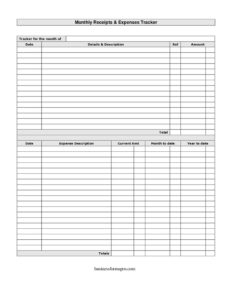
Monthly Receipts List
Track income and spending each month with this free Monthly Receipts List template, available as a printable PDF or editable DOCX free download.
PDF
DOCX
5 downloads
0
likes
Download Files
- DOCX
A Monthly Receipts List is a simple ledger that records all the money you receive and spend during a single month, helping you keep an organized running total of your finances. People most often use it to gather receipts in one place for budgeting, bookkeeping, or tax preparation. You can download this template free in both PDF and DOCX formats — no signup required.
What Is a Monthly Receipts List?
A Monthly Receipts List is a one-page financial tracking sheet that logs each transaction for a given month, along with the date, a short description, a reference number, and the amount. Individuals, freelancers, small business owners, treasurers, and household managers use it to capture receipts as they come in rather than scrambling at month’s end. The form documents both money received and money spent, and it carries forward running balances so you always know where you stand. Because it includes month-to-date and year-to-date columns, it doubles as a quick snapshot of longer-term trends. It is not an official accounting statement, but a clear, practical worksheet that anyone can use to stay on top of their cash flow.
When Do You Need a Monthly Receipts List?
This tracker is useful any time receipts and small transactions tend to pile up. Common situations include:
- Freelance and side-gig income: logging client payments and business purchases month by month for self-employment records.
- Household budgeting: capturing groceries, utilities, and incidental spending so you can compare actual outflow against a budget.
- Tax season prep: organizing deductible receipts throughout the year instead of sorting a shoebox in April.
- Club, team, or group treasurer duties: tracking dues collected and expenses paid for a small organization.
- Reimbursement tracking: recording out-of-pocket costs you intend to claim back from an employer or client.
- Small business cash logs: documenting petty cash, daily takings, or supplier payments where a full accounting system is overkill.
What a Monthly Receipts List Should Have
A complete tracker makes every line easy to read and every total easy to verify. The essential elements are:
- A clear label for the month being tracked, so multiple sheets stay in the right order.
- A date column for each entry to keep transactions in chronological sequence.
- A details and description field explaining what the money was for.
- A reference column for receipt or invoice numbers that link the entry to a source document.
- An amount column with a clear distinction between income received and expenses paid.
- Running total, month-to-date, and year-to-date figures that summarize the bigger picture.
How to Fill Out a Monthly Receipts List
- Set the period. At the top, fill in the tracker for the month of field with the month and year, for example “March 2025,” so the sheet is unmistakable.
- Enter the date. For each transaction, write the date it occurred. Keep entries in order to make balancing easier.
- Describe the entry. In the details & description field, note what the money covered — “office supplies,” “client payment,” or “electricity bill.”
- Add a reference. Use the ref column for the receipt number, invoice number, or check number tied to the transaction.
- Record the amount. Enter the figure in the amount column. If you mix income and expenses, mark which is which clearly.
- Update the total. Add each new amount into the running total so the balance stays current.
- Track spending separately. Use the expense description and current amt fields to detail individual costs as they arise.
- Carry forward balances. Update the month to date figure for the current month and the year to date figure for the cumulative annual total.
Tips for Keeping the Tracker Accurate
The value of a receipts list comes from consistency. Update it as transactions happen, or set a fixed routine — every evening or every Friday — so entries do not back up. Keep the matching paper or digital receipt for every reference number you record; the ref column is only useful if you can find the original document later. When you reach the end of a month, double-check that the month-to-date total equals the sum of that month’s entries, then roll the figure into the year-to-date column before starting a fresh sheet. Storing each completed month in a labeled folder makes year-end review far less stressful.
How It Differs From a Full Accounting Ledger
A Monthly Receipts List is intentionally lightweight. Unlike formal double-entry bookkeeping, it does not separate debits and credits across multiple accounts or generate financial statements. It is a tracking and organizing tool — perfect for individuals and very small operations, and a good feeder for whoever does prepare formal accounts. If your finances grow more complex, this sheet still works as the source record you hand to an accountant or import into software, since every line is dated, described, and referenced.
Common Mistakes to Avoid
- Skipping the month label: undated sheets become impossible to file or reconcile later.
- Vague descriptions: “misc” or “stuff” tells you nothing at tax time — be specific in the details field.
- Leaving the reference blank: without a receipt number, you cannot prove or trace the transaction.
- Mixing income and expenses without marking them: this distorts the running total and the month-to-date figure.
- Forgetting to roll figures forward: a month-to-date total that never feeds the year-to-date column defeats the purpose of those columns.
- Updating too infrequently: waiting weeks invites forgotten entries and lost receipts.
Frequently Asked Questions
What is a Monthly Receipts List used for? It is used to record and organize all the money received and spent in a single month, with a reference for each receipt. People use it for budgeting, bookkeeping, reimbursement claims, and gathering documentation ahead of tax season.
How do I fill out the month-to-date and year-to-date columns? The month-to-date column shows the cumulative total for the current month as you add each entry, while the year-to-date column carries the running total across all months in the year. Update the month-to-date figure with every new entry, and roll it into the year-to-date total when the month closes.
Is this template free to download? Yes. You can download the Monthly Receipts List free in both PDF and DOCX formats, with no signup or payment required. Use the PDF to print and fill by hand, or the DOCX to type entries on your computer.
Can I use this for both personal and business finances? Absolutely. The format works equally well for household budgeting, freelance income tracking, club treasury records, and small business cash logs. Just keep separate sheets for personal and business activity so the totals stay clean.
Does a Monthly Receipts List replace formal accounting? No. It is an organizing and tracking tool, not a substitute for double-entry bookkeeping or official financial statements. It works best as the source record you keep yourself and later hand to an accountant or enter into accounting software.
How long should I keep completed sheets? Retention needs vary, but many people keep financial records for several years, especially anything that supports a tax return. Check the record-keeping guidance that applies in your area and store each month’s sheet with its matching receipts.
This Monthly Receipts List template is a general example provided for informational purposes only and is not financial, accounting, or tax advice. Record-keeping and tax requirements vary by jurisdiction — consult a qualified accountant or tax professional for guidance specific to your situation.
Official resource: for the rules that apply to your situation, see the Consumer Financial Protection Bureau.
Related Forms
- Release Of UCC Financing Statement
- Balance Sheet
- Debt Snowball Form
- Hobby Cash Envelope
- Hair Cash Envelope
- Pocket Tip Calculator
Browse more in Money.