
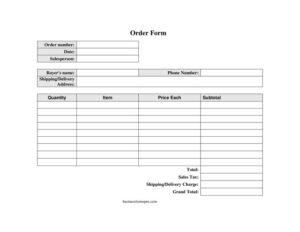
Order Form
Free order form template in PDF & DOCX. Learn what an order form is, the types, and how to fill one out — download a printable sales order form today.
PDF 2
DOCX
DOC
1 downloads
0
likes
Download Files
- DOCX
- DOC
An order form is a document a customer or buyer uses to request products or services, listing the items, quantities, and prices for the seller to fulfill. This printable version works for sales orders, wholesale, and internal requests. Download it free in PDF or DOCX. No signup or email required.
What Is an Order Form?
An order form is a structured document that captures everything a seller needs to fulfill a request: who is ordering, what they want, how many, at what price, and where and when to deliver it. It turns a casual “I’d like to buy…” into a clear, written record that both sides can rely on. For a business, order forms reduce mistakes, speed up fulfillment, and create a paper trail that ties neatly to invoicing and inventory. Whether it’s filled in by a salesperson on a customer’s behalf or completed directly by the buyer, the order form is the single sheet that starts the transaction.
Types of Order Forms
The same basic layout adapts to several situations, and knowing which you need keeps the paperwork relevant:
- Sales order form — used by a business to record a customer’s purchase of goods or services.
- Purchase order — issued by a buyer to a supplier to authorize a purchase (the buyer’s side of the same transaction).
- Wholesale or bulk order form — for resellers ordering large quantities, often with tiered pricing.
- Service order form — requests a service rather than a physical product.
- Internal requisition — used by one department to order supplies from another.
This template is built as a flexible sales/customer order form and can be adapted to any of these.
When Do You Need an Order Form?
- Taking orders from customers in person, by phone, or by email
- Selling wholesale or bulk products that need clear quantities and pricing
- Keeping a written record that ties to your invoices and inventory
- Letting a salesperson capture an order on a customer’s behalf
- Standardizing how orders are collected so nothing is missed
What an Order Form Should Include
A complete order form captures the parties, the products, and the logistics. That means the customer and seller details, an order number and date for tracking, a clear line for each item with its quantity and price, a total, and the delivery and payment terms. Leaving any of these out is what leads to wrong shipments, billing disputes, and delays — so the goal is a form detailed enough that anyone in your business could fulfill the order from the sheet alone.
How to Fill Out an Order Form
- Enter who the order is from (the customer), their customer number, and the terms of the sale.
- Add the ship to address, the salesperson, and the order number and date for tracking.
- Specify delivery via and routing, plus the ship week if the delivery is scheduled.
- For each product, list the item, description, quantity ordered, unit count, and unit price.
- Calculate each line total and add them for the order total, noting anything important under notes/comments.
- Have the purchaser and an approver sign with their title to authorize the order.
Order Form vs. Invoice vs. Purchase Order
These three documents are easy to mix up because they all describe a transaction, but they happen at different moments. An order form records what a customer wants to buy at the start. A purchase order is the buyer’s authorization sent to a supplier — essentially an order form from the buyer’s side. An invoice comes last and requests payment once the goods or services have been delivered. Used together, they create a clean trail from request to fulfillment to payment, which is exactly what your accounting needs to keep everything matched.
Tips for Error-Free Orders
Give every order a unique number so it can be tracked from request to delivery to invoice. Confirm quantities and prices with the customer before processing, especially on large or custom orders. Keep a copy of every completed form so you can check the shipment and the invoice against it. And if you take orders by phone, read the details back to the customer — a thirty-second confirmation prevents most fulfillment mistakes.
Common Mistakes to Avoid
- Vague item descriptions that lead to the wrong product being shipped
- Skipping the order number, which makes tracking and reconciliation hard
- Forgetting delivery details, so the order can’t be prioritized or routed
- Math errors in line totals — always double-check quantity × unit price
- Not keeping a copy to match against the invoice and shipment later
Frequently Asked Questions
What is an order form? It’s a document a customer uses to request products or services, listing the items, quantities, prices, and delivery details the seller needs to fulfill the order.
What’s the difference between an order form and an invoice? An order form records what a customer wants to buy at the start of a transaction; an invoice is sent afterward to request payment once the order has been delivered.
What’s the difference between an order form and a purchase order? They’re two sides of the same coin — an order form records a customer’s request to a seller, while a purchase order is a buyer’s authorization sent to a supplier.
How do I make an order form? Use a ready-made template like the one above, or build one with columns for item, description, quantity, unit price, and total, plus customer and delivery details. Add an order number and date for tracking.
Can I edit this order form? Yes. The DOCX version is fully editable, so you can add your logo, change column labels, or adjust it for wholesale or service orders.
Is an order form legally binding? On its own, a completed order form records the agreed details of a sale; whether it creates a binding contract depends on your terms and local law. Many businesses treat a signed, accepted order as binding once both sides confirm it.
Can customers fill out the order form themselves? Yes. You can hand or email the form to customers to complete, or a salesperson can fill it in on their behalf and read the details back before processing the order.
How much does this order form cost? It’s free to download in PDF and DOCX.
Related Forms
Purchase Order · Invoice · Proforma Invoice · Sales Order Confirmation · Quotation Record · Requisition Form
This template is provided for general informational purposes only and is not legal or financial advice. Adapt the pricing, tax, and terms fields to your own business requirements.
Need to work out sales tax? Use our free Sales Tax Calculator to add or remove sales tax from any amount in seconds.
Official resource: for the rules that apply to your situation, see the U.S. Small Business Administration.
Related Forms
- Packing List
- Statement of Work
- Tailor Alterations Form
- Rain Check Long
- Purchase Order
- Proforma Invoice
Browse more in Invoices and Order Forms.