
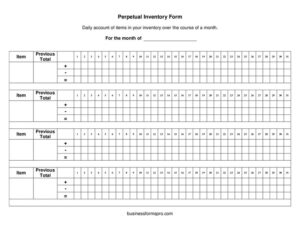
Perpetual Inventory Form
Track stock daily with our free Perpetual Inventory Form template, an easy way to monitor item counts all month long — free download in PDF and DOCX.
PDF
DOC
4 downloads
0
likes
Download Files
- DOC
A Perpetual Inventory Form is a running record that tracks the quantity of each item in your inventory every day across a single month. Businesses use it most often to keep an always-current count of stock so they never run out of fast-moving products or over-order slow ones. You can download this template for free in PDF and DOCX, with no signup required.
What Is a Perpetual Inventory Form?
A Perpetual Inventory Form is a daily log used to maintain a continuous, up-to-date count of items on hand. Unlike a periodic count taken once a month or quarter, a perpetual system updates the balance each time stock comes in or goes out. This template is organized around a single month, listing each item alongside its previous total so you can carry forward yesterday’s figure and adjust it. Retailers, warehouse staff, restaurant managers, office administrators, and small-business owners use it to spot shortages early, reconcile against physical counts, and keep purchasing decisions grounded in real numbers rather than guesswork.
When Do You Need a Perpetual Inventory Form?
This form is useful any time you need an ongoing, day-by-day picture of what you have in stock. Common situations include:
- Retail shops tracking shelf and backroom quantities of products that sell quickly and need frequent reordering.
- Restaurants and cafes monitoring perishable ingredients and high-turnover supplies throughout the month.
- Warehouses and distribution centers keeping a live balance of SKUs as shipments arrive and orders go out.
- Office managers watching consumable supplies like paper, toner, and cleaning materials so reorders happen before shortages.
- Medical and dental practices recording usage of gloves, dressings, and other items that must always be available.
- Manufacturers following raw materials and component parts so production never stalls for lack of stock.
What a Perpetual Inventory Form Should Have
A complete perpetual inventory log gives you everything you need to read a quantity at a glance and trust the number. At a minimum it should include:
- A clear label for the month the log covers, so records stay organized over time.
- An item column identifying each product, part, or supply, ideally by name and any internal code.
- A previous total field that carries the starting or prior-day balance forward.
- Space to record daily additions (received stock) and reductions (sales, usage, waste).
- A running balance that reflects the current quantity on hand at the end of each day.
- Room for notes explaining unusual changes, such as damaged goods or returns.
How to Fill Out a Perpetual Inventory Form
This template keeps fields simple so you can update it quickly. Follow these steps:
- Enter the month. At the top of the form, write the month and year the log applies to. Start a new sheet for each month to keep records clean.
- List each item. In the item column, write the name of each product or supply you are tracking. Add a SKU or internal code if you use one to avoid confusion between similar items.
- Record the previous total. In the previous total field, enter the quantity carried forward — either the closing balance from the prior month or the prior day, depending on how you use the sheet.
- Log daily changes. Each day, note items received and items removed. Add receipts to the previous total and subtract anything sold, used, or discarded.
- Update the running balance. Calculate the new total after each change so the figure always reflects what is physically on hand.
- Note exceptions. Briefly record returns, damage, or count corrections so the numbers can be explained later.
- Carry the total forward. At the end of the day or month, the final balance becomes the next period’s previous total.
Perpetual vs. Periodic Inventory
Understanding the difference helps you decide how to use this form. A periodic system counts stock only at set intervals — say, the last day of the month — and calculates usage by comparing the beginning and ending counts. A perpetual system, which this template supports, keeps the balance current every single day. The perpetual approach gives you faster warning of shortages and theft, makes reordering more accurate, and reduces the surprise of a large month-end discrepancy. Many businesses use both: a daily perpetual log for live decisions and a periodic physical count to verify that the running figures match reality.
Tips for Accurate Stock Counts
The value of any perpetual log depends on the discipline behind it. Update the form at the same time each day so entries do not pile up and get forgotten. Assign one or two people responsibility for the log to keep handwriting and methods consistent. Periodically perform a physical count and compare it to the running total — small gaps reveal miscounts, shrinkage, or unrecorded usage. Keep completed monthly sheets on file so you can review seasonal patterns and forecast future demand. If you maintain many items, consider sorting them by category or location to speed up daily updates.
Common Mistakes to Avoid
- Skipping days. Gaps in the log break the running balance and make it hard to trust any single figure.
- Forgetting to carry the total forward. If the previous total is wrong, every entry that follows it is wrong too.
- Recording sales but not receipts (or vice versa), which steadily pushes the count away from reality.
- Using vague item names so two similar products get logged on the same line.
- Never reconciling with a physical count, letting errors and shrinkage hide indefinitely.
- Mixing months on one sheet, which clutters records and complicates monthly comparisons.
Frequently Asked Questions
What is a Perpetual Inventory Form used for? It is used to keep a continuous daily count of each item in your inventory across a month. By updating the balance whenever stock comes in or goes out, you always know your current quantity on hand, which helps with reordering, loss prevention, and planning.
How is it different from a regular inventory sheet? A regular or periodic inventory sheet is filled in only at set intervals, such as month-end. A perpetual inventory form is updated continuously, so the balance reflects today’s reality rather than a count taken weeks ago, giving you earlier warning of shortages.
What does the “previous total” field mean? The previous total is the quantity of an item carried forward from the prior period — either the closing balance from last month or yesterday’s ending count. You use it as the starting figure, then add receipts and subtract usage to find the current balance.
Do I need to fill out a new sheet every month? Yes, starting a fresh sheet for each month keeps your records organized and makes it easy to compare periods. Simply carry the final balance of each item forward as the previous total on the new month’s form.
Is this Perpetual Inventory Form free to download? Yes. You can download it for free in both PDF and DOCX formats with no signup required. The DOCX version is fully editable, so you can add columns for SKUs, locations, or daily receipts and reductions to fit your workflow.
Can I use this form for tax or accounting purposes? The form can support your recordkeeping by documenting stock levels over time, but inventory valuation and reporting rules vary. Always confirm how your figures should be recorded with a qualified accountant or tax professional before relying on them for filings.
This template is a general example provided for informational purposes only and does not constitute legal, financial, accounting, or tax advice. Inventory and recordkeeping requirements vary by jurisdiction and business type — consult a qualified professional to ensure your records meet applicable standards.
Related Forms
Browse more in Log and Inventory.