
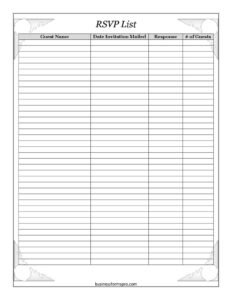
RSVP List
Track guest responses easily with this free RSVP List template, available as a free download in PDF and DOCX to manage your event headcount.
PDF
DOCX
5 downloads
0
likes
Download Files
- DOCX
An RSVP List is a simple tracking sheet used to record who has been invited to an event and whether they plan to attend, so you always know your expected headcount at a glance. People most often use it to manage replies for weddings, parties, conferences, and other gatherings without losing track of invitations. You can download this RSVP List free in both PDF and DOCX formats — no signup required.
What Is an RSVP List?
An RSVP List is an organized record that pairs each invited guest with the status of their reply. The term “RSVP” comes from the French phrase répondez s’il vous plaît, meaning “please respond.” Whoever is hosting or coordinating the event maintains the list, logging the guest’s name, the date an invitation was sent, whether a response has come back, and how many people are coming. It serves as a central reference for catering counts, seating charts, favors, and follow-up reminders. Rather than digging through emails, texts, and voicemails, the host keeps every reply in one place, making it easy to spot who still needs to be contacted before the deadline.
When Do You Need an RSVP List?
An RSVP List is helpful any time you invite a group and need to know who is coming. Common situations include:
- Weddings and receptions — tracking accepts, declines, and total head counts for the caterer and venue.
- Birthday parties and anniversaries — keeping tabs on family and friends as replies trickle in.
- Corporate events and conferences — managing attendee numbers for seating, name badges, and materials.
- Baby and bridal showers — confirming guest counts so you can plan food, games, and favors.
- Fundraisers and galas — coordinating ticketed attendance and table assignments.
- Holiday gatherings or reunions — organizing who has confirmed and who still needs a nudge.
What an RSVP List Should Have
A useful RSVP List captures enough detail to plan confidently without becoming cluttered. The essentials include a clear space for each guest’s name, the date the invitation was mailed or sent, a column to mark whether a response has been received, and a field for the number of guests attending under each invitation. A column for the response itself — accepting or declining — lets you total your numbers quickly. Many hosts add a running tally at the bottom and leave room for notes such as dietary restrictions, plus-ones, or special requests. The goal is a tidy, scannable sheet that answers two questions instantly: who has replied, and how many people to expect.
How to Fill Out an RSVP List
- Guest Name: Write the full name of each invited individual, household, or family. List one line per invitation so each reply maps to a single entry.
- Date: Enter the relevant date — typically the date the guest responded, or the date you last updated their status. This helps you sort recent replies and track timing.
- Invitation Mailed: Record the date you sent the invitation, whether by mail, email, or messaging. This lets you judge when a follow-up is reasonable.
- Response: Note the outcome — “Yes/Accepting,” “No/Declining,” or “Pending” if you are still waiting. Leave it blank or marked pending until you hear back.
- Number of Guests: For each accepting reply, write how many people are coming, including any plus-ones or children. Add these figures to reach your total expected attendance.
Update the sheet as replies arrive, and review the pending rows as your deadline approaches so you can send gentle reminders.
Tips for Managing Responses Effectively
Set a clear RSVP deadline on your invitations — typically two to three weeks before the event — so you have time to finalize counts with vendors. Use the Invitation Mailed date to decide when a follow-up call or message is appropriate; if two weeks have passed with no reply, a polite check-in is reasonable. Keep the list in a format you can easily edit, such as the DOCX version, so you can update numbers on the fly. Color-coding or simple symbols (a checkmark for yes, an X for no, a question mark for pending) make the sheet quick to scan. Always confirm your final headcount in writing with your caterer or venue, and keep a small buffer for last-minute changes.
RSVP List vs. Guest List
These two documents are related but serve different purposes. A guest list is simply everyone you intend to invite, often compiled before invitations go out. An RSVP List picks up from there, adding the status of each reply and the confirmed number attending. In practice, many hosts start with a guest list and convert it into an RSVP List once invitations are sent, layering in the response and headcount columns. Using both keeps your planning organized from the first idea through the final confirmed count.
Common Mistakes to Avoid
- Forgetting to log the mailing date — without it, you cannot judge when a guest is overdue to respond.
- Lumping households into one line inconsistently — decide whether you count by invitation or by person and stay consistent.
- Leaving plus-ones uncounted — always ask how many will attend rather than assuming one per invitation.
- Not updating pending rows — stale entries lead to over- or under-ordering for the event.
- Skipping a running total — recalculating from scratch each time wastes effort and invites errors.
- Ignoring follow-ups — guests sometimes overlook invitations, so a reminder before the deadline protects your count.
Frequently Asked Questions
What is an RSVP List used for? An RSVP List is used to track who has been invited to an event and whether they have confirmed attendance. It records each guest’s reply and the number of people coming, giving the host an accurate headcount for catering, seating, and planning.
How do I fill out an RSVP List? Add each invited guest or household on its own line, note the date you mailed the invitation, and record their response as you hear back. Then enter the number of guests attending under each accepting reply and total the figures to get your expected headcount.
Is an RSVP List a legal document? No, an RSVP List is purely an organizational tool with no legal weight. It exists to help you plan an event and keep replies in one place, not to create any binding obligation on the host or guests.
When should I send invitations and set the RSVP deadline? For most events, invitations go out four to six weeks ahead, with an RSVP deadline two to three weeks before the date. Larger events like weddings often allow more lead time so vendors have firm counts well in advance.
Can I use this template for any type of event? Yes, the fields work for weddings, parties, showers, corporate functions, fundraisers, and reunions alike. You can edit the DOCX version to add columns such as meal choice or dietary notes to fit your specific gathering.
How much does this RSVP List template cost? Nothing — this RSVP List is completely free to download from Business Forms Pro in both PDF and DOCX formats. There is no signup required, and you can print it or edit it as many times as you like.
This RSVP List template is a general example provided for informational and organizational purposes only. It does not constitute legal, financial, or professional advice, and event planning requirements may vary. For specialized needs, consult a qualified professional or your event vendor.
Related Forms
- Set List
- Request Transcript
- Accident Claim Worksheet
- Home Moving Checklist
- Premarital Counseling Questionnaire
- Production Goal Sign
Browse more in Miscellaneous.