
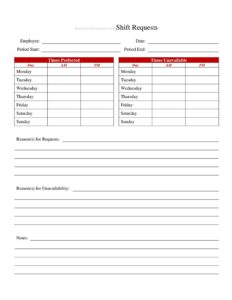
Shift Request Form
Download a free Shift Request Form template for restaurants to manage schedule changes, swaps, and time-off requests with a free download in PDF or DOCX.
PDF
DOCX
2 downloads
0
likes
Download Files
- DOCX
A Shift Request Form is a simple document restaurant staff use to formally ask for a schedule change, a shift swap, or time off. It gives managers a written, consistent record of who wants what and when, so the floor stays covered. You can download this template free in both PDF and DOCX formats — no signup required.
What Is a Shift Request Form?
A Shift Request Form is a standardized request that an employee submits to a manager or scheduler to change their assigned work hours. In a restaurant setting, it captures the specific shift an employee wants to drop, pick up, swap, or have off, along with the reason and the dates involved. Servers, line cooks, bartenders, hosts, dishwashers, and shift leads all use it. The form documents the request and the manager’s decision so there’s no confusion later about who agreed to cover a Friday dinner rush or a Sunday brunch. It protects both the employee and the business by replacing verbal, hard-to-track requests with a clear paper trail that supports fair scheduling and accurate payroll.
When Do You Need a Shift Request Form?
Restaurants run on tight, fast-changing schedules, and a written request keeps everyone aligned. Common situations include:
- A server needs a weekend night off for a family event and wants to find coverage in advance.
- Two line cooks agree to swap shifts — one takes the lunch, the other the dinner.
- A bartender wants to pick up extra hours during a busy holiday week to boost earnings.
- A host needs to leave early for a medical appointment and requests a shortened shift.
- An employee has a recurring class schedule and asks not to be scheduled on certain mornings.
- A team member is feeling unwell and needs to drop an upcoming shift while arranging a replacement.
In each case, the form turns a casual ask into a documented, reviewable request the manager can approve or deny on the spot.
Types of Shift Requests
Not every request is the same, and a good form lets staff specify which kind they’re making. The most common types are time-off requests (asking to be removed from a scheduled shift), shift swaps (trading a shift with a named coworker), pick-up requests (volunteering for an open or extra shift), and availability changes (updating which days or hours an employee can generally work). Labeling the request type up front helps the scheduler process it quickly and route swaps to the right coworker for confirmation.
What a Shift Request Form Should Have
A complete restaurant Shift Request Form should clearly identify the employee, the shift in question, and the outcome. Key elements include the employee’s name and position or department, the date the request is submitted, the type of request, the specific date(s) and times affected, the name of any coworker involved in a swap, a short reason for the request, and a manager approval section with a signature and date. Including space for both the employee and manager to sign closes the loop and confirms mutual agreement.
How to Fill Out a Shift Request Form
- Employee name and position: Write your full name and your role — server, cook, bartender, host, or other — so the manager knows the staffing impact.
- Date submitted: Enter the date you’re filling out the form. Submitting early gives the scheduler time to find coverage.
- Type of request: Indicate whether you want time off, a shift swap, to pick up a shift, or to change your availability.
- Current shift details: List the date, day of the week, and start/end times of the shift you currently hold and want changed.
- Requested change: Describe what you want — the date and hours off, the new shift you want, or the shift you’d take instead.
- Coworker involved: For a swap or pick-up, name the coworker who has agreed to trade or release the shift.
- Reason: Add a brief explanation. Keep it short and professional.
- Employee signature: Sign and date to confirm the request is genuine.
- Manager approval: Leave the bottom section for your manager to approve or deny, sign, and date.
Tips for Getting Your Request Approved
Managers are far more likely to say yes when a request is easy to act on. Submit your form well ahead of the schedule deadline rather than at the last minute. If you’re requesting a swap, line up a willing coworker first and write their name on the form so the manager only has to confirm rather than hunt for coverage. Be specific about exact dates and times — vague requests slow everything down. During known busy periods such as holidays, weekends, or local events, expect more scrutiny and offer to trade for a less critical shift. Finally, keep your reasons honest and concise; a clear, reasonable request builds trust over time.
After You Submit the Form
Once you hand in the form, the manager reviews coverage and either approves or denies the request, then signs the approval section. Keep a copy for yourself, and confirm the updated schedule reflects the change before the day arrives. If your request involved a swap, both you and your coworker should verify the posted schedule matches what was agreed. Documented approval protects you if there’s ever a question about whether you were supposed to work a given shift, and it helps payroll record hours accurately.
Common Mistakes to Avoid
- Submitting the request too late for the scheduler to arrange coverage.
- Leaving the exact dates or times blank, which forces the manager to chase details.
- Arranging a swap verbally without naming the coworker on the form.
- Forgetting to get the manager’s signature, so the change is never officially approved.
- Not keeping a copy, leaving you with no proof if a dispute arises.
- Assuming the request is approved before you actually hear back — never skip a shift on an unconfirmed request.
Frequently Asked Questions
What is a Shift Request Form used for? It is used by restaurant employees to formally request a schedule change such as time off, a shift swap, picking up extra hours, or updating availability. The form gives managers a clear, written record of the request and their decision, which prevents scheduling confusion and supports accurate payroll.
How do I fill out a Shift Request Form? Enter your name, position, and the date, then select the type of request and list the specific shift dates and times involved. Add a brief reason, name any coworker for a swap, sign the form, and submit it to your manager for approval.
Do I need my manager to sign it? Yes. The manager’s signature in the approval section is what makes the change official. Until the form is approved and signed, you should assume your original scheduled shift still applies and report as normal.
How far in advance should I submit a shift request? Submit as early as possible — ideally before the schedule for that period is posted. Requests made before the scheduling deadline are easier to accommodate, while last-minute requests are harder to approve because coverage may already be set.
Is this form legally binding? The form itself is an internal scheduling document rather than a legal contract. However, a signed and approved request creates a useful record that both the employee and employer can rely on, and your workplace’s policies and any applicable labor rules still govern how requests are handled.
How much does this Shift Request Form cost? It is completely free to download from Business Forms Pro in both PDF and DOCX formats, with no signup required. You can use it as is or edit the DOCX version to match your restaurant’s roles, shift types, and approval workflow.
This template is a general example provided for informational purposes only and is not legal, financial, or human resources advice. Scheduling rules and labor requirements vary by jurisdiction and employer — consult a qualified professional or your workplace policies for guidance specific to your situation.
Related Forms
- Breakfast Menu Casual
- Prix Fixe Menu
- Alcohol Refusal Tracker
- Brunch Menu
- Bathrooms For Customers Sign
- Kids Menu
Browse more in Restaurant.