
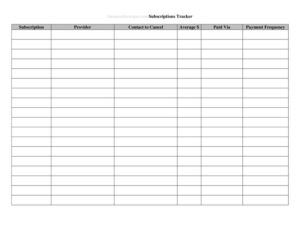
Subscriptions Tracker
Track every recurring subscription, renewal date, and cost in one place with our free Subscriptions Tracker template — free download in PDF and DOCX.
PDF
DOCX
5 downloads
0
likes
Download Files
- DOCX
A Subscriptions Tracker is a simple recurring-expense log that lists every subscription you or your business pays for, along with its cost, billing cycle, and renewal date. People most often use it to stop paying for forgotten or unused services and to forecast monthly and annual spending. It’s free to download here in both PDF and DOCX formats with no signup required.
What Is a Subscriptions Tracker?
A Subscriptions Tracker is a worksheet or spreadsheet-style form that documents all of your active recurring payments in one place. It’s used by individuals managing personal finances, by freelancers and small business owners juggling software-as-a-service tools, and by office managers responsible for company accounts. The form captures details like the service name, the amount charged, how often it bills, the payment method, and the next renewal date. By centralizing this information, the tracker turns scattered charges across credit cards and bank accounts into a clear, reviewable picture. It helps you spot duplicate tools, cancel before unwanted auto-renewals, and budget accurately for ongoing commitments throughout the year.
When Do You Need a Subscriptions Tracker?
Recurring charges add up quietly, and a tracker brings them into focus. Common situations where this form earns its keep include:
- Auditing personal spending — when you suspect you’re paying for streaming, apps, or memberships you no longer use.
- Managing business software — keeping tabs on SaaS tools, cloud storage, and design platforms billed to a company card.
- Preparing a household budget — totaling monthly and annual recurring costs so they fit your income plan.
- Avoiding surprise renewals — tracking trial end dates and annual renewals so you can cancel before being charged again.
- Tax and expense reporting — separating deductible business subscriptions from personal ones at filing time.
- Onboarding a new finance role — handing a bookkeeper or assistant a single document showing every active vendor and login owner.
What a Subscriptions Tracker Should Have
A useful tracker captures enough detail to take action, not just to observe. At minimum, each entry should record the service or vendor name, the subscription category (entertainment, software, utilities, memberships), the cost per billing period, the billing frequency (monthly, quarterly, annual), the start date, and the next renewal or billing date. Strong trackers also include the payment method used, the account or login owner, the status (active, paused, cancelled), and a notes column for cancellation steps or contract terms. A summary area that totals monthly and annualized spending turns the list into a budgeting tool, making it easy to see exactly how much your recurring commitments cost over time.
How to Fill Out a Subscriptions Tracker
Work through your bank and credit card statements and complete one row per subscription:
- Service name: Enter the company or product as it appears on your statement (for example, the streaming service or software vendor).
- Category: Tag the entry — software, entertainment, utility, membership, or personal — so you can group and total later.
- Cost: Record the exact amount charged each billing cycle, including any tax.
- Billing frequency: Note whether it bills monthly, quarterly, or annually, since this affects your totals.
- Start date: Add when the subscription began or when the current term started.
- Next renewal date: Enter the upcoming charge or auto-renewal date so you have a deadline to review.
- Payment method: List the card or account billed, which helps when reconciling statements.
- Account owner: Identify who manages the login or holds the account.
- Status: Mark it active, paused, or cancelled.
- Notes: Capture cancellation instructions, contract end dates, or renewal terms.
Calculating Your True Recurring Spend
The real power of a Subscriptions Tracker comes from normalizing every cost to the same time scale. To compare apples to apples, convert each subscription to a monthly figure: divide annual plans by twelve and quarterly plans by three. Adding those monthly equivalents gives you a single, honest number for what your subscriptions cost per month. Multiply that by twelve for an annual projection. Reviewing the list against this total often reveals that a handful of small charges quietly add up to a meaningful sum each year. Highlighting your most expensive entries — and any you haven’t used recently — gives you a clear shortlist of candidates to cancel or downgrade.
Tips for Keeping the Tracker Current
A tracker is only valuable if it stays accurate. Set a recurring calendar reminder to review it monthly or quarterly, ideally right after your statements close. When you sign up for a free trial, add it immediately with the trial end date in the renewal column so you decide before being charged. Color-code or flag entries you intend to cancel, and update the status field the moment you do so you don’t second-guess yourself later. If you share accounts within a household or team, store the tracker somewhere everyone can reach it and assign a single owner responsible for keeping it tidy.
Common Mistakes to Avoid
- Forgetting annual subscriptions — yearly charges are easy to miss because they don’t show up monthly; scan a full year of statements.
- Logging the wrong renewal date — an inaccurate date defeats the purpose of avoiding surprise charges.
- Mixing monthly and annual costs in the totals without converting them to a common period.
- Leaving cancelled entries marked active, which inflates your spending picture.
- Skipping the payment-method column, making it harder to reconcile or cancel later.
- Tracking once and never updating it — subscriptions change, so the form needs periodic review to stay useful.
Frequently Asked Questions
What is a Subscriptions Tracker used for? It’s used to list and monitor all of your recurring payments in one place. People rely on it to catch unused services, avoid surprise auto-renewals, and budget accurately for ongoing costs. It works equally well for personal finances and for managing business software accounts.
How do I fill out a Subscriptions Tracker? Work through your bank and credit card statements and add one row per subscription, recording the service name, category, cost, billing frequency, start date, and next renewal date. Then note the payment method, account owner, status, and any cancellation details. Update the totals so you can see your monthly and annual spend at a glance.
Is the Subscriptions Tracker free to download? Yes. You can download it free here in both PDF and DOCX formats with no signup required. The DOCX version is easy to edit so you can add columns or adjust categories to fit your needs.
Should I track free trials too? Absolutely. Adding trials with their end dates in the renewal column is one of the most valuable uses of the form. It reminds you to cancel or commit before a trial converts to a paid plan and an unexpected charge.
How often should I update the tracker? A monthly or quarterly review works well for most people, ideally just after your statements close. Update entries whenever you start, pause, or cancel a service so the document always reflects your real commitments.
Can I use this for business expenses? Yes. Many freelancers and small businesses use it to track SaaS tools, cloud services, and memberships. Tagging entries by category and noting the account owner makes it easier to separate deductible business costs from personal ones at tax time.
This Subscriptions Tracker template is a general example provided for informational purposes only and is not financial, accounting, or tax advice. Budgeting needs and tax treatment of subscription expenses vary by individual and jurisdiction — consult a qualified professional for guidance specific to your situation.
Need to work out sales tax? Use our free Sales Tax Calculator to add or remove sales tax from any amount in seconds.
Official resource: for the rules that apply to your situation, see the U.S. Small Business Administration.
Related Forms
- Credit Application
- Exercise Option
- Order Authorization Form
- Announcing Sales Campaign
- Competitive Analysis
- Customer Referral Form
Browse more in Sales.